Automating service reminders turns completed jobs into repeat bookings with far less admin. The fastest first step is a recurring SMS reminder that includes a one-click booking link, sent through a booking and reminder system and backed by secure payment processing. Set that one workflow up correctly, and the rest of the automation loop follows naturally.
TL;DR:
- Automating service reminders with a booking link and payment integration turns completed jobs into scheduled repeat bookings, increasing customer lifetime value.
- Reminder sequences follow the actual completion date to keep service cycles accurate, regardless of delays, and include key trigger options like fixed intervals or usage-based triggers.
- Using targeted channels such as SMS for time-sensitive alerts, combined with personalized templates and opt-out options, significantly boosts response and booking rates.
- Setting up the workflow requires accurate customer data, tested links, and a fallback plan for failed messages, with small-scale testing before full deployment.
- Automation is most beneficial for businesses with consistent volume and repeatable services, making manual follow-up inefficient and prone to errors.
Table of Contents
- How does service reminder automation actually work?
- What's the business case for automating reminders?
- Which channels and templates should you use?
- How do you set up the reminder workflow step by step?
- What mistakes should you avoid, and what actually improves response?
- How does MyAirCare handle reminders for trade teams?
- What happens when a reminder fails to send?
- Should your business automate reminders now?
- A practical route to reminders, bookings and payments in one place
- Selected practical sources and further reading
- FAQ
How does service reminder automation actually work?
Service reminder automation follows a loop, not a single message. Once a job finishes, the system records the completion date, works out when the next service is due, and schedules the follow-up sequence automatically. No one has to remember to check a spreadsheet three months from now.
Here's the sequence a well-built maintenance reminder system runs through:
- Track the completion date. The moment a technician marks a job done, that date becomes the anchor point for every future reminder. This matters more than it sounds. Calculating the next due date from the actual completion date, rather than a fixed calendar date, keeps service cycles accurate even when individual jobs run late.
- Set the trigger logic. Most trade businesses use one of three trigger types: a fixed interval (every 6 months), a usage-based trigger (after a filter reaches a certain runtime), or an expiry-based trigger (a warranty or contract term ending). Pick whichever matches how the service is actually sold.
- Run the message sequence. A single reminder rarely does the job. A pre-due nudge two to three weeks out, a due notice on the day, and a short follow-up or snooze option a week later covers most no-shows without feeling like nagging.
- Embed a one-click booking link. Every message in the sequence should carry a link that pre-fills the customer's details and lets them confirm a slot without a phone call. Reminders without a direct conversion path convert at a noticeably lower rate than those with one.
- Track and measure. Log opens, clicks, and completed bookings against each campaign so you know which message and which timing actually rebooked the job.
This is where recurring service reminders differ from a one-off text nudge. The system logs every reminder and every response permanently, which builds a record you can use to escalate overdue jobs or answer a customer who queries when they were last contacted.
For businesses running annual service contracts, maintenance plan enrolment data feeds directly into this workflow, since the plan terms often set the trigger dates.
What's the business case for automating reminders?
The core benefit is simple: a completed job becomes a scheduled future job instead of a hope. Every customer who books once and then reliably rebooks on schedule adds far more lifetime value than one who books once and disappears.
Three numbers are worth tracking from day one:
- Repeat booking rate — the percentage of past customers who rebook within their expected service window.
- Rebooking lead time — how many days before the due date a customer actually confirms their next slot.
- No-show reduction — the drop in missed appointments after confirmation reminders go live.
Confirming bookings through SMS within a week of scheduling reduces no-shows and speeds up how quickly customers commit to a slot, which is one of the more reliable levers a trade business has for protecting revenue it has already won.
Pro Tip: *Run the numbers on a conservative basis before you commit to any tool.
Admin time saved matters just as much as revenue recovered. A technician or office admin manually tracking due dates in a spreadsheet, calling customers, and chasing no-shows can easily lose several hours a week to that single task. Automating the trigger and the message sequence removes almost all of that manual chasing, leaving admin time for the calls that actually need a human.
Which channels and templates should you use?
Not every reminder deserves the same channel. Trade businesses that run one channel for everything usually see weaker response rates than those matching the channel to the message's urgency.
- SMS — best for time-sensitive confirmations and due-date nudges. Open rates are high and the format suits a short message with a link.
- Email — better for detailed reminders with service history, invoices, or maintenance advice attached.
- WhatsApp — useful where customers already message the business that way, particularly for two-way scheduling conversations.
- Voice calls — reserved for high-value jobs or customers who haven't responded to text and email at all.
- In-app notifications — relevant if customers already use a booking app regularly.
- Post — largely obsolete for reminders now, though some regional or older customer bases still respond better to a printed notice.
Timing follows a simple rhythm for most trade services: a nudge 2 to 3 weeks before the due date, a firmer reminder on the due date itself, and a follow-up a week later if there's no response. Stretching the sequence further than that tends to feel like pressure rather than a helpful prompt.
A library of appointment reminder templates built for service businesses gives you a starting point rather than a blank page. A few examples worth adapting:
- "Hi [Name], your [service] is due on [date]. Tap here to book your slot: [link]."
- "Just a reminder — your air-con service is coming up in 2 weeks. Book now to lock in your preferred time: [link]."
- "We haven't heard back about your upcoming service. Reply STOP to opt out, or tap here to rebook: [link]."
Personalise with the customer's name, the specific service, and the last completion date where possible. Generic blasts read as spam; specific reminders read as a business that keeps its records straight.
Every message needs a clear opt-out instruction. Respecting consent and opt-out records isn't just good manners, it protects deliverability across every channel you use, since providers penalise senders with high complaint rates.
How do you set up the reminder workflow step by step?
Getting reminders running doesn't need a developer. It needs clean data, a tested link, and a small pilot before a full rollout.
- Prepare your customer data. Every record needs a correct phone number or email, the last service date, and the service type. Run a quick quality pass, since a reminder sent to a dead number or wrong customer wastes the message and can trigger complaints.
- Record consent and opt-out status. Only send reminders to customers who've agreed to receive them, and store opt-out requests immediately so they're never contacted again on that channel.
- Build and test the booking link. A good link pre-fills the customer's name, service type, and preferred location, so confirming a slot takes one tap. Test it on a few internal numbers before it goes live.
- Connect payment processing. Linking Stripe to the booking flow lets customers confirm and pay a deposit or full invoice in the same step, which cuts a second follow-up call out of the process entirely.
- Sync the calendar. Whatever booking or job management system you use, connect it to your calendar so confirmed reminders block out the technician's schedule automatically.
- Set intervals from the completion date, not a fixed date. This single decision determines whether your reminders stay accurate over the following twelve months.
- Test on a small sample first. Send the sequence to 20 to 30 customers, monitor deliverability and response rates, then scale once you're confident the message and timing land well.
A short pre-launch checklist to run through before scaling:
- Phone numbers and emails validated
- Opt-out register in place
- Booking link tested end-to-end
- Payment integration confirmed working
- Calendar sync verified
- Small test batch sent and reviewed
Skipping the small test batch is the most common shortcut businesses regret. A typo in a merge field or a broken link reaches every customer at once if you go straight to full volume.
What mistakes should you avoid, and what actually improves response?
The single most common setup mistake is calculating the next due date from a fixed calendar date instead of the actual completion date. A job finished two weeks late throws every future reminder off by the same margin unless the system anchors to when the work was actually done.
Reminder spam is the second most common failure. Sending three messages in the same week erodes trust faster than sending none. Test your cadence, keep it tight, and always give the customer an easy way out.
A few practices consistently lift response rates:
- Always include a direct, one-click booking link rather than asking the customer to call in.
- Send the confirmation SMS within the first week of any new booking to lock in commitment early.
- Run simple A/B tests on subject lines and send times, since even small shifts in wording change open rates.
- Check deliverability regularly, particularly for SMS, where carrier filtering can silently block messages that look automated.
Pro Tip: If you're unsure which send time performs best, test a morning slot against a late afternoon slot for two weeks. Trade customers often respond faster to messages that land before their workday starts.
How does MyAirCare handle reminders for trade teams?
Certain booking platforms build reminder automation specifically around air-con cleaning workflows, rather than adapting a generic scheduling tool to fit the trade afterwards. That distinction shows up in a few concrete features:
- Appointment reminder templates built for the rhythm of air-con servicing, covering pre-due nudges through to overdue follow-ups.
- Booking confirmation SMS sent automatically once a job is scheduled, reducing the manual back-and-forth of confirming a time slot.
- Invoice reminder automation that chases outstanding payments without a phone call from the technician.
- Stripe-integrated payments, letting a customer confirm and pay in the same tap that books their next service.
The design choices behind this focus on one operational problem trade businesses know well: double bookings and missed calls. Locking a confirmed slot into a shared calendar the moment a customer books removes the guesswork a phone-based booking system creates.
What happens when a reminder fails to send?
Every reminder system has to plan for failure, not just success. Phone numbers change, inboxes fill up, and carriers occasionally block messages that look automated even when they're legitimate.
A reliable maintenance reminder system flags undelivered messages rather than silently dropping them. If an SMS bounces, the system should automatically fall back to a secondary channel, usually email, rather than assuming the customer received nothing and moving on.
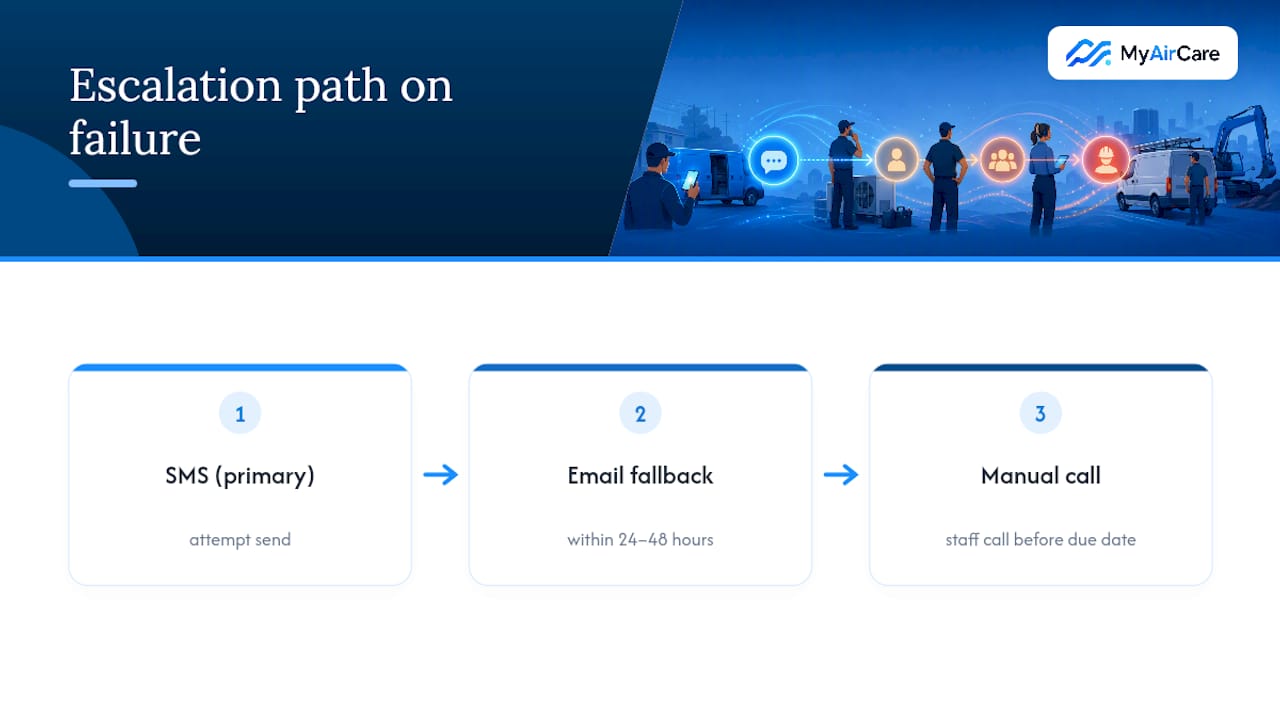
Build a short escalation path into the workflow: first attempt on the primary channel, a fallback on a second channel within 24 to 48 hours, then a manual flag for staff to call directly if both fail. This third step matters more than businesses expect. A customer who never received a reminder and misses their service isn't a lost customer if someone picks up the phone before the due date passes entirely.
Keep a simple log of delivery failures by channel. If SMS bounce rates climb for a particular carrier or region, that's a data quality problem, usually an outdated number, worth fixing at the source rather than patching with more follow-up messages. Reviewing this log monthly catches issues before they compound into a backlog of customers who've quietly fallen out of the reminder cycle altogether.
Should your business automate reminders now?
Automation pays off fastest for businesses with steady customer volume, a genuinely repeatable service, and admin time currently lost to manual follow-up. If you're servicing fewer than a handful of customers a month, a phone call still works fine, and there's no shame in that.
The decision gets easy once volume grows past what one person can track reliably by memory or spreadsheet. At that point, the question isn't whether to automate, it's how soon.
Start with one recurring reminder for your highest-volume service type. Everything else can follow once that one workflow proves itself.
— Lewis
A practical route to reminders, bookings and payments in one place
Some platforms are built specifically for the air-con cleaning trade, drawing on operational experience rather than using generic scheduling templates stretched to fit. Where a general-purpose booking app makes you configure reminder logic, payment links, and calendar sync separately, MyAirCare bundles all three into one workflow designed around how air-con cleaning jobs actually run, from GST-ready invoicing to service areas that match how local trades quote work.

The Free plan gets you started with core booking and reminder features, and MyAirCare Pro unlocks the full set, including automated invoice reminders and deeper reporting. There's no lock-in contract holding you to either tier. If you want to see how a pre-filled booking link actually behaves for a customer, the Pristine Aircon Cleaning booking page shows the flow end to end. Check the pricing page and set up your first recurring reminder this week.
Selected practical sources and further reading
- Appointment reminder templates for service businesses — a ready-made template library.
- HarbourSide Digital — marketing support for integrating reminders with local booking funnels.
FAQ
What are some examples of service automation?
Common examples include recurring SMS or email reminders for scheduled maintenance, automated booking confirmations, invoice and payment reminders, and follow-up messages after a missed appointment. Trade businesses like air-con cleaners typically automate the whole loop from job completion through to the next booking, using a platform such as MyAirCare to handle reminders, confirmations, and payments together.
Is there a free service for automated text reminders?
Some booking platforms offer a free tier with basic reminder features, though limits usually apply to volume or customisation. MyAirCare's Free plan includes reminder functionality at no monthly cost, with a booking fee applied per transaction rather than a subscription charge.
How do I set automated reminder emails in Outlook?
Outlook supports basic recurring calendar reminders and rules-based email scheduling, but it wasn't built for customer-facing service reminders tied to job completion dates. For a maintenance reminder system that tracks due dates automatically and sends booking links, a dedicated platform is a more reliable fit than adapting a personal email client.
How do I set up automated text reminders?
Start by collecting accurate phone numbers and consent records, then set the trigger logic (fixed interval, usage-based, or expiry-based) from each job's completion date. Test the message sequence and booking link on a small batch before scaling to your full customer list, checking deliverability as you go.
Does service reminder automation actually reduce no-shows?
Yes. Confirming bookings through SMS within a week of scheduling reduces no-shows and speeds up rebooking, largely because a direct confirmation removes the ambiguity of an unconfirmed slot. Adding a one-click booking link to every reminder further improves conversion compared to messages that require a phone call to act on.