Three channels handle every appointment reminder you need: email for details, SMS for time-sensitive nudges, and phone for high-touch bookings. Send a confirmation at booking, an SMS 24 hours out, and a same-day SMS two hours before. That sequence covers most service businesses.
Every reminder set needs six message types: confirmation, 24-hour reminder, 2-hour or same-day reminder, prep-required notices, reschedule or cancellation replies, and a follow-up for no-shows.
- Confirmation (email, sent instantly at booking)
- 24-hour reminder (SMS)
- 2-hour or same-day reminder (SMS)
- Prep-required notice (email, sent 48 hours out if forms or preparation apply)
- Reschedule or cancellation reply (SMS or email, triggered on request)
- Follow-up after a no-show (email or SMS, sent same day)
Providers using a multi-touch sequence with calendar attachments see fewer missed appointments than those sending a single reminder. Here is a same-day SMS you can paste in now: "Hi [Name], reminder: your appointment with [Business] is today at [Time]. Reply C to confirm or R to reschedule."
Key Takeaways
The most reliable appointment reminder system combines email for detail, SMS for urgency, and a confirmation-to-follow-up sequence tailored to how far ahead the client booked.
| Point | Details |
|---|---|
| Use six reminder types | Cover confirmation, 24-hour, 2-hour, prep-required, reschedule, and follow-up messages for full coverage. |
| Match channel to job | Email carries detail and ICS attachments; SMS handles urgent, short, time-sensitive nudges. |
| Adjust cadence by lead time | Add a 7-day reminder for long-lead bookings and extra touches for high-value appointments. |
| Keep SMS under 160 characters | Short messages with a one-tap reply (YES or CHANGE) get faster confirmations. |
| Automate with MyAirCare | MyAirCare applies these templates and cadence automatically for air-con cleaning businesses through merge tags and calendar sync. |
Table of Contents
- What must every appointment reminder template include?
- How often should you send appointment reminders?
- Should you use email, SMS, or phone for each reminder?
- Email templates you can copy and automate
- SMS templates for confirmations and time-based nudges
- Sources
What must every appointment reminder template include?
A reminder that misses one detail causes more no-shows than sending no reminder at all, because clients either forget the specifics or assume someone else will chase them. Every template, regardless of channel, needs the same core information before you touch on tone or branding.
- Date and time, written in full (avoid "tomorrow" alone; pair it with the actual date)
- Service booked, so the client knows what they are turning up for
- Location or meeting link, including suburb or building details for first-time clients
- Provider or technician name, particularly for trades and personal services
- A clear call to action: confirm, reschedule, or cancel, ideally in one click or one reply
- Opt-out instructions, especially for SMS, to stay compliant with anti-spam rules
- Business contact details, so a client with a question doesn't have to hunt for your number
SMS carries a 160-character limit per segment before it splits into multiple parts, and some providers bill per segment. Keep text reminders short and put the detail in email instead.
Pro Tip: Put the reschedule link before the opt-out line in SMS. Clients scan top to bottom, and the action you want them to take should appear before the fine print.
How often should you send appointment reminders?
A baseline cadence works for most bookings: confirmation at the time of booking, a 24-hour SMS reminder, and a 2-hour SMS on the day. Shopify recommends sending reminders within a 24 to 72-hour window before the appointment, which lines up with what most scheduling platforms build in by default.
That baseline shifts for two reasons: how far ahead the client booked, and how much is riding on the appointment.
- Same-week bookings need only the standard three touches: confirmation, 24-hour SMS, 2-hour SMS.
- Long-lead bookings (booked more than two weeks out) benefit from an extra 7-day reminder, since clients forget appointments made a month earlier.
- Prep-required bookings need a 48-hour email that spells out what the client must do beforehand, separate from the timing reminder.
- High-value or complex bookings can justify a denser sequence. Zocdoc notes that medical practices sometimes use up to five touches for appointments where a no-show is costly, while a lighter three-touch baseline suits most consumer services.
Cancellation windows also shape cadence. If your policy requires 24 hours' notice to avoid a fee, your last reminder needs to land before that window closes, not after it, or clients lose the chance to reschedule without a penalty. A same-day SMS sent at 9am for a 10am cancellation cutoff is useless. Move it earlier.
Automated reminder sequences are widely reported to cut no-shows substantially compared to sending none at all, though the size of the reduction depends heavily on your industry, cadence, and how well your contact details are kept up to date.
Should you use email, SMS, or phone for each reminder?
Each channel does a different job, and using the wrong one is a common reason reminders get ignored. Email suits detail. SMS suits urgency. Phone suits trust.
Email works best for:
- Booking confirmations with a calendar ICS attachment, so the client can add the appointment with one click
- Prep instructions, required forms, or anything with more than two lines of information
- Invoices and receipts that need to be kept for records
SMS works best for:
- 24-hour and same-day reminders, where speed of delivery matters more than detail
- Text messages carry open rates near 98%, against email open rates that rarely clear 30%
- Simple confirm or reschedule replies, since most people can text back in seconds without opening an app
Phone works best for:
- Elderly clients or anyone who has previously missed a text-based reminder
- Complex prep instructions where a client might misread a written message
- High-value bookings where a missed appointment costs real money, such as first-time consultations or large jobs
Mixing email and SMS outperforms relying on either alone, because email holds the detail while SMS grabs immediate attention at the moment it counts. A calendar attachment in the confirmation email should always carry a timezone note if the appointment involves anyone working remotely or across regions, since a mismatched timezone is one of the most common causes of a genuine no-show.
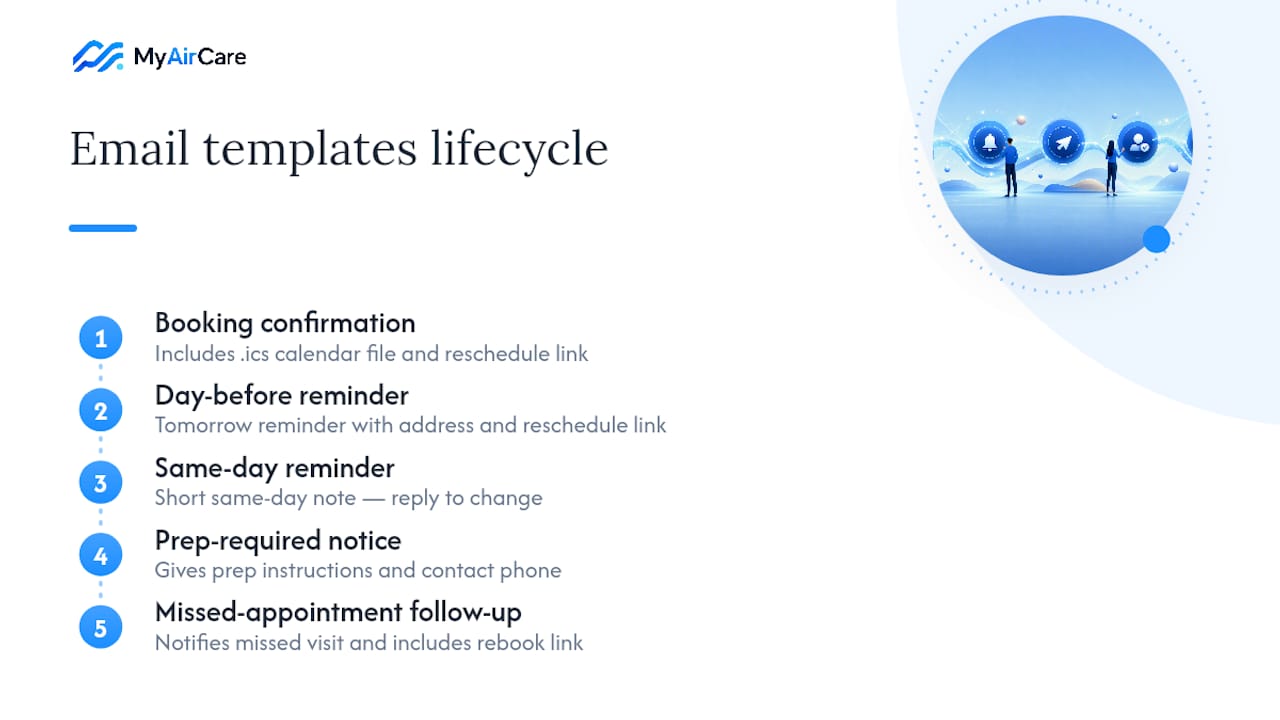
Email templates you can copy and automate
These five templates cover the full email lifecycle from booking to follow-up. Swap the bracketed fields for merge tags in your booking software and they're ready to automate.
1. Booking confirmation Subject: Your appointment is confirmed for [Date] Body: "Hi [Name], your [Service] with [Business] is confirmed for [Date] at [Time] at [Location]. A calendar file is attached so you can add this to your diary. Need to change anything? [Reschedule Link]."
2. Day-before reminder Subject: Reminder: your appointment is tomorrow Body: "Hi [Name], just a reminder that your [Service] is booked for tomorrow, [Date], at [Time]. Location: [Address]. If you need to reschedule, click here: [Link]."
3. Same-day reminder Subject: Today: your [Time] appointment Body: "Hi [Name], see you today at [Time] for your [Service]. Reply if you need to make any changes."
4. Prep-required notice Subject: What to prepare before your appointment Body: "Hi [Name], ahead of your [Service] on [Date], please [Prep Instructions]. This helps us complete the job efficiently. Questions? Call [Phone]."
5. Follow-up after a missed appointment Subject: Sorry we missed you Body: "Hi [Name], we noticed you weren't able to make your [Date] appointment. No problem. Click here to rebook at a time that suits: [Link]."
Tone shifts by industry. A confirmation email built around clear appointment details works well for trades and home services with a straightforward, friendly tone. Legal and medical bookings usually read better formal: "Please be advised your consultation is scheduled for..." rather than "Hey, quick reminder!"
Pro Tip: Attach the calendar file (.ics) to every confirmation email, not just the day-before reminder. Clients who add it immediately are far less likely to double-book themselves later.
SMS templates for confirmations and time-based nudges
SMS needs to do one job per message. Keep each script under 160 characters where you can, since going over splits the text into paid segments on most providers.
- Booking confirmation SMS: "Hi [Name], your [Service] with [Business] is booked for [Date] at [Time]. Reply YES to confirm or CHANGE to reschedule."
- 48-hour reminder SMS: "Reminder: your appointment with [Business] is in 2 days, [Date] at [Time]. Reply CHANGE to reschedule."
- 24-hour reminder SMS: "Hi [Name], your appointment is tomorrow at [Time]. See you at [Location]. Reply CHANGE to reschedule."
- 2-hour reminder SMS: "[Business] here: your appointment is at [Time] today. Reply if anything's changed."
- Reschedule flow reply: "No worries, [Name]. Here's a link to pick a new time: [Link]. Reply STOP to opt out of texts."
Short reply flows like "reply YES" or "reply R" increase confirmation rates because they remove the friction of opening an app or dialling a number. Always close with an opt-out instruction on marketing-adjacent texts, even when the message itself is transactional. It protects you under Australian spam rules and costs one line.
Phone scripts and voicemail templates for high-touch appointments
Use a live call when a client has missed two text reminders, or when the booking involves complex prep they might misread.
- Quick confirm script: "Hi [Name], calling to confirm your [Service] appointment for [Date] at [Time]. Does that still work for you?"
- Prep-check script: "Hi [Name], just checking you've received the prep instructions for your [Date] appointment. Any questions before then?"
- Voicemail template: "Hi [Name], this is [Business] calling about your [Date] appointment at [Time]. Please call us back on [Phone] if you need to change anything."
Reserve calls for clients who need the personal touch or have a pattern of missed reminders. Automated messages handle everyone else more efficiently.
Adapting tone and detail by industry
Regulated and prep-heavy services need more instruction, not more words. A medical clinic might add: "Please fast for 8 hours before your appointment." A trades business might add: "Please ensure clear access to the outdoor unit." Quick-consumer services, like a hair appointment or a car wash, need the opposite: strip the message down to date, time, and location.
- Legal or medical: formal tone, safety or prep instructions included, no casual language
- Trades and home services: friendly but direct, access and location details prioritised
- Beauty and personal services: casual tone, shorter messages, minimal formality
Personalising with merge tags without breaking the message
Merge tags like [First Name], [Date], [Time], [Service], and [Provider] let one template serve every booking. The risk is a broken message when a field is empty.
- Use safe fallbacks: "Hi there" instead of "Hi [blank]" when a name field fails to populate
- Test every template with a missing field before automating it at scale
- Keep a plain-text version of every email for clients whose inbox blocks HTML
- Attach calendar files with a timezone note for any client outside your local area
Pro Tip: Run one test booking through your entire automated sequence every time you edit a template. A single broken merge tag sent to hundreds of clients is a bad first impression at scale.
Measuring whether your reminders are actually working
Track four numbers: no-show rate, confirmation rate, reschedule click rate, and last-minute cancellations. These tell you whether your cadence is working or just generating noise.
- Week 1 to 2: Run your current reminder setup and record the baseline no-show rate.
- Week 3 to 4: Switch to the multi-touch cadence outlined earlier and track the same metrics.
- Compare: A meaningful drop in no-shows with a stable or improved confirmation rate means the new cadence is working; if reschedules spike, your timing or channel choice needs adjusting, not the message itself.
A practitioner's note on rolling out reminder templates
Missed calls and double bookings are the two problems every field-service operator mentions first, long before they think about reminder wording. Before automating a full sequence, test it with a small group of regular clients. Watch how they respond, then expand. MyAirCare's resources for air-con cleaners cover this rollout in more depth.
How MyAirCare turns these templates into automatic reminders
MyAirCare is the practical shortcut for air-con cleaning businesses that would otherwise be manually copying these templates into a phone or inbox between jobs. Instead of building your own SMS and email sequence from scratch, MyAirCare automates the confirmation, 24-hour, and same-day reminders using merge tags pulled straight from each booking, with calendar sync so appointments land directly in your diary and your client's.

The platform's booking pages already carry reschedule links and contact details built in, so clients can act on a reminder without calling you back. Secure payments through Stripe mean a confirmation email can also close out payment before the job even starts. If you want to see the templates and cadence in this guide running on a live booking page, look at how Pristine Aircon Cleaning has set theirs up, then head to MyAirCare to set up your own automated reminder sequence.
Sources
- 10 Appointment Reminder Templates (Text & Email Examples) - Acuity Scheduling
- Frontdesk
- Doctor appointment reminder templates that cut no-shows - Zocdoc
- Appointment reminder template: examples and best practices - Shopify