
A ready-to-use, editable service report template is the fastest way for technicians to capture completed work and close jobs correctly. Download one of the options below, adapt the header to your business, and start using it on your next job.
Quick download picks by format:
- Word: ProjectManager's free service report template covers all core fields and exports cleanly to PDF for customer sign-off.
- Excel: ProjectManager's maintenance report template suits equipment-heavy operations with structured tables for parts, labour and asset details.
- Google Sheets / Excel: Template works in both formats and is free to download and reuse across a team.
- Mobile form: JotForm's service report form templates support photo capture, digital signatures and custom fields for on-site completion.
If a team runs more than several jobs per week, needs automated invoicing, or requires offline sync to asset records, a dedicated job-management app will serve better than a static template.
Key takeaways
A complete, signed service report is the single document that connects field work to billing, warranty, and compliance records in Australian field operations.
| Point | Details |
|---|---|
| Choose format by use case | Word suits formal customer-facing reports; Excel/Sheets suits parts and cost tracking; mobile forms suit on-site photo and signature capture. |
| Five core fields are non-negotiable | Every report needs a header, customer/asset details, diagnosis, work performed with part numbers, and a signed outcome. |
| Complete reports on site | Fill in the report before leaving the job, or within 24 hours, to preserve accuracy of part numbers, readings, and photo timestamps. |
| Switch to an app at volume | When manual data re-entry for invoicing becomes a regular time cost, a job-management platform is worth evaluating over static templates. |
| MyAirCare for air-con cleaners | MyAirCare pre-fills job headers, captures timestamped photos and digital sign-off, and processes payment at job completion via Stripe. |
Table of Contents
- What is a service report and when do field teams use it?
- Why using a standard template saves time and reduces disputes
- When to complete a service report and who is responsible
- What fields every service report must include
- How to build a service report in Word, Excel, Google Sheets, or as a mobile form
- Where to download editable service report templates
- On-the-job checklist for filling service reports accurately
- When should you switch from templates to a field-service app?
- The right template depends on your trade and your job volume
- MyAirCare gives air-con cleaners a faster path from job to invoice
- Sources
What is a service report and when do field teams use it?
A service report is a structured document that records who performed work, what was found, what was done, which parts were used, how long the job took, and what the outcome was. It closes with a customer or supervisor sign-off. The document is completed at the end of a service visit and becomes the permanent record of that job.
Field teams use service reports across a wide range of job types: scheduled preventive maintenance, reactive repairs, equipment installations, warranty work, safety inspections, commissioning sign-offs, and site handovers. Each scenario produces a slightly different report, but the core structure stays the same.
In Australian field operations, a completed service report does three practical things. It supports billing by confirming the work scope and parts consumed. It protects warranty claims by recording the exact condition of an asset before and after service. It also satisfies compliance requirements, particularly for safety-critical equipment where regulators or insurers may request evidence of work performed.
Why using a standard template saves time and reduces disputes
Consistency is the main operational benefit. When every technician uses the same layout, office staff can process reports without chasing missing information, and customers receive a document that looks professional regardless of who attended the job.
Key benefits of a standard service report template include:
- Audit trail: A numbered, dated report creates a retrievable record for warranty queries, insurance claims, and compliance audits.
- Faster invoicing: Pre-structured parts and labour fields mean billing staff can generate an invoice directly from the report without re-entering data.
- Clearer warranty records: Recorded serial numbers and condition notes make warranty claims straightforward to substantiate.
- Improved shift handoffs: An outgoing technician's completed report gives the incoming technician the exact status of an asset without a verbal briefing.
- Fewer billing disputes: A customer-signed report confirms the scope of work, reducing disagreements about what was or was not done.
For small operators, the parts-tracking benefit is particularly useful. Knowing exactly which components were installed on which asset, with quantities and part numbers, removes guesswork from reordering and prevents over-ordering.
Pro Tip: Add a mandatory three-field header to every template: company name, job number, and asset ID. Those three fields alone cut retrieval time significantly when searching archived reports for a specific asset or billing query.
When to complete a service report and who is responsible
A service report should be completed at the end of every job that involves physical work on a customer's asset or site. The specific scenarios include:
- Scheduled preventive maintenance visits
- Reactive or emergency repairs
- New equipment installations
- Warranty service calls
- Safety inspections with findings
- Commissioning and final sign-off visits
The on-site technician completes the report. A supervisor or team leader reviews and verifies it, particularly for warranty or compliance jobs. Office staff file the completed report and link it to the corresponding invoice or work order in the billing system.
The timing rule is straightforward: complete the report on site before leaving, or within 24 hours at the latest. Reports filled in from memory two or three days later lose accuracy, particularly for part numbers, meter readings, and the sequence of diagnostic steps. Photos taken on the day but attached later are also harder to verify as contemporaneous.
What fields every service report must include
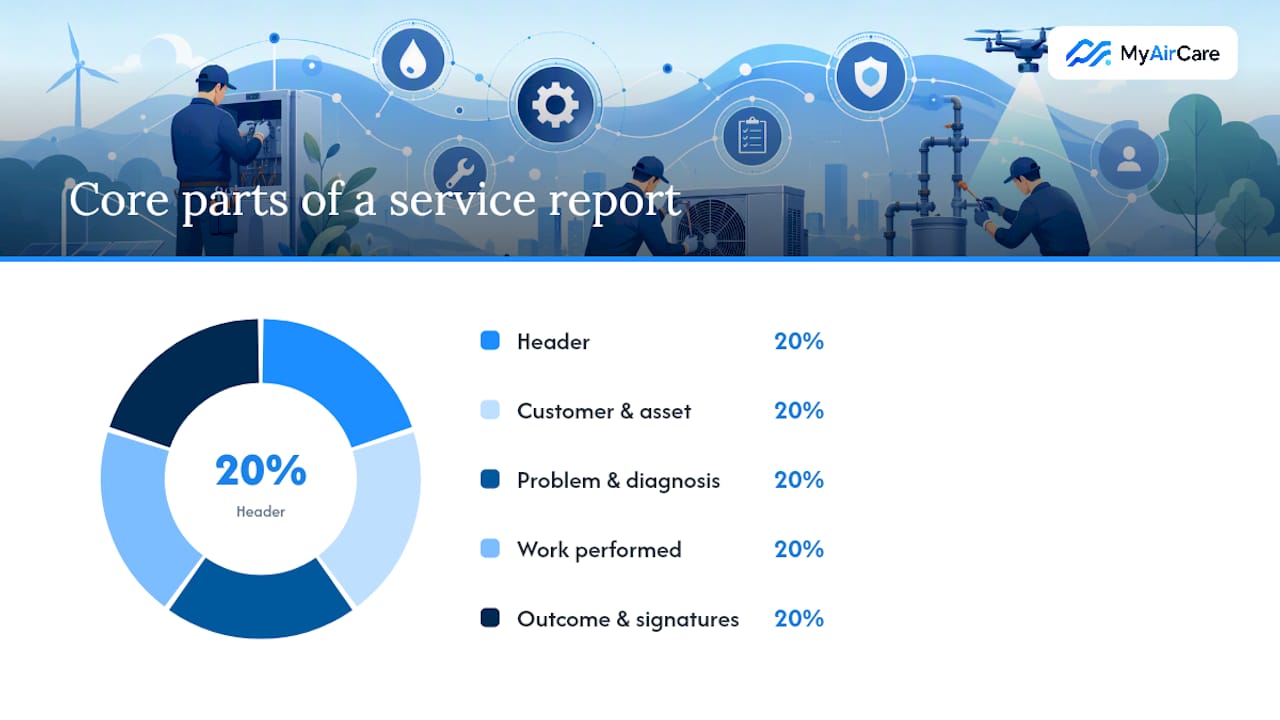
A defensible, complete service report has five core parts. Each part serves a specific purpose in the billing, warranty, and compliance chain.
1. Header Company name, job number, report date, and technician name. The job number links the report to the work order and invoice.
2. Customer and asset details Customer name, site address, contact number, asset type, asset ID, serial number, and installation date where known. Asset ID and serial number are particularly important for equipment-heavy operations, where similar machines on the same site are easily confused.
3. Problem reported and diagnosis A concise statement of what the customer reported, followed by the technician's diagnosis. Write in plain, testable language. For example: "Customer reported unit not cooling. Found refrigerant pressure below specification at 150 kPa suction. Leak detected at service valve fitting." Avoid vague entries like "unit faulty" or "not working properly."
4. Work performed, parts used, and labour A step-by-step account of the work carried out, with specific part numbers, quantities, and labour hours. For example:
- Isolated unit and recovered refrigerant.
- Replaced service valve fitting (Part No. SV-4412, qty 1).
- Pressure-tested to 800 kPa for 30 minutes. No drop detected.
- Recharged with R-410A refrigerant (1.2 kg).
- Tested unit operation. Supply air temperature 12°C at full load.
5. Outcome, follow-up actions, and signatures Record the final status (completed, parts on order, return visit required), any follow-up actions with expected dates, and obtain the customer's signature. Include the technician's signature and the date.
Additional fields worth including: start and finish timestamps, meter or hour readings, before/after photos with filenames, and any warranty notes or safety observations. The Smartsheet daily maintenance report template demonstrates how shift ID, ticket number, diagnostics, downtime, and attachments can be structured on a single printable page.
Pro Tip: Record specific part numbers and quantities rather than generic labels. "Capacitor 35/5 µF, Part No. CAP-3505, qty 1" is retrievable and orderable. "Spare part" is neither.
How to build a service report in Word, Excel, Google Sheets, or as a mobile form
Word
- Open a blank document and insert a two-row header table: left cell for your logo and company details, right cell for job number, date, and technician name.
- Below the header, add a two-column section for customer and asset details (label in the left column, entry field in the right).
- Add a full-width text block for problem reported and diagnosis.
- Insert a table with columns for step number, description, part number, quantity, and unit cost to capture work performed and parts.
- Add a labour summary row below the parts table.
- Add a full-width outcome and follow-up section, then a signature block with lines for customer and technician signatures plus date.
- Insert placeholder boxes for before/after photos.
- Save as a
.dotxtemplate file so each new job opens a clean copy. Export to PDF before sending to the customer.
Excel and Google Sheets
- Use row 1–5 for the header block (company, job number, date, technician).
- Rows 6–15: customer and asset details in a two-column layout.
- Rows 16–20: problem and diagnosis as a merged-cell text area.
- Rows 21–40: a structured parts/labour table with columns for description, part number, quantity, unit cost, and total. Use a SUM formula in the total column and protect those formula cells.
- Add a dropdown in the status cell (Completed / Parts on Order / Return Visit Required) using data validation.
- Use
=NOW()in a timestamp cell and lock it once the report is saved. - In Google Sheets, share the master template as view-only and have technicians make a copy for each job. This prevents accidental overwrites of the master.
The ProjectManager maintenance report template for Excel follows a similar structure and includes guidance on entering asset details, activities, resource use, and sign-off, which is useful as a reference when building a custom version.
Mobile form
- Use a platform such as JotForm to build a form with required fields matching the five core parts above.
- Enable photo upload fields for before and after images.
- Add a signature capture widget for customer sign-off on site.
- Enable offline mode so technicians can complete reports without mobile data and sync when connectivity returns.
- Connect form submissions to a cloud folder or job-management system so completed reports are filed automatically.
Pro Tip: Save a "master" copy of any template with a clear filename (e.g. ServiceReport_MASTER_v2.docx) and keep completed reports in a separate folder named by job number. This prevents edits to a completed report from overwriting the master.
Where to download editable service report templates
Reliable sources for ready-to-use templates, organised by format:
- Word (free, editable): ProjectManager's service report template covers all standard fields and includes guidance on customer sign-off and recordkeeping. No account required.
- Excel (free, editable): ProjectManager's maintenance report template is structured for equipment-heavy operations with asset details, activities, and resource tracking.
- Excel and Google Sheets (free, editable): Template is available in both formats and can be edited online or downloaded for offline use.
- PDF (printable): The Smartsheet daily maintenance report is a structured, printable template suited to shift-based or site teams.
- Mobile form: JotForm's service report form templates are customisable for photo capture, digital signatures, and parts lists, with no coding required.
For format selection: use Word for formal, customer-facing reports where presentation matters. Use Excel or Google Sheets when tracking parts, costs, and labour across multiple jobs. Use a mobile form for on-site capture, particularly when photos and signatures are required at the point of service.
If a job also requires a quote before work begins, a free quote template for trades and small business can be paired with the service report to cover the full job lifecycle from estimate to sign-off.
On-the-job checklist for filling service reports accurately
A consistent on-site routine prevents the most common reporting errors: missing part numbers, no customer signature, and photos taken after the fact.
Before starting work:
- Confirm job number, site address, and asset ID against the work order.
- Photograph the asset in its current condition (before state).
During the job:
- Record the exact start time.
- Note each diagnostic step and finding as it occurs, not from memory at the end.
- Record part numbers, quantities, and serial numbers as parts are installed.
At completion:
- Photograph the asset in its final condition (after state).
- Record the finish time.
- Complete the outcome and follow-up section, including any parts on order and expected return date.
- Obtain the customer's signature before leaving the site.
- Confirm the customer understands any follow-up actions and the expected timeframe.
Pro Tip: Use a filename convention for photos: JobNumber_before.jpg and JobNumber_after.jpg. This keeps images linked to the correct report when stored in a shared folder, and makes retrieval straightforward during a warranty query.
For guidance on capturing and organising before and after photos specifically for air-con cleaning jobs, the MyAirCare photo guide covers file naming, timing, and what to capture at each stage.
When should you switch from templates to a field-service app?
Templates work well for low-volume operations. As job volume grows, certain gaps become operationally costly: manual data re-entry for invoicing, no offline sync, no automated reminders, and no connection between the service report and the customer's booking record.
The decision criteria worth weighing:
- Number of technicians: One or two technicians can manage shared Sheets templates. Larger teams need role-based access and centralised job records.
- Job volume: High weekly job counts make manual filing and invoice generation a significant time cost.
- Offline capture: Mobile forms handle offline use, but syncing to asset records and invoicing still requires manual steps.
- Automated invoicing: Templates require a separate invoicing step. Apps can generate an invoice directly from the completed report fields.
- Scheduling conflicts: Templates have no scheduling logic. Apps flag double bookings and send automated reminders.
| Feature | Templates (Word/Excel/Sheets) | Entry-level field apps | Enterprise platforms |
|---|---|---|---|
| Photo capture | Manual attachment | Built-in, timestamped | Built-in, GPS-tagged |
| Digital signature | PDF signature tool | Native on-form | Native on-form |
| Offline use | Yes (local file) | Yes (app sync on reconnect) | Yes (enterprise sync) |
| Automated invoicing | No | Yes | Yes |
| Scheduling | No | Yes | Yes, with integrations |
| Sync to asset record | Manual | Automatic | Automatic |
For Australian air-con cleaning businesses, the point where a job-management platform becomes the practical choice is typically when the business needs branded booking pages, Stripe payment processing, automated customer reminders, and mobile job tracking in one place. MyAirCare is built specifically for that transition, connecting the booking record directly to the job workflow so report fields like customer name, site address, and job number are pre-populated rather than typed manually on site.
The right template depends on your trade and your job volume
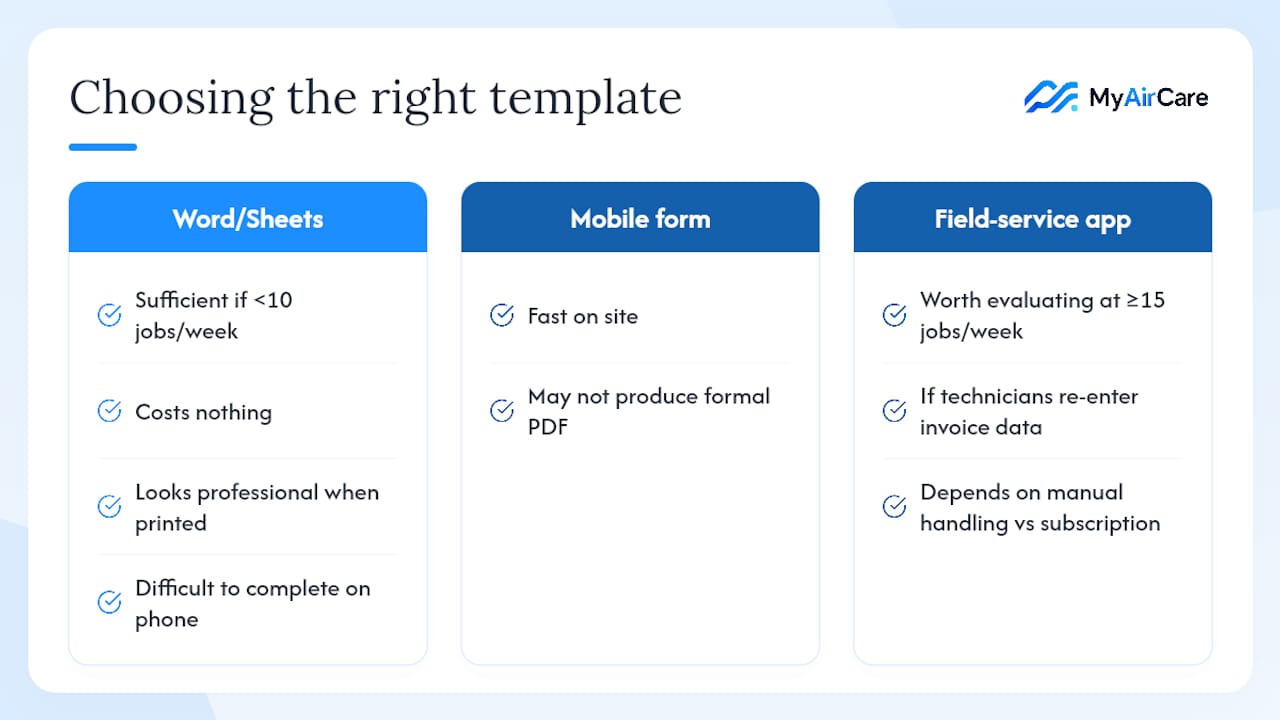
The most common mistake field technicians make with service reports is choosing a format that suits the office rather than the job site. A detailed Word document looks professional when printed, but it is difficult to complete on a phone in a roof cavity. A mobile form is fast on site, but it may not produce the formal PDF a commercial client expects.
A practical heuristic: if fewer than 10 jobs per week are completed, a Word or Google Sheets template is sufficient and costs nothing. If the business runs 15 or more jobs per week and technicians are spending time re-entering data for invoices, a field-service app is worth evaluating. The crossover point is not about the number of technicians; it is about the cost of manual data handling relative to a monthly software subscription.
For air-con cleaning specifically, the service report fields that matter most are different from those in mechanical maintenance. Coil condition, filter type and size, refrigerant readings, and before/after photos of the indoor unit are the fields that support warranty claims and justify return visits. A generic maintenance report template will need those fields added before it is fit for purpose.
The practical advice: pick one template format, use it on every job for two weeks, and note which fields are consistently left blank or filled vaguely. Those gaps show exactly what needs to be adjusted before the template becomes a permanent workflow tool.
MyAirCare gives air-con cleaners a faster path from job to invoice
For Australian air-con cleaning businesses that have outgrown static templates, MyAirCare replaces the manual steps between booking and invoice with a connected mobile workflow.

The platform's features map directly to the fields in a service report: branded booking pages pre-fill the job header with customer name, site address, and job number. The mobile app captures before and after photos with timestamps, records digital customer sign-off on site, and processes payment via Stripe at job completion. Automated reminders reduce missed appointments and support repeat bookings without manual follow-up.
The result is a service record that is complete, timestamped, and linked to the payment before the technician leaves the site. For operators managing multiple technicians or growing a client base, MyAirCare removes the gap between completing a job and closing it administratively. Start a free plan to see how the booking-to-invoice workflow fits your operation.
Sources
- Service Report Template for Word (Free Download)
- Maintenance Report Template for Excel (Free Download)
- Daily maintenance report template (PDF)
- Template
- Service Report Form Template