
A high-converting booking page for an Australian air-con cleaning business must let a customer select a service, choose a date and time, and pay or hold a slot within two clear interactions. That single principle drives every design decision in this guide.
The must-have elements at a glance:
- A clear headline that confirms the visitor is in the right place
- Service cards showing name, duration, and price (GST-inclusive or exclusive, stated clearly)
- A live availability calendar placed early in the flow
- A short details form (phone number and postcode at minimum)
- Stripe payment integration for deposits or full payment
- Calendar sync and automated SMS/email reminders
- A visible booking reference on the confirmation screen
Australian Consumer Law requires pricing transparency and clear cancellation terms. Build those into the page from the start, not as an afterthought.
Table of Contents
- What does good booking page design actually require?
- What booking flow should you build?
- Australian operational considerations for your booking page
- Which technical integrations matter most?
- Booking page checklist and wireframe templates
- How do you measure and improve booking page performance?
- How long does implementation take, and what does it cost?
- MyAirCare is built for exactly this
- Key takeaways
- Why the design details matter more than operators expect
- Useful sources
What does good booking page design actually require?
Visual hierarchy is the single most important feature of any booking page. Layouts that follow Z or F reading patterns guide visitors to key actions and raise perceived value without requiring extra copy.
The headline is the first thing a visitor reads. It should confirm they are in the right place and state the main benefit plainly, for example: "Book your air-con clean online — same-week appointments available." A weak or missing headline is the fastest way to lose a visitor who arrived ready to book.
"Organising services logically and using a clear, captivating headline increases perceived value and guides buying behaviour." — Checkfront booking page design guide
Service cards work better than long dropdown lists for most air-con cleaning offerings. Each card should show the service name (short, plain English), estimated duration, and price. Trust signals belong above the fold too: a Stripe secure payment badge, a phone number, and a brief service guarantee all reduce hesitation.
Mobile-first layout means single-column stacking, large touch targets (minimum 44px), and no more than four visible form fields at once. Most residential customers will book from a phone.

Pro Tip: Place the availability calendar or the primary "Book now" button above the fold on mobile. If a visitor has to scroll before they can act, a portion of them will not.
What booking flow should you build?
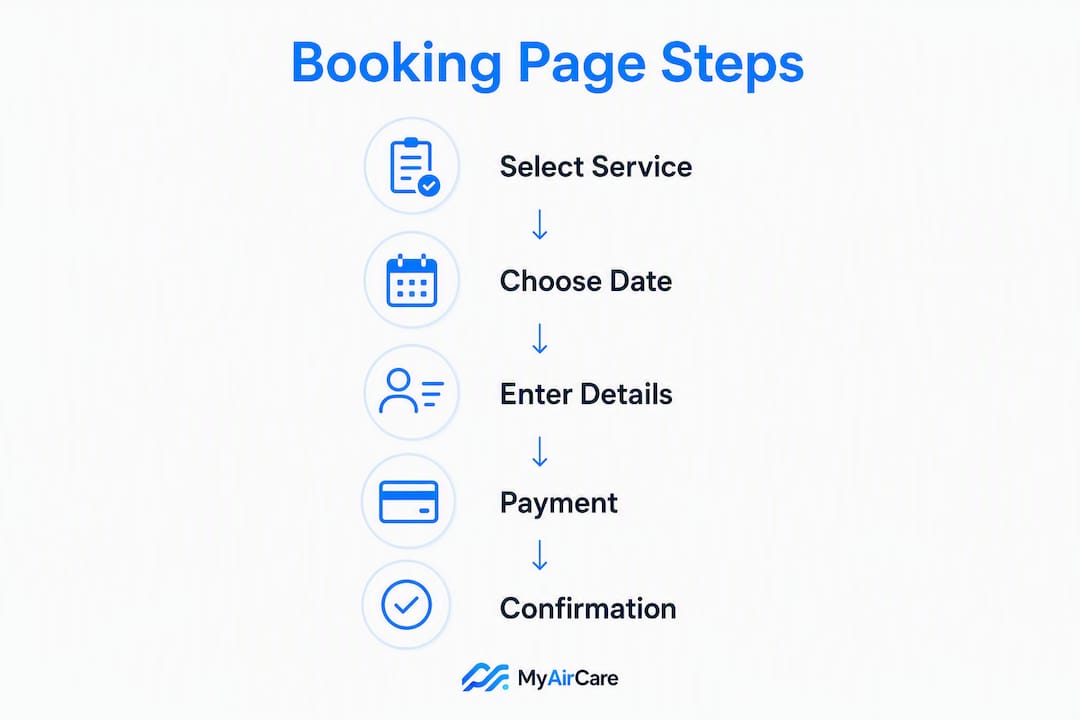
A five-step wizard covers most air-con cleaning scenarios: service selection, date, time slot, customer details, then confirmation. Single-page flows that combine date and time selection work well for operators with one or two service types.
- Service selection — present cards or a short list; include duration and price.
- Date selection — show a calendar with available dates highlighted; grey out unavailable ones.
- Time slot — display a slot grid layout with available windows; lock a slot the moment a customer selects it.
- Customer details — collect name, phone, email, and postcode; keep it to five fields or fewer.
- Confirmation — display a booking reference, send an email with an .ics calendar invite, and offer an optional SMS confirmation.
Availability rules prevent most booking errors before they happen.
| Rule | Recommended setting | Purpose |
|---|---|---|
| Lead time | Lead time set to prevent same-hour bookings the technician cannot reach | Prevents same-hour bookings the technician cannot reach |
| Buffer between jobs | Buffer time allowing travel and setup | Allows travel and setup time |
| Cancellation window | Cancellation window aligned with fair consumer expectations | Aligns with fair consumer expectations |
| Maximum advance booking | Maximum advance booking period to keep the calendar manageable | Keeps the calendar manageable |
| Same-day cutoff | Same-day cutoff time to give the technician time to plan the day | Gives the technician time to plan the day |
Double-booking prevention requires a slot hold token issued at selection, with a short expiry (typically 10–15 minutes). Real-time availability checks on the backend confirm the slot is still free before payment is processed.
Australian operational considerations for your booking page
Local practice and compliance shape several design decisions that generic booking guides overlook.
- GST presentation: State clearly whether displayed prices include GST. "From $120 incl. GST" removes ambiguity and meets pricing transparency expectations under Australian Consumer Law.
- Cancellation and refund terms: A brief, plain-English cancellation policy on the booking page (or linked from it) satisfies disclosure obligations and reduces disputes. MyAirCare's customer terms provide a working model.
- Travel charges and service area: Display travel fees or postcode-based availability restrictions before the customer reaches the payment step. A postcode lookup field early in the flow prevents wasted time for both parties.
- Accessibility: Use large labels, high-contrast text (minimum 4.5:1 ratio), and clear error messages. Many residential air-con customers are older adults who benefit from simple, uncluttered forms.
Pro Tip: Collect only phone number and postcode at the first step. Defer optional fields — unit number, access instructions, preferred technician — to the confirmation screen or a follow-up SMS. Shorter initial forms convert at a higher rate.
Which technical integrations matter most?
Payments. Stripe is the standard for Australian online bookings. It supports card payments, deposit collection, and refunds, and it is available to Australian merchants without complex setup. Display the Stripe secure badge on the payment step.
Calendar sync. Two-way sync with Google Calendar or Outlook prevents double bookings when operators also take phone or in-person bookings. Configure timezone handling explicitly for operators working across Queensland, New South Wales, or other states with different daylight saving rules.
Automated reminders. SMS and email reminders sent 24–48 hours before an appointment, and again 2–4 hours before, reduce no-shows. Automated reminders are one of the highest-impact features an air-con cleaning business can add to its booking workflow.
- Security: Use TLS on all booking pages. Never store raw card data; Stripe's tokenisation handles this. Keep customer data limited to what is needed for service delivery.
- Mobile/field workflows: A mobile app that allows technicians to check in, check out, capture before-and-after photos, and take on-site payments closes the loop between the online booking and the completed job.
Booking page checklist and wireframe templates
Use this checklist when briefing a developer or configuring a SaaS platform.
- Headline (confirms service and location)
- Hero image or short video showing the service
- Service cards (name, duration, GST-inclusive price)
- Availability calendar (above the fold on mobile)
- Time slot picker
- Short details form (five fields maximum)
- Payment step with Stripe badge
- Confirmation screen with booking reference
- Trust signals (guarantee, contact number, secure payment badge)
- Footer with phone, email, and cancellation policy link
Template A — Single-page flow (best for one or two services): stack all steps vertically on one page. Service card at top, calendar below, time slots below that, then the details form and payment in one scrollable view. Confirmation appears on a separate screen.
Template B — Two-step flow (best for multiple services or team scheduling): Step 1 shows service cards and the calendar. Step 2 shows the time slot picker, details form, and payment. This pattern, similar to what Pristine Aircon Cleaning uses on MyAirCare, keeps each screen focused.
Branding: use one primary colour consistently, keep service names under five words, and match button copy to the rest of the site. "Book now" outperforms "Submit" or "Continue" on conversion.
Pro Tip: Load the booking page on a real phone and time a complete booking from landing to confirmation. Target an efficient booking time for a standard residential job, ideally under two minutes. If it takes longer, identify which step causes the delay and simplify it.
How do you measure and improve booking page performance?
Primary metrics to track:
- Booking conversion rate (visitors who complete a booking divided by total page visitors)
- Time to book (from first page load to confirmation)
- Abandoned booking rate (sessions that start the flow but do not complete)
- No-show rate (confirmed bookings where the customer does not attend)
Secondary metrics: average order value, return visitor bookings, and the ratio of phone calls to online bookings (a high call rate often signals a confusing booking page).
A/B test sequence:
- Headline copy — test a benefit-led headline against a plain descriptive one.
- CTA placement — test "Book now" above the fold versus below the service cards.
- Price visibility — test showing price upfront on the service card versus revealing it after selection.
- Form field count — test five fields versus three fields on the details step.
Set up GA4 event tracking on each booking step to identify where visitors drop off. Run one major test every 4–6 weeks and apply small copy or colour adjustments continuously between tests.
How long does implementation take, and what does it cost?
| Path | Typical timeline | Who does the work |
|---|---|---|
| DIY template (website builder) | 1–2 weeks | Operator |
| SaaS platform (e.g. MyAirCare) | 1–3 days | Operator + SaaS support |
| Custom developer build | 3–6 weeks | Developer + operator for content |
Cost considerations by path:
- DIY: Hosting and template costs vary; Stripe processing fees apply to all online payments (standard Australian rate applies per transaction).
- SaaS subscription: MyAirCare offers a free plan supported by booking fees, with a paid subscription tier that unlocks branded booking pages, advanced reminders, and team features. See current pricing for plan details.
- Custom build: Developer hours plus ongoing maintenance; Stripe and SMS provider fees are additional recurring costs.
For most sole traders and small teams, a SaaS platform is the fastest path to a working, compliant booking page. The onboarding time is measured in days, not weeks, and the recurring cost is predictable.
MyAirCare is built for exactly this
Air-con cleaning businesses in Australia have specific needs that generic booking tools do not address: postcode-based service area controls, job documentation, on-site payment capture, and reminders timed to the cleaning cycle. MyAirCare covers all of it in one platform.

The platform provides branded booking pages with Stripe payments, two-way calendar sync, automated SMS and email reminders, and a mobile app for technicians. Operators on the free plan pay per booking; the paid subscription removes booking fees and adds team scheduling, custom service terms, and priority support. The setup takes 1–3 days, not weeks.
Operators who want to see the booking experience before committing can review a live booking page or visit myaircare.com.au to start a free account and configure services.
Key takeaways
A high-converting booking page for an Australian air-con cleaning business requires a clear headline, service cards with upfront pricing, an early availability calendar, Stripe payments, and automated reminders working together.
| Point | Details |
|---|---|
| Lead with the calendar | Place the availability calendar above the fold on mobile to reduce friction for date-ready visitors. |
| Show GST-inclusive prices | State whether prices include GST on every service card to meet Australian Consumer Law requirements. |
| Keep forms short | Collect phone and postcode first; defer optional fields to the confirmation screen. |
| Automate reminders | Configure SMS and email reminders at 24–48 hours and 2–4 hours before each appointment to cut no-shows. |
| MyAirCare as a ready solution | MyAirCare provides branded booking pages, Stripe, calendar sync, and reminders configured for Australian air-con cleaners. |
Why the design details matter more than operators expect
Most air-con cleaning businesses lose bookings not because their prices are wrong or their service is poor, but because the booking process itself creates friction. A customer who cannot find an available time slot within three taps, or who reaches a payment step with no visible security badge, will close the tab and call a competitor.
The design choices in this guide are not cosmetic. Headline placement, GST-inclusive pricing, and a slot-locking mechanism each address a specific failure point in the booking journey. Operators who treat the booking page as a form rather than a conversion tool consistently underperform against those who treat it as the first service interaction.
The businesses that see the clearest operational improvement — fewer double bookings, fewer missed calls, faster quote-to-job times — are those that configure their booking page once, correctly, and then measure it. The measurement step is where most operators stop short. A booking conversion rate tracked weekly reveals more about business health than most other metrics available to a sole trader.
Useful sources
- Checkfront booking page design guide — visual hierarchy, headline placement, and hero imagery recommendations
- builtbyai appointment scheduler (GitHub) — five-step wizard flow and ICS calendar invite implementation
- shadcn calendar booking slots block — two-panel calendar and slot grid UI reference
- 99designs booking website inspiration — mobile-first booking page design examples
- MyAirCare — product overview and free account — branded booking pages, Stripe, reminders, and mobile app for Australian air-con cleaners
- Pristine Aircon Cleaning — live booking page example — real example of service card structure and two-step flow
- MyAirCare pricing — free and paid plan details for operators budgeting implementation