To reduce no shows quickly, deploy two-way multi-channel reminders, make rescheduling effortless through online self-scheduling, and measure your baseline no-show rate before changing anything else. These three levers form the core of every effective prevention strategy, and the evidence for them is strong: one 2025 study found online-booked appointments carried a median no-show rate of just 1.8%, against 5.9% for offline bookings. Platforms like MyAirCare bundle these functions into a single workflow, which matters more than it sounds, because the biggest driver of missed appointments is friction, not forgetfulness.
Layering these three levers with a waitlist and backfill system, plus targeted outreach to high-risk bookings, produces the best return for the effort involved. No single tactic gets you to zero. Academic reviews of no-show interventions consistently find that reminders alone hit a ceiling, so a service business that wants a durable fix needs a system, not a fix.
Start here:
- Reminders: multi-channel, two-way, sent on a set cadence (not once, not by SMS alone)
- Self-scheduling: reduce the lead time between booking and appointment where practical
- Measurement: know your current no-show rate before you touch anything
Key Takeaways
Reducing no-shows requires layering multi-channel reminders, frictionless self-scheduling, a clear enforceable policy, and automated recovery, because no single tactic closes the gap alone.
| Point | Details |
|---|---|
| Start with measurement | Calculate your baseline no-show rate by appointment type and channel before changing anything. |
| Two-way reminders beat one-way | Use a 72 hour, 24 hour, and morning-of cadence with a reply or confirm action built in. |
| Cut lead time where possible | Offer near-term slots first and re-confirm any booking made more than two weeks out. |
| Enforce policy consistently | Disclose fees and card-on-file terms at booking, on the confirmation, and in reminders. |
| Automate recovery | Waitlist backfill and outreach within 24 hours of a miss recover far more bookings than manual follow-up. |
| MyAirCare as the practical platform | MyAirCare combines self-scheduling, reminders, and Stripe card-on-file in one workflow for air-con cleaning businesses. |
Table of Contents
- Quick checklist: six priority actions you can start this week
- Design reminders and confirmations that change behaviour
- Make rescheduling effortless and reduce lead time
- Policy design, deposits and card-on-file: fair enforcement that reduces weak commitment
- Waitlist, backfill and rapid post-miss recovery
- Segment by risk and focus human outreach where it moves the needle
- Measure honestly and run a 30/60/90 rollout
- Practitioner proof: how integrated booking, reminders and payments reduce no-shows
- Train your staff to communicate, not just remind
- Consider telehealth for appointments that do not need a physical visit
- Offering incentives or rewards for attendance
- Addressing barriers to attendance such as transport, childcare or accessibility
- Personalising reminders based on client preferences and behaviour
- Using predictive analytics to spot risk beyond simple rules
- How MyAirCare helps you put these levers into practice
- Sources
Quick checklist: six priority actions you can start this week
You do not need a twelve-month project plan to move the needle on missed appointments. Most clinics and service businesses see measurable change within a few weeks of tightening these six areas.
- Set a two-way reminder cadence. Send confirmations at 72 hours, 24 hours, and the morning of the appointment, and let the client reply to confirm, cancel, or reschedule.
- Turn on online self-scheduling. Let clients pick their own slot and reschedule with one tap, rather than phoning during business hours.
- Shorten lead time where you can. Offer the next available slot first, and re-confirm any booking made more than two weeks in advance.
- Publish your cancellation and no-show policy at the point of booking. Do not bury it in a terms page nobody reads.
- Build a waitlist and backfill process. Automate it so a cancellation triggers an offer to the next person in line within minutes.
- Flag high-risk bookings for a human phone call. First-time clients, long-lead bookings, and repeat no-shows deserve a real conversation, not just another text.
Each of these is cheap to implement and none requires new hardware. The order matters, though: get reminders and self-scheduling working before you layer on policy enforcement or predictive flagging, because those later steps depend on clean booking data to work properly.
Design reminders and confirmations that change behaviour
A one-way reminder tells someone about their appointment. A two-way confirmation asks them to do something about it, and that small difference in design changes outcomes. When a client has to tap "confirm" or reply "yes," they re-commit to the booking rather than passively receiving a notification they might forget five minutes later.
The cadence that tends to work best follows a three-touch pattern: a confirmation at 72 hours out (enough time to reschedule if something has come up), a reminder at 24 hours (close enough to be top of mind), and a final nudge on the morning of the appointment. For cohorts with historically higher no-show rates, longer lead-time services, or first-time clients, adding a fourth touch a week out gives more room to catch a scheduling conflict before it becomes a missed slot.
Channel choice should follow the client, not the business's preference:
- SMS works best for short, time-sensitive confirmations most people read within minutes
- Phone calls suit high-value or high-risk bookings where a real conversation catches problems early
- Email suits longer messages, like policy reminders or pre-appointment instructions
Framing matters more than most operators expect. A reminder that states what is at stake, a reserved slot that someone else could have used, tends to outperform a neutral "see you Tuesday" message, according to behavioural research on reminder wording. A gentle accountability nudge beats a purely informational one.
Pro Tip: Route every "cancel" or "reschedule" reply into an automated workflow that immediately offers the freed slot to your waitlist, so one reply does two jobs: it updates your calendar and it fills the gap.
Make rescheduling effortless and reduce lead time
The longer the gap between booking and the actual appointment, the more chances there are for memory to fade, plans to change, or the original motivation to weaken. This is not a hunch. Multiple operational studies tie longer lead times directly to higher no-show rates, and the inverse holds too: online scheduling systems that let clients book closer to when they actually need the service show markedly better attendance.
Practical fixes here fall into two buckets. First, wherever your service allows it, offer the next available slot rather than defaulting to a date three weeks out. Second, for appointments that genuinely need to be booked well in advance (specialist consults, seasonal servicing, annual reviews), build in a re-confirmation step roughly a week before the visit, separate from your standard reminder cadence.
Your booking page and reminder messages need to make rescheduling a single action, not a phone call during business hours:
- Every confirmation and reminder should include a direct reschedule link, not just a phone number
- The booking page itself should show real-time availability so a client can move their own appointment in under a minute
- Avoid forcing a client to cancel and rebook from scratch. A one-step "change time" function keeps the original booking intact and reduces the odds they abandon the process altogether
A well-structured booking page removes most of the friction that turns a minor scheduling conflict into a silent no-show.
Policy design, deposits and card-on-file: fair enforcement that reduces weak commitment
A clear no-show policy is not about punishing clients. It is about making the cost of skipping visible before the booking is confirmed, which measurably reduces the casual, low-commitment bookings that are most likely to fall through. Vague or inconsistently applied fee policies do the opposite: they invite disputes and damage trust, according to Australian legal guidance on no-show fees.
Build your policy around three elements:
- A clear definition of what counts as a no-show, including the notice window that separates a "late cancellation" from a genuine no-show (24 hours is common practice).
- A stated fee or deposit amount, along with any exceptions (illness, emergencies, first-offence leniency) so the policy reads as fair rather than punitive.
- A consistent enforcement process, applied the same way to every client, every time. Selective enforcement is the fastest way to generate a complaint.
If you collect card-on-file or a refundable deposit, state the terms plainly at the point of booking. Clients should know exactly what happens if they miss the appointment before they hit "confirm," not discover it in a follow-up email. This single step does most of the legal heavy lifting: policies that are disclosed at booking, backed by a card on file, and applied consistently are far easier to enforce without disputes than ones added retroactively.
Display the policy in three places: the booking page itself, the confirmation message, and at least one reminder. Repetition here is not overkill. It is what makes the policy defensible if a client later claims they were not told. Card-on-file capture also ties directly into your invoice and payment workflow, so the same system that takes the deposit can process the no-show fee automatically if needed.
Waitlist, backfill and rapid post-miss recovery
Prevention will never get you to zero, which is why recovery deserves equal attention. An automated waitlist that instantly offers a cancelled slot to the next eligible client converts far more of those gaps into filled appointments than a staff member manually working the phones, and it does so without adding to anyone's workload. Recupra's operational data on waitlist automation shows this recovery effect scales well beyond what manual refill attempts achieve.
Speed matters just as much for genuine no-shows, not just cancellations. Reaching out within 24 hours of a missed appointment, while the reason is still fresh, produces far better re-booking rates than a generic follow-up days later. Keep the tone practical rather than accusatory: acknowledge the missed slot, ask if everything is okay, and offer the next available time in the same message.
- Automate the waitlist trigger so a cancellation or no-show fires an offer within minutes, not hours
- Reserve staff time for the outreach that automation cannot do well: a personal call to a client who has missed twice in a row
- Track recovery rate separately from your no-show rate, since a rising no-show number paired with a strong recovery rate tells a very different operational story than the same no-show number with no recovery at all
Pro Tip: Draft two or three post-miss message templates in advance so the tone stays warm and consistent, rather than being written on the fly by whichever staff member is free.
Segment by risk and focus human outreach where it moves the needle
Not every booking carries the same risk of becoming a no-show, and treating them all the same wastes your team's limited time on live outreach. Start with simple, observable rules rather than anything complicated: clients with a prior no-show, bookings made far in advance, and appointment types that historically show weaker attendance are the three easiest flags to set up without any modelling at all.
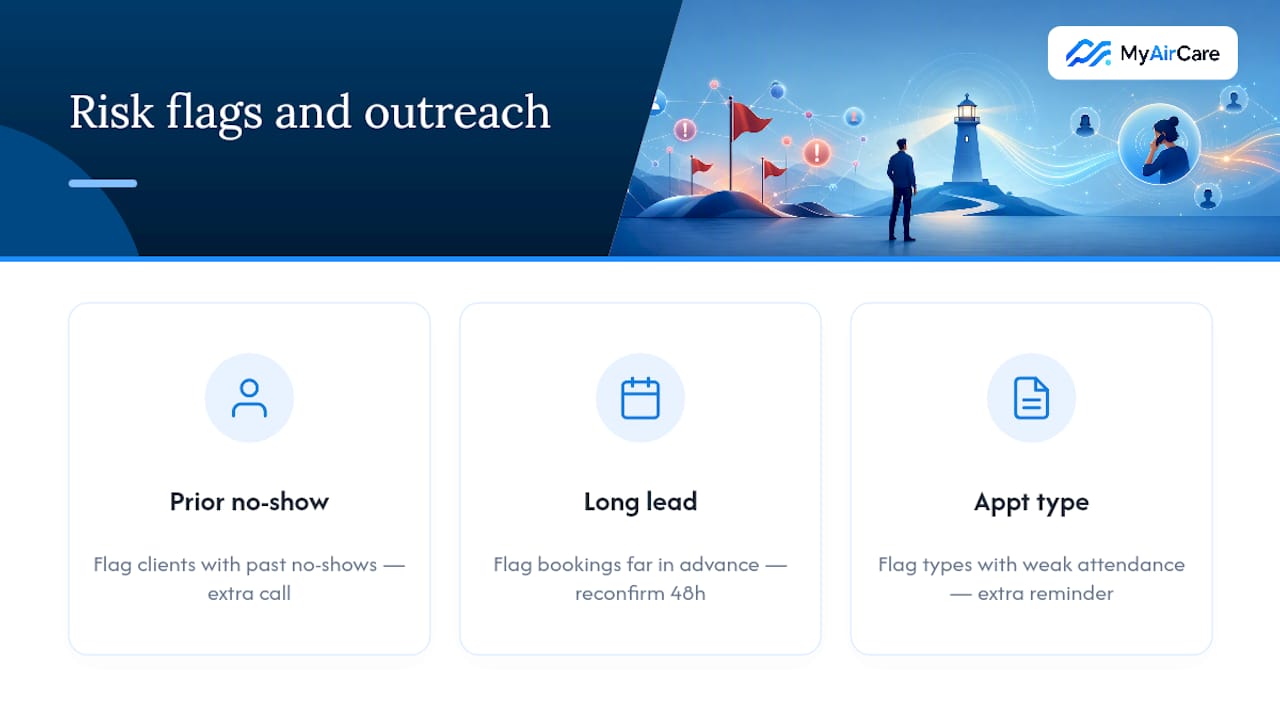
Once those flags exist, route them differently from the rest of your bookings. A flagged appointment might get an extra reminder touch, a phone call instead of just a text, or a request to reconfirm 48 hours out. The point is not to punish the client for a past miss. It is to spend your team's limited outreach time where it actually changes the outcome.
Predictive models can extend this further, and vendors sometimes report accuracy figures in the 85 to 90 percent range for flagging high-risk bookings. Treat those numbers as a starting point, not a guarantee. Model accuracy is highly dependent on the population it was trained on, and a model built on one clinic's booking history will not necessarily perform the same way on yours. Validate any predictive tool against your own historical data before you let it drive scheduling decisions, and keep the simple rule-based flags running underneath it as a sanity check.
For businesses managing genuine capacity crunches alongside no-show risk, pairing this triage approach with structured clinic queue management can help staff handle both problems without duplicating effort.
Measure honestly and run a 30/60/90 rollout
You cannot improve what you have not measured, and no-show rate is one of the easier operational metrics to get wrong. Calculate it as missed appointments divided by total scheduled appointments over a fixed period, then break it down by appointment type, booking channel, and lead time. A single blended number will hide the segments actually driving your losses.
A staged rollout beats trying to fix everything in month one:
- Days 1 to 30: baseline. Measure your current no-show rate by segment before changing anything. Turn on basic two-way reminders and online self-scheduling.
- Days 31 to 60: reduce friction. Add one-tap rescheduling, shorten lead times where practical, and publish your cancellation policy clearly at booking.
- Days 61 to 90: add enforcement and recovery. Introduce card-on-file or deposits for higher-risk bookings, and switch on automated waitlist backfill.
- Beyond day 90: refine. Compare your new no-show rate against the baseline by segment, and run small A/B tests on reminder wording or cadence to see what moves your specific population.
Two tests worth running early: compare a two-touch reminder cadence against a three-touch one, and compare neutral reminder wording against the cost-framed version described earlier. Watch the effect on your riskiest segments first. Improvements often show up there before they show up in your overall rate.
Practitioner proof: how integrated booking, reminders and payments reduce no-shows
The reason a single-platform approach tends to outperform a patchwork of separate tools comes down to friction. Every extra step between "I need to reschedule" and "it's done" is a chance for a client to give up and simply not show. MyAirCare was built around this exact problem for air conditioning cleaning businesses, where a missed job costs real revenue and a callback to fix a double-booking eats into a technician's day.
- Online booking removes the phone-tag that causes long lead times and missed callbacks
- Automated reminders run on a set cadence without a staff member needing to remember to send them
- Card-on-file through Stripe makes deposit and no-show fee enforcement practical rather than theoretical
- Mobile job management lets a technician confirm, reschedule, or take payment on-site, closing the loop without a return trip to the office
When booking, reminders, and payment capture sit in one system, a client who wants to reschedule can do it in the same message that reminded them of the appointment, rather than starting a separate phone call that might never happen.
That single design choice, collapsing three separate friction points into one workflow, is what turns a good reminder policy into a system that actually holds up under real scheduling pressure.
Train your staff to communicate, not just remind
Automated systems handle the volume, but the conversations your staff have still decide whether a hesitant client actually turns up. A reminder can only do so much if the person answering your phones sounds rushed or unclear about the cancellation policy when a client calls to ask about it.
Front-line staff need three specific skills, not general customer service training. First, they need to explain the no-show policy in plain language without sounding like they are reading a legal disclaimer, since a client who understands why the policy exists is far more likely to accept it. Second, they need a simple script for the post-miss outreach call discussed earlier: acknowledge the miss, keep the tone warm, and move straight to rebooking rather than dwelling on the miss itself. Third, they need to recognise the difference between a client who is genuinely struggling to attend (transport, cost, confusion about timing) and one who is simply disengaged, because those two situations call for different responses.
A five-minute briefing on these three points, repeated whenever new staff join, does more for attendance than most software rollouts. The tone your reception staff use when confirming a booking sets the expectation for how seriously that booking will be treated. Pair this with the reminder wording guidance covered earlier, and you get consistency between what the automated system says and what a human says when a client calls in confused. That consistency matters more than either channel alone.
Consider telehealth for appointments that do not need a physical visit
Not every booking needs someone in the room, and offering a virtual option for the appointments that do not removes several of the practical barriers that cause no-shows in the first place. A client who would have skipped an in-person follow-up because of a work conflict or a transport issue can often still make a fifteen-minute video call from their car or lunch break.
This is not a universal fix. Physical assessments, hands-on treatment, and anything requiring equipment obviously still need an in-person slot. But routine check-ins, medication reviews, results discussions, and follow-up consultations are strong candidates for a virtual option, and offering the choice at the point of booking, rather than only after a client has already missed once, captures more of the benefit.
Operationally, treat telehealth bookings the same way you treat in-person ones for reminder purposes. A virtual appointment still needs a two-way confirmation and a reschedule link, because the assumption that "it's just a video call, they'll remember" is exactly the kind of thinking that causes virtual no-shows too. The main advantage is that rescheduling a telehealth slot is usually even lower-friction than an in-person one, since there's no travel time to renegotiate. That makes it a genuinely useful release valve for clients juggling tight schedules, rather than a replacement for your core booking system.
Offering incentives or rewards for attendance
A modest reward for showing up consistently works better as a relationship-building tool than as a blunt attendance fix, and it pairs naturally with a no-show fee rather than replacing it. Loyalty-style incentives, a discount on the next service after a run of kept appointments, or a small reward for booking and attending the next slot before leaving today, give clients a reason to prioritise the booking beyond simply avoiding a penalty.
The businesses that get the most out of this keep the incentive simple and consistent, rather than running a different promotion every month. A client who knows that keeping their appointments earns something small and predictable is more likely to treat the booking as a commitment worth keeping, not just an entry in their calendar. This works particularly well for repeat-service businesses, seasonal servicing, or ongoing care plans, where attendance compounds over multiple visits rather than being a single event.
Keep incentives separate from your enforcement policy in how you communicate them. A no-show fee is about accountability. An attendance reward is about appreciation. Blending the two into one confusing message (implying a fee is really a "reward you didn't earn") tends to land badly. State each clearly and let them work together rather than trying to make one do the job of both.
Addressing barriers to attendance such as transport, childcare or accessibility
Some no-shows have nothing to do with forgetfulness or weak commitment. A client without reliable transport, a parent who could not arrange childcare, or someone whose accessibility needs were not accommodated at booking will miss the appointment regardless of how good your reminder cadence is. These barriers are worth asking about directly, because they are often invisible until a client is asked.
Practical steps here are modest but effective. Offering a wider spread of appointment times, including early morning or early evening slots, helps clients working around inflexible jobs or school pickups. Asking about accessibility needs at the point of booking, rather than discovering them on arrival, prevents a wasted trip for both the client and your business. For services where transport is a genuine obstacle, a telehealth option or a longer rescheduling window without penalty removes the barrier without requiring the business to solve transport itself.
The simplest fix is often just asking. A short optional field on the booking form, "Is there anything that might make it hard for you to attend?", surfaces problems you can actually solve, whether that's a different time slot, a virtual option, or a reminder sent to a different contact number. Treating these clients the same as a disengaged no-show, with escalating fees and no follow-up, tends to lose them permanently rather than solving the underlying problem.
Personalising reminders based on client preferences and behaviour
A reminder that ignores how a client actually behaves is a missed opportunity. Some clients reliably confirm by text within minutes. Others never open SMS but always answer a phone call. Matching your reminder channel to the behaviour you have already observed, rather than sending every client the same sequence, improves response rates without any extra cost.
This does not require complex software. Even a simple system, tracking which channel a client responded to last time and defaulting to it next time, captures most of the benefit. Over time, a client who consistently confirms 24 hours out but never engages with the 72 hour message can be moved to a lighter-touch sequence, freeing up your two-touch cadence for clients who actually need the extra nudge.
Timing preferences matter too. A client who always books early morning appointments is unlikely to read a reminder sent at 9pm the night before if they are already asleep by then. Aligning reminder send times with the client's own booking pattern, rather than a single fixed schedule for the whole business, is a small adjustment that compounds across hundreds of bookings. The goal is not a fully bespoke message for every client. It is removing the mismatches that cause an otherwise reliable client to miss a reminder simply because it arrived at the wrong time through the wrong channel.
Using predictive analytics to spot risk beyond simple rules
Simple segmentation rules, covered earlier, catch the obvious cases: past no-shows, long lead times, certain appointment types. Predictive analytics goes further by weighing dozens of variables at once, including booking channel, time of day, weather, distance from the appointment location, and appointment history, to produce a risk score for each booking.
The appeal is real, but so is the caveat already raised in the risk segmentation section: vendor accuracy claims are population-specific, and a model needs validation against your own booking history before it should influence staffing or outreach decisions. A model trained on a large metropolitan clinic's data will not necessarily transfer cleanly to a regional service business with a different client base and booking pattern.
Where predictive scoring earns its place is in prioritisation, not prediction. Rather than treating a risk score as a certainty, use it to decide which flagged bookings get a phone call this week when your team only has time to call a handful. Layer it on top of the simple rules you already have running, and treat any score as a starting point for a human decision rather than an automated cancellation or double-booking trigger. The technology is genuinely useful for triage. It is not yet reliable enough to replace judgment.
Author's short view: priorities for small clinics and solo operators
If you are running a small clinic or a solo service business, sequence matters more than sophistication. Get your baseline no-show rate measured, two-way reminders running, and one-click rescheduling live before you touch anything else. Card-on-file and deposits work far better once clients already understand your policy through clear communication, not as a first move. Automate the waitlist early. It is cheap and pays for itself immediately. Save your actual staff time for the phone calls that automation cannot replace: the client who has missed twice, the first-time booking that feels shaky.
— Lewis
How MyAirCare helps you put these levers into practice
MyAirCare is built for the exact friction points covered throughout this piece, but specifically for air conditioning cleaning businesses rather than as a generic booking tool retrofitted for the trade. Online self-scheduling, automated multi-channel reminders, and card-on-file payments through Stripe all run from one system, which means you're not stitching together a booking widget, a separate SMS tool, and a manual spreadsheet to track who has paid a deposit.

For a solo operator or small team, the practical path is straightforward: get your booking page live so clients can self-schedule, switch on the reminder sequence so confirmations go out without anyone remembering to send them, and enable card-on-file for higher-value or first-time jobs where a no-show costs you the most. Mobile job management means a technician can confirm a reschedule or take payment on-site, without a call back to the office. If you want to see the booking flow in action before committing, start with a live booking page to get a feel for how a client experiences the reminder and rescheduling sequence, or head to MyAirCare to set up your own.
Sources
For deeper reading on the evidence behind these recommendations, the digital scheduling study on no-show rates offers the clearest data on self-scheduling's effect. The academic review of no-show interventions covers the theoretical grounding for layered approaches. For policy design specific to Australian operators, Sprintlaw's guide to no-show fees explains what makes a fee enforceable. Recupra's operational guide on waitlists and recovery covers the recovery side in practical detail.
- Digital health scheduling study (2025) — effect of online booking on no-shows
- Family practice press release on ML models predicting no-shows
- Setting and enforcing no-show fees legally in Australia (Sprintlaw)
- Operational tactics: waitlists and post-miss recovery (Recupra)