
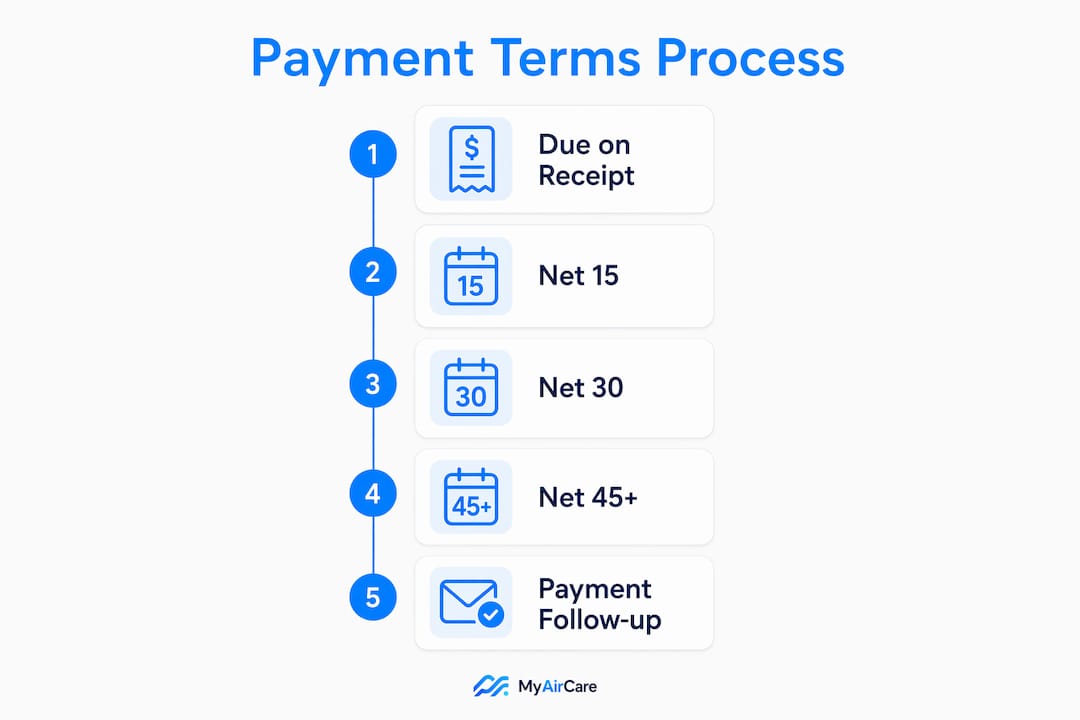
For most residential air-con cleaning jobs, Due on Receipt or Net 15 is the right starting point. For recurring commercial maintenance contracts, Net 15 keeps cash moving. For larger tendered work, a deposit plus staged payments reduces financial exposure. MyAirCare handles all three scenarios, with Stripe processing payments securely so operators collect faster and spend less time chasing invoices.
Residential one-off: Due on Receipt — payment expected on the day of service, collected via Stripe on site. Recurring commercial maintenance: Net 15 from invoice date — short enough to maintain cash flow, long enough for a client's accounts payable cycle.
Table of Contents
- What are invoice payment terms and why do they matter?
- Which payment terms suit each type of air-con cleaning job?
- What should every invoice display?
- How to chase late payments without damaging client relationships
- How to set up payment terms in MyAirCare with Stripe
- Copy-and-paste invoice clauses and reminder scripts
- Key takeaways
- Why clear terms matter more than operators think
- MyAirCare makes payment terms work automatically
- Useful sources and next steps
What are invoice payment terms and why do they matter?
Invoice payment terms are the conditions that specify when and how a client must pay. They include the payment window (Net 15, Net 30, Due on Receipt), any early-payment discount (such as 2/10 Net 30), accepted payment methods, and the date from which the clock starts. NetSuite describes them as the backbone of cash-flow management, not just transactional instructions.
For an air-con cleaning business, the practical effects are direct:
- Shorter terms reduce Days Sales Outstanding (DSO) and keep the bank account funded between jobs.
- Explicit due dates prevent clients from disputing when payment is actually owed.
- Stated late-fee clauses give operators legal standing to charge interest on overdue accounts.
- Consistent terms across quotes, contracts, and invoices reduce the most common source of payment disputes.
- Professional invoicing signals to commercial clients that the business operates to a standard they expect.
Relying on defaults weakens a supplier's position — many jurisdictions assume a 30-day expectation when no terms are stated, which makes late-fee enforcement harder.
Pro Tip: Always print the exact calendar due date on every invoice (e.g., "Due: 15 July 2026"), not just the term label. Clients should never have to calculate it themselves.
Which payment terms suit each type of air-con cleaning job?
Matching terms to job type reduces DSO and reflects the actual risk of each engagement. Stripe recommends aligning due dates with a client's payroll or accounts payable run dates to increase on-time payment.

| Job type | Suggested term | Deposit or milestone |
|---|---|---|
| Residential one-off | Due on Receipt or 2/10 Net 30 | No deposit; collect on site |
| Small commercial (single site) | Net 15 | No deposit for established clients |
| Recurring maintenance contract | Net 15 | First invoice upfront; subsequent on completion |
| Large commercial or tender | Net 30 | 20% deposit on booking; staged on milestones |
Sample clause — residential: "Payment due on completion. Accepted via card (Stripe) or EFT." Sample clause — recurring: "Net 15 from invoice date. Invoiced on the last business day of each service month." Sample clause — large tender: "20% deposit payable on booking confirmation; balance due Net 30 from practical completion date."
When a commercial client insists on Net 45 or Net 60, price the job to cover the financing cost. Extended terms mean carrying receivables longer, and that has a real cost. Net 15 is common for recurring services and improves cash turnover compared with a default Net 30.
For operators bidding on larger contracts, the MyAirCare tenders page provides a starting point for structuring deposit and milestone terms.
What should every invoice display?
A complete, unambiguous invoice reduces disputes and speeds collection. Every invoice should include:
- Invoice number — unique, sequential
- Invoice date — the date issued, which starts the payment clock
- Payment terms — written in full (e.g., "Net 15 from invoice date")
- Due date — explicit calendar date (e.g., "Due: 20 July 2026")
- GST statement — "Tax Invoice" if registered for GST; ABN displayed
- Accepted payment methods — card via Stripe, EFT/bank transfer, BPAY where available
- Late fee notice — reference to the clause (e.g., "Overdue amounts accrue interest at 1.5% per month per contract terms")
- Billing contact — name or email for payment queries
Unless "business days" is explicitly stated, "Net" terms count calendar days, including weekends and public holidays. Writing "Net 30 from invoice date" removes any ambiguity about when the clock starts. If a due date falls on a weekend or public holiday, state whether it rolls forward to the next business day — card payments via Stripe often process on weekends, but EFT transfers may not.
How to chase late payments without damaging client relationships
A structured reminder schedule recovers cash while keeping the relationship intact. Automate the first three steps in MyAirCare; escalate manually only when necessary.
- Three days before due date — automated email: "A reminder that invoice #[X] for $[amount] is due on [date]. Pay securely at [Stripe link]."
- Day of due date — automated SMS: "Invoice #[X] is due today. Pay here: [link]. Contact us if you have any questions."
- Seven days overdue — email with late fee notice: "Invoice #[X] is now 7 days overdue. A late fee of 1.5% per month applies from the due date per our agreed terms. Please pay by [new date] or contact us to arrange a payment plan."
- 21 days overdue — phone call, then formal written notice: advise that services will be suspended and the account referred to a debt recovery service if payment is not received within 7 days.
Key points on late fees:
- State the rate in the original contract and reference it on the invoice — fees cannot be applied retrospectively without prior agreement.
- Common B2B late fees range from 1–2% per month; always cap at the maximum rate permitted by law.
- Offer a payment plan before escalating — a structured arrangement is better than a disputed debt.
- Never waive a late fee without documenting the reason; repeated waivers set a precedent.
Pro Tip: Log every contact attempt — date, channel, and response — in MyAirCare's job notes. This audit trail is essential if the matter escalates to a debt recovery service or tribunal.
How to set up payment terms in MyAirCare with Stripe
MyAirCare lets operators configure default payment terms once and apply them automatically to every invoice and booking confirmation.
- In MyAirCare settings, navigate to Invoicing and set the default payment term (e.g., Net 15).
- Enable Stripe as the payment gateway; connect the business bank account and verify the ABN.
- For each job type, set a per-job override if the default term does not apply (e.g., Due on Receipt for residential).
- Turn on automated reminders — configure the pre-due, day-of, and overdue sequences.
- Enable automatic receipt generation so clients receive confirmation immediately on payment.
- Add a link to the MyAirCare customer terms page in every booking confirmation email and invoice footer.
Mobile crew checklist:
- Collect deposits on site via the MyAirCare mobile app before work begins on large jobs.
- Mark the job complete in the app immediately on finishing — this sets the correct invoice date.
- Issue the tax invoice from the app before leaving the site for Due on Receipt jobs.
- Confirm the Stripe payment link is active and tested before each service day.
Copy-and-paste invoice clauses and reminder scripts
Invoice term lines:
- Due on Receipt: "Payment due on receipt of this invoice. Accepted via card (Stripe link below) or EFT."
- Net 15: "Payment Terms: Net 15. Due date: [dd Mmm yyyy]. Payment due 15 calendar days from invoice date."
- Net 30: "Payment Terms: Net 30. Due date: [dd Mmm yyyy]. Payment due 30 calendar days from invoice date."
- 2/10 Net 30: "A 2% discount applies if paid within 10 days of invoice date. Full amount due within 30 days." The annualised saving on 2/10 Net 30 provides a strong incentive for commercial clients to pay early compared with waiting the full 30 days.
Deposit and cancellation clause: "A 20% deposit is payable on booking confirmation. The deposit is non-refundable if the booking is cancelled within 24 hours of the scheduled service time."
Reminder email (pre-due): "Hi [Name], this is a reminder that invoice #[X] for $[amount] is due on [date]. You can pay securely here: [Stripe link]. Contact us at [email] with any questions."
Reminder SMS (overdue): "Invoice #[X] from [Business Name] is overdue. Please pay at [link] or call [number] to discuss."
Key takeaways
Clear, explicit invoice payment terms — stated on the contract, quote, and invoice — are the single most effective way to reduce overdue accounts and improve cash flow for air-con cleaning businesses.
| Point | Details |
|---|---|
| Match terms to job type | Use Due on Receipt for residential, Net 15 for recurring commercial, and deposits for large tenders. |
| Always show the calendar due date | Print the exact date on every invoice so clients never have to calculate it. |
| State "calendar days" explicitly | Net terms count calendar days unless "business days" is specified; ambiguity causes disputes. |
| Automate reminders and receipts | Configure pre-due, day-of, and overdue sequences in MyAirCare to reduce manual follow-up. |
| MyAirCare + Stripe | MyAirCare's default term settings, Stripe integration, and automated reminders enforce payment terms without extra admin. |
Why clear terms matter more than operators think
The common assumption among trades operators is that strict payment terms will push clients away. The evidence points in the opposite direction. Commercial clients — body corporates, property managers, facilities teams — expect standardised invoicing. An invoice that lacks a due date or payment method looks unprofessional to an accounts payable team, and that alone can delay payment by a full billing cycle.
The more practical risk is internal inconsistency: a contract that says Net 30 while the invoice says Net 15, or a term label with no calendar date attached. These mismatches are the most common reason a payment gets held in a client's approval queue. Fixing the template costs nothing and removes the friction entirely.
Automation matters here because the discipline breaks down under volume. When a crew completes six jobs in a day, manually setting due dates and sending reminders is the first thing that gets skipped. Platforms like MyAirCare exist precisely to hold that process together without adding to the operator's workload.
MyAirCare makes payment terms work automatically
Knowing the right terms is only half the job. The other half is applying them consistently across every invoice, every job, every week. MyAirCare handles default payment terms, Stripe payment processing, automated reminders, deposit collection, and tax invoice generation in one place — built specifically for Australian air-con cleaning businesses.

Operators on MyAirCare spend less time chasing payments and more time on the tools. Set your default terms once, connect Stripe, and the platform manages the rest — from booking confirmation through to receipt. Start with MyAirCare and see how much admin disappears in the first billing cycle. For a full breakdown of plan features, visit the MyAirCare pricing page.
Useful sources and next steps
- LedgerUp — Invoice Payment Terms Examples: real-world examples of Net 30, Net 15, 2/10 Net 30, and late fee clauses with invoice formatting.
- NetSuite — What Are Payment Terms?: accounting-level explanation of terms as a cash-flow framework; useful for bookkeeping best practice.
- Stripe — Invoice Due Dates: practical guidance on choosing due dates and aligning them with client pay cycles.
- InvoiceGrid — How to Calculate Invoice Due Dates: step-by-step due date calculation including EOM, Net terms, and early-payment discount mechanics.
- InvoiceCat — Due Date Calculator: free tool for calculating Net 15, Net 30, EOM, and custom term due dates; useful for checking weekend roll-forward scenarios.
Suggested next steps: Update invoice templates to include explicit calendar due dates and a GST/tax invoice statement. Set Net 15 as the default for recurring accounts in MyAirCare. Enable Stripe and configure the automated reminder sequence. Add a deposit clause to quotes for any job over a threshold that reflects your business's cash-flow risk. Apply Australian GST rules as advised by a registered tax agent or the ATO for your specific circumstances — this guide is general information, not professional tax or legal advice.