
Use a payment link when you need money fast and formal documentation can wait. Use an invoice when the client needs an itemised, tax compliant record or expects payment terms. Most service businesses do best with both: a payment link to collect a deposit or on the spot fee, followed by a proper invoice for the paperwork.
TL;DR:
- Payment links provide fast, single-payment checkout options ideal for deposits or small transactions, but lack detailed itemisation and tax breakdowns.
- Invoices offer structured, tax-compliant records with itemised services and payment terms, suitable for B2B clients and larger projects.
- Combining both methods allows for quick payments and proper documentation, with automatic conversion streamlining administrative work.
- Taging each payment link with job or client references significantly simplifies reconciliation and improves accounting accuracy.
- For ongoing or large jobs, invoices with multiple payment options and clear terms remain the preferred choice over standalone payment links.
Table of Contents
- Payment links vs invoices: comparing the two side by side
- How payment links work, and where they fall short
- Why invoices still matter for service businesses
- The hybrid workflow: get paid fast without losing the paperwork
- How to choose the right method for your next job
- How a booking platform actually runs this workflow
- What actually works for most service businesses
- A simpler way to run bookings and payments together
- Sources
- FAQ
Payment links vs invoices: comparing the two side by side
A payment link is a shareable URL that sends a customer to a hosted checkout page for instant payment. An invoice is a formal billing document that itemises the work, states tax details, and sets payment terms, and it doubles as your primary accounting record. The two tools solve different problems, and the gap between them shows up clearly once you line them up.
- Speed to payment: payment links win here, since the customer taps, pays and is done in seconds; invoices depend on when the client chooses to act, especially with 30 day terms.
- Formality and audit trail: invoices carry an invoice number, line items and tax breakdowns; a bare payment link usually carries none of that.
- Suitability: payment links suit consumer and one-off transactions; invoices suit B2B work, particularly where a purchase order number is expected.
- Reconciliation: invoices map cleanly to a client and job in your books; payment links can arrive as an unlabelled deposit unless you tag them.
- Payment terms and partial payments: Stripe's own documentation notes that invoices support partial payments and Net terms, while payment links are built for a single, reusable checkout rather than staged billing.
The pattern that emerges: links are built for speed, invoices are built for structure. Knowing which one a transaction needs is the first decision, not an afterthought.
How payment links work, and where they fall short
A payment link sends the customer to a hosted checkout page, often with a one-tap flow optimised for mobile. You generate the link once, then reuse it across a text message, an Instagram bio, or a QR code on a job site. There's no invoice number to chase and no PDF to email, which is exactly why they get paid quickly. Stripe notes that payment links remove the friction between message and checkout, which is a big part of why they convert well on mobile and in social selling.
The trade-off is documentation. Payment links typically:
- Skip itemised line items, so the customer sees a total, not a breakdown.
- Provide a weaker audit trail for B2B accounting, since there's no invoice number tying the payment to a job.
- Create reconciliation headaches if multiple links look identical in your bank feed.
- Offer little visibility into GST or tax components unless the platform adds it manually.
They still shine in specific situations: collecting a deposit before a job, taking payment during a phone call, or selling a small add-on service where a full invoice would be overkill.
Why invoices still matter for service businesses
An invoice earns its place because it's a record, not just a request for money. A proper invoice includes an invoice number, itemised services, GST or tax detail, and clear payment terms, and that structure is what your bookkeeper (or the ATO) actually needs come tax time. A tax invoice checklist covering these fields is worth keeping on hand if you're not confident your current template holds up.
Corporate and B2B clients tend to insist on invoices for a reason beyond habit. Larger buyers often run purchase orders through an approval workflow, and a payment link without a PO number or tax breakdown can stall in someone's inbox because it doesn't fit their process.
Invoices also support more payment methods than a simple link:
- Bank transfer, which suits larger B2B amounts but adds a manual reconciliation step.
- Card payment via an embedded pay link, which speeds things up without losing the paper trail.
- Direct Debit, which works well for recurring billing and, according to GoCardless, cuts down on chronic late payment for businesses that invoice regularly.
Structured e-invoicing adds a further gain: the Australian Taxation Office's guidance confirms it reduces average time to pay and lowers late payment rates compared with manual, PDF-based invoicing.
The hybrid workflow: get paid fast without losing the paperwork
Most service businesses don't need to pick a side. Two patterns cover almost every scenario:
- Pattern A: send a payment link for immediate settlement (a deposit, an on-site payment, a quick job), then auto-generate a tax invoice or receipt once the money lands, so your books stay clean.
- Pattern B: issue a full invoice with an embedded pay button, giving the client the itemised detail they need while still letting them settle in one tap.
Platforms that support both let a paid payment link convert automatically into an invoice, with the receipt posted to your accounting system without you touching a spreadsheet. Practitioners report that this single step, converting a paid request into a formal invoice, is what actually cuts the manual admin that chews up a Friday afternoon.
Pro Tip: Tag every payment link with a job ID or client reference before you send it. It takes five seconds and it's the difference between a bank feed you can reconcile in minutes and one that takes an hour of guesswork.
How to choose the right method for your next job
Run through this before you send anything:
- Check the client type. Consumer or one-off job? A link is fine. Corporate client with a PO number? Send an invoice.
- Check the amount and timing. Small, immediate payments suit a link. Larger jobs with staged milestones suit an invoice with payment terms.
- Check your tax obligations. If GST needs to be itemised for the client's own records, issue an invoice, not a bare link.
- Set up automatic reconciliation so payments map to the right ledger account without manual entry.
- Export and file every receipt, whether it came from a link or an invoice, so you've got a copy on hand if the ATO ever asks.
Pro Tip: Treat unusual requests, like a client asking to pay via an unfamiliar route or a stream of small, unexplained deposits, as a red flag worth a phone call before you process anything.
For deposit-specific wording and timing, a guide to taking deposits online covers the practical side in more depth.
How a booking platform actually runs this workflow
A typical setup looks like this: the customer books online and pays a deposit through a payment link at the time of booking, then receives a full tax invoice once the job is finished. Integrated Stripe payments mean that deposit is reconciled automatically, with no manual entry linking a bank line to a booking record, as explained in Your Stripe, your money. Facet Cloud.
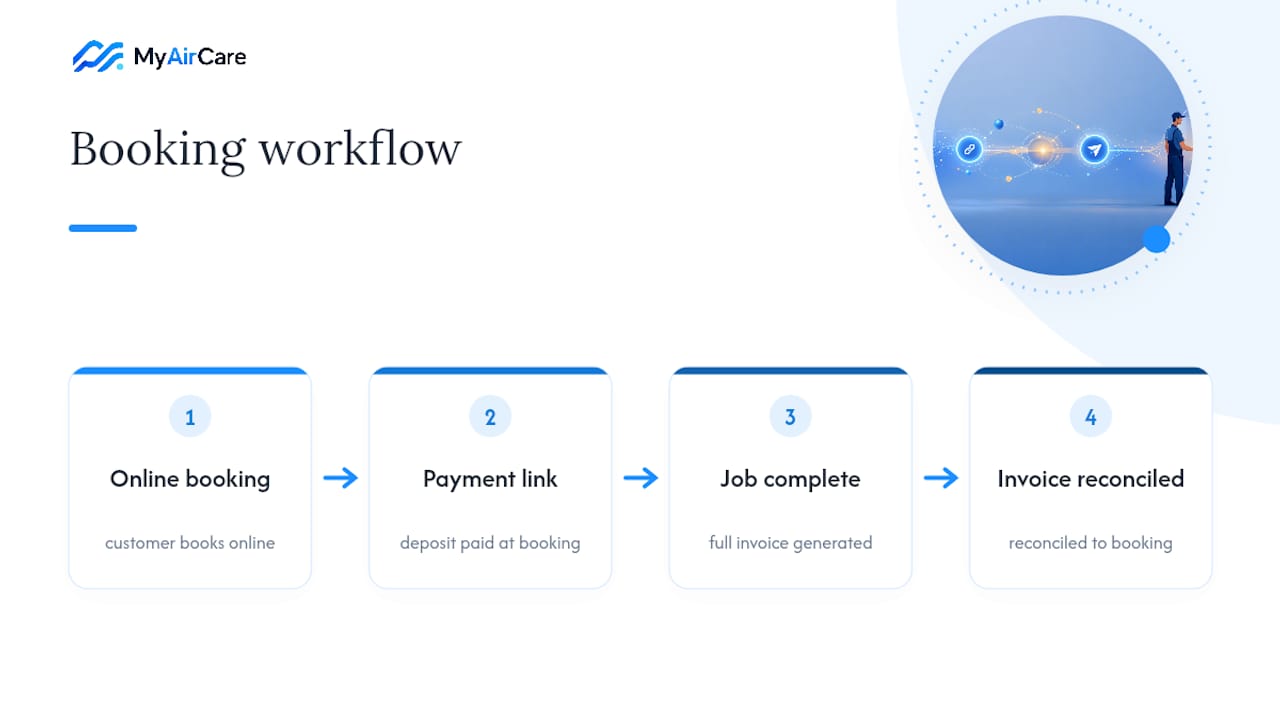
This is the same pattern used by some booking platforms where deposits, final payments and invoice generation sit in one system rather than three disconnected ones. For businesses working out their own terms, a breakdown of invoice payment terms and how Stripe fees apply is worth reading before you set your own defaults.
What actually works for most service businesses
Hybrid is the sensible default for most small service operators: a link for speed, an invoice for the record. Pure invoicing still makes sense for large B2B contracts with formal terms, and a pure payment link is fine for genuinely small, one-off consumer sales. Once billing becomes recurring, it's worth moving toward Direct Debit or subscription billing rather than sending fresh links every month.
— Lewis
A simpler way to run bookings and payments together
There are other ways to stitch payment links and invoices together manually, juggling a payments app, a separate invoicing tool and a spreadsheet to tie it all back. Some platforms skip that stitching entirely: bookings, deposits via integrated Stripe payments, and invoice generation all sit in one system, so a customer can pay on the spot and you still get a proper tax invoice without juggling multiple apps. These platforms are often built specifically around how air-con cleaning businesses take jobs and get paid, rather than adapted from generic invoicing software.
If you want to see the customer-facing side of this in action, the Pristine Aircon Cleaning booking page shows the flow end to end. To set it up for your own business, start at MyAirCare and get your booking and payment system running from one place.
Sources
- Payment Link vs Invoice: When to Use Each (2026 Guide) | PayRequest
- Choosing between Stripe Checkout UIs or Invoicing — Stripe Support
FAQ
What is the difference between a payment link and an invoice?
A payment link is a shareable URL for instant checkout, while an invoice is a formal document that itemises the work, tax and payment terms and serves as your accounting record.
What is an example of a payment link?
A common example is a URL sent via text or shared on social media that takes a customer straight to a hosted checkout page to pay a deposit or a small invoice, often used for on-site or phone payments.
What are the risks of using payment links?
The main risks are limited itemisation, a weaker audit trail for B2B accounting, and reconciliation difficulties if payments aren't tagged with a job or client reference before they land in your bank feed.
What is the definition of a payment link?
A payment link is a shareable checkout URL that lets a customer pay instantly without an itemised invoice, best suited to deposits, consumer sales and quick on-the-spot transactions rather than formal B2B billing.