
If you are registered for GST and make a taxable sale, you must provide a tax invoice when a customer requests one. Under ATO rules, two thresholds determine what that invoice must contain:
- Sales above the low-value threshold (including GST): a full tax invoice is required on request.
- Sales of $1,000 or more: the invoice must also identify the buyer by name, ABN, or address.
For most trades and service businesses, the practical steps are: issue a compliant tax invoice at the point of sale, confirm your ABN is displayed, and use a template that meets the minimum ATO fields. For sales at or above $1,000, verify the buyer's ABN through the Australian Business Register before sending.
Key takeaways
A GST-registered Australian business must issue a compliant tax invoice for any taxable sale above $82.50 when requested, and must include the buyer's identity or ABN for sales of $1,000 or more.
| Point | Details |
|---|---|
| GST registration and tax invoices | Only GST-registered businesses may issue a "Tax Invoice"; non-registered businesses must use a standard invoice. |
| Two key thresholds | Sales above $82.50 require a full tax invoice on request; sales of $1,000 or more must also identify the buyer. |
| Issue at point of sale | Providing the invoice immediately avoids the 28-day follow-up window and reduces administrative risk. |
| Correct and retain records | Replace incorrect invoices promptly and retain all tax records for five years to satisfy ATO requirements. |
| MyAirCare automation | MyAirCare generates threshold-aware, ATO-compliant tax invoices automatically after each completed booking. |
Table of Contents
- When must you provide a tax invoice?
- Who must register for GST, and when does GST apply?
- What must appear on a tax invoice for sales under $1,000?
- What extra details are required for invoices of $1,000 or more?
- When can a buyer issue the invoice? Recipient-created tax invoices explained
- Are electronic and eInvoices valid tax invoices?
- How do rounding rules and mixed invoices work?
- How to correct, replace, or cancel a tax invoice
- A practical compliance checklist and sample tax invoice template
- How automation reduces invoice compliance risk
- A practical perspective on invoicing for small Australian businesses
- MyAirCare handles the invoicing details so you can focus on the job
- Sources
When must you provide a tax invoice?
A GST-registered supplier must provide a tax invoice when a buyer requests one. The obligation is triggered by two conditions: the supplier is registered for GST, and the sale is a taxable supply.
The ATO states that once a buyer requests a tax invoice, the supplier has a limited time to provide it, typically up to about a month. Missing that window is a compliance breach, not just an administrative oversight. Sales of $82.50 or less (including GST) are exempt from this obligation, so a $75 cash job does not require a tax invoice unless the customer specifically asks for one.
Common triggers in practice:
- At the point of sale for any taxable service or product above $82.50
- On request from a business customer who needs to claim GST credits
- On a regular billing cycle for ongoing service contracts
Pro Tip: Issue the tax invoice at the point of sale wherever practical. Waiting for a customer to request one creates unnecessary follow-up work and risks missing the 28-day window.
Who must register for GST, and when does GST apply?
GST registration is the gateway to tax invoices. Only a GST-registered business may issue a document labelled "tax invoice." A business must register for GST once its annual turnover reaches or is expected to reach $75,000 (or $150,000 for non-profit organisations), according to ATO GST guidance.
A tax invoice is a GST-registered supplier's document; a regular invoice is what a non-registered business issues. The distinction matters because only a valid tax invoice allows the buyer to claim an input tax credit.
Key points on GST and invoicing:
- GST-registered suppliers charge 10% GST on taxable supplies and must show it on the invoice.
- GST-free supplies (such as basic food or exported goods) and input-taxed supplies (such as residential rent) do not attract GST, but the invoice must still identify the supply type correctly.
- Reckon's guidance warns that labelling a document "tax invoice" when not registered for GST is a common compliance trap that can cause audit problems.
- A buyer cannot claim a GST credit without a valid tax invoice from a registered supplier.
For ABN registration and GST status checks, Business provides a practical starting point alongside the ATO's own registration tools.
What must appear on a tax invoice for sales under $1,000?
For taxable sales above the low-value threshold and under $1,000, the ATO requires several key items to be clearly ascertainable on the document. "Clearly ascertainable" means the information does not have to appear in a single field, but a reader must be able to determine it from the document without ambiguity, as set out in GSTR 2013/1.
| Required field | Notes |
|---|---|
| The words "Tax Invoice" | Must appear prominently on the document |
| Supplier's identity | Business name or trading name |
| Supplier's ABN | Must be correct and current |
| Date of issue | The date the invoice is created or sent |
| Brief description of the supply | Enough detail to identify the goods or services |
| GST amount payable | Either stated separately or a statement that the total price includes GST |
| Total price | The full amount the buyer owes |
For a simple air-con cleaning job invoiced at $220 including GST, the GST component is $20. The invoice can show "$220 (includes GST of $20)" or list the price as $200 + $20 GST = $220 total. Both formats satisfy the requirement.
Progressive Legal's checklist reinforces that these fields serve a dual purpose: they satisfy the ATO's document test and they give the buyer the evidence needed to claim their input tax credit.
What extra details are required for invoices of $1,000 or more?
For sales above a higher threshold, generally $1,000 or more, the invoice must also identify the buyer. Acceptable buyer identification is the buyer's name, ABN, or address. This is the single most commonly missed requirement on high-value invoices.
A $1,000+ invoice that also meets all the under-$1,000 fields is valid for any sale amount, so using the fuller format as your default template is sound practice. For jobs involving co-owners or multiple recipients, the invoice should identify each party or note the arrangement clearly.
Verify the buyer's ABN before issuing the invoice using the ABR lookup tool. An incorrect ABN on a high-value invoice can block the buyer's ability to claim GST credits, which creates disputes and delays payment. The ATO's guidance notes that automated templates often default to seller-only fields, so check your software settings specifically for the buyer-identity field on invoices above $1,000.
When can a buyer issue the invoice? Recipient-created tax invoices explained
A recipient-created tax invoice (RCTI) reverses the normal arrangement: the buyer, not the supplier, prepares and issues the tax invoice. The ATO permits RCTIs only in specific circumstances, and both parties must be GST-registered.
Core conditions for a valid RCTI, as detailed in GSTR 2013/1:
- Both the supplier and the recipient must be registered for GST at the time the RCTI is issued.
- There must be a written agreement between the parties that the recipient will issue the tax invoice.
- The supplier must not issue a tax invoice for the same supply.
- The document must be clearly labelled "Recipient-Created Tax Invoice."
An RCTI must contain the same core fields as a standard tax invoice, plus the buyer's ABN and a statement that the GST is payable by the supplier. The supplier remains liable for the GST, even though the buyer prepared the document.
Practical steps for setting up an RCTI arrangement:
- Confirm both ABNs are current using the ABR lookup.
- Draft a written agreement specifying that the recipient will issue RCTIs for the relevant supplies.
- Retain a copy of the agreement with your tax records.
- Configure your invoicing system to produce documents labelled correctly and to suppress supplier-issued invoices for those transactions.
Pro Tip: Verify both ABNs before the first RCTI is issued and re-check them at least annually. An RCTI issued when either party's GST registration has lapsed is not a valid tax invoice.
Are electronic and eInvoices valid tax invoices?
Electronic invoices, including PDFs sent by email and structured eInvoices transmitted via the Peppol network, are acceptable tax invoices provided they contain all required information. The ATO's eInvoicing guidance confirms that an electronic document satisfying the A-NZ Invoice Specification meets the "intended to be a tax invoice" test under the GST Act.
Practical requirements for electronic records:
- The invoice must be stored in a format that remains accessible and readable for the full retention period.
- PDF invoices sent by email satisfy the format requirement; the email itself is not the invoice.
- Peppol eInvoices are structured data files exchanged directly between accounting systems, reducing manual entry errors and missing fields.
- Back up electronic records to at least one off-site or cloud location.
Storage obligations mirror those for paper records: five years from the date of the transaction or the date the document is prepared, whichever is later.
Pro Tip: After configuring invoicing software, export a test invoice and check every mandatory field against the ATO's list. Automated templates sometimes omit the GST amount line or the "Tax Invoice" label when a job is marked as GST-free.
How do rounding rules and mixed invoices work?
GST rounding follows two methods, and the ATO permits both. The total invoice method calculates GST on the total invoice amount and rounds to the nearest cent. The taxable supply method calculates GST separately on each line item and rounds each to the nearest cent before summing. For most small businesses, the total invoice method is simpler and produces consistent results.
Key points on mixed invoices and non-taxable supplies:
- A single invoice can include taxable, GST-free, and input-taxed supplies.
- Each line must show the extent to which it is taxable, either by stating the GST amount per line or by clearly marking GST-free items as "$0 GST" or "GST-free."
- The total GST payable must be clearly ascertainable from the document as a whole.
- Input-taxed supplies (such as financial services or residential rent) do not carry GST and must be identified separately from taxable lines.
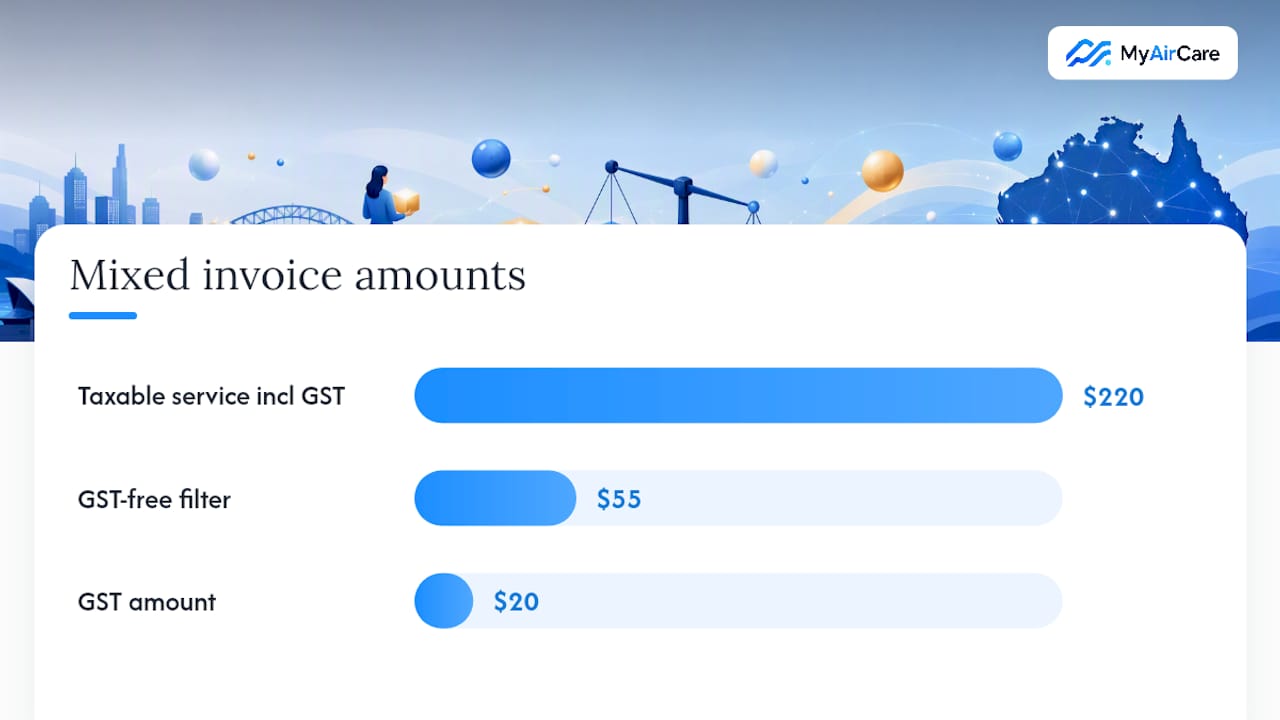
For a mixed invoice covering a taxable air-con service ($220 including $20 GST) and a GST-free filter replacement ($55), the invoice should show each line's GST status and a total GST figure of $20 for the whole document.
Pro Tip: Set your accounting software to use the total invoice rounding method by default. Switching between methods mid-year creates reconciliation discrepancies that are time-consuming to resolve at BAS time.
How to correct, replace, or cancel a tax invoice
When an error is discovered on a tax invoice already issued, the supplier must issue a corrected or replacement document. The original invoice should be clearly cancelled or marked as superseded, and the replacement must contain all required fields plus a reference to the original invoice number.
Common errors and correction steps:
- Wrong GST amount: issue a replacement invoice with the correct GST figure and note the original invoice number and date.
- Missing buyer ABN on a $1,000+ invoice: the buyer cannot claim their GST credit until a corrected invoice is provided; issue the replacement promptly.
- Duplicate invoice numbers: cancel the duplicate in your system, issue a credit note or cancellation notice, and reissue with a unique number.
Numbered steps for issuing a replacement:
- Identify the error and the original invoice number.
- Create a new invoice with a new unique number.
- Include a note such as "Replaces Tax Invoice [original number] dated [date]."
- Confirm all mandatory fields are present on the replacement.
- Send the replacement to the buyer and retain both the original and the replacement in your records.
The ATO requires tax records, including tax invoices, to be kept for a minimum retention period as prescribed by tax law, typically several years. The ATO's GST credit guidance confirms that a buyer cannot claim an input tax credit until they hold a valid, complete tax invoice, so delays in issuing replacements directly affect the buyer's tax position.
A practical compliance checklist and sample tax invoice template
Before sending any tax invoice, confirm the following steps are complete:
- The document is labelled "Tax Invoice."
- Your business name and ABN are correct and current.
- The date of issue is shown.
- The supply is described clearly enough to identify the goods or services.
- The GST amount is stated separately or the total is noted as including GST.
- The total price is shown.
- For sales of $1,000 or more: the buyer's name, ABN, or address is included.
The table below shows a sample layout for a compliant tax invoice covering a single taxable service job above $1,000.
For jobs under $1,000, remove the buyer ABN row. For GST-free supplies, replace the GST line with "GST: $0.00 (GST-free supply)."
The ATO provides downloadable invoice templates and guidance at ato.gov.au/tax-invoices. For operators who want a ready-to-adapt format, business.gov.au also offers practical invoicing templates and step-by-step guidance.
How automation reduces invoice compliance risk
Automation addresses the most frequent sources of non-compliance: missing mandatory fields, incorrect GST calculations, and late responses to the 28-day request window. For trades and service businesses processing multiple jobs per day, manual invoice preparation introduces errors that are easy to miss until an audit or a buyer dispute surfaces them.
Checks to require in any invoicing software:
- ABN lookup integration: the system should verify the supplier's ABN and, for $1,000+ invoices, prompt for the buyer's ABN.
- Mandatory field validation: the software should prevent sending an invoice that is missing the "Tax Invoice" label, date, or GST amount.
- Automatic invoice numbering: sequential, unique numbers prevent duplicates and simplify record retrieval.
- Threshold-aware templates: separate templates for under $1,000 and $1,000+ jobs, pre-configured with the correct fields.
- Record retention: invoices stored in the system for at least five years with export capability for ATO requests.
MyAirCare addresses these requirements directly for air-con cleaning operators. The platform stores customer ABNs against each client record, applies compliant invoice templates based on job value, and sends invoices automatically after a booking is completed. Payments are processed through Stripe, and the invoice record is retained in the system alongside the job history. For operators managing invoice payment terms across multiple clients, having ABN capture and template selection handled automatically removes a consistent source of compliance risk.
Pro Tip: Run a monthly audit of your invoicing settings: open the last five invoices sent and check each against the ATO's mandatory field list. Misconfigurations in templates often go undetected for months.
A practical perspective on invoicing for small Australian businesses
Compliant invoicing is not a separate compliance task; it is part of the payment process. Businesses that treat the tax invoice as the final step of a job, rather than an afterthought, tend to get paid faster and face fewer disputes.
Two habits make the biggest difference in practice. First, consistent invoice numbering from day one creates an audit trail that is straightforward to follow if the ATO ever requests records. Second, a monthly review of the last batch of invoices, checking for missing fields or incorrect GST treatment, catches template errors before they accumulate.
For operators who want templates, examples, and practical guidance beyond what the ATO's own pages provide, the MyAirCare blog covers invoicing practices specific to air-con cleaning businesses, including payment terms and follow-up processes.
MyAirCare handles the invoicing details so you can focus on the job
Air-con cleaning operators who use MyAirCare get invoice compliance built into their workflow rather than bolted on as an afterthought. The platform generates tax invoices automatically after each completed booking, with the correct fields pre-populated based on job value, and stores customer ABNs against each client record so the $1,000+ buyer-identity requirement is met without manual checking.

Key features that map directly to ATO requirements:
- Compliant "Tax Invoice" label and supplier ABN on every document
- Threshold-aware templates for jobs under $1,000 and $1,000 or more
- Buyer ABN capture and storage for B2B clients
- Automated invoice sending after job completion, reducing 28-day window risk
- Secure payment processing via Stripe with invoice records retained in the system
MyAirCare offers a free plan for operators getting started, with a paid tier unlocking full automation and team features. See the full platform at Myaircare and check whether the features suit your current invoicing setup.
Sources
The following official and practitioner sources cover the specific questions most likely to arise when preparing compliant tax invoices in Australia:
- Tax invoices | Australian Taxation Office
- Business
- Tax invoice vs invoice | Reckon
- Tax Invoice Requirements Australia: ATO Guidelines & What to Include
- ABR — Australian Business Register
This article is general information, not a substitute for advice from a qualified financial advisor. Consult a qualified financial professional about your own circumstances before acting on anything here.