
Yes, you can take deposits online in Australia, and most booking platforms support it natively. The process involves three steps: connect a payment gateway to your booking system, create a deposit rule for each service type, then run a test booking to confirm the charge and confirmation email both work correctly. Two legal points apply from the start: a deposit and a prepayment are not the same thing under Australian Consumer Law (ACL), and a "non-refundable" label in your terms does not override a customer's statutory rights if you fail to deliver the service.
Three actions to take in the next 30 minutes:
- Enable your payment gateway. Connect Stripe or an equivalent PCI-compliant gateway to your booking platform and confirm it is active.
- Create a deposit rule. Set a fixed amount or percentage per service type, choose whether the card is charged immediately at booking or held as an authorisation, and attach your cancellation terms.
- Run a test booking. Use a real card in test mode, confirm the deposit charges correctly, check the confirmation email includes the deposit amount and cancellation policy, and verify you can process a refund from the gateway dashboard.
Key takeaways
Taking deposits online in Australia is straightforward when the gateway, deposit rule, and cancellation terms are configured correctly before the first live booking.
| Point | Details |
|---|---|
| Set up gateway first | Connect a PCI-compliant gateway like Stripe before creating deposit rules in your booking platform. |
| Match deposit to actual loss | Set deposit amounts that reflect genuine preparation costs; disproportionate amounts risk being unenforceable. |
| Use a sliding scale | A tiered refund policy (100% refundable beyond 14 days, 50% for 3–14 days, forfeited within 72 hours) is more defensible than a blanket non-refundable clause. |
| Display terms at checkout | Customers must see and accept deposit and cancellation terms before paying; a tick-box creates a clear record. |
| MyAirCare automates the flow | MyAirCare's Stripe integration and per-service deposit rules handle capture, reminders, and reconciliation for air-con cleaning businesses. |
Table of Contents
- How to take deposits online: step-by-step setup
- What to watch for in booking and payment platforms
- Australian legal essentials for online deposits
- Policy wording you can use right now
- Operational flows: capturing, reconciling and refunding deposits
- Common problems and quick fixes
- Practical setup for air-con cleaning businesses
- MyAirCare handles deposits end-to-end for air-con cleaners
- Sources
How to take deposits online: step-by-step setup
Before you begin
Work through this checklist before touching your booking platform settings:
- Your payment gateway (Stripe, Square, or equivalent) is connected and verified in your booking platform.
- Your subscription plan supports online payments and deposit rules — some platforms restrict this to paid tiers.
- Online bookings are enabled and your booking page is publicly accessible.
- Your gateway is PCI DSS compliant and your privacy policy explains how customer payment data is handled.
- Your cancellation and deposit terms are drafted and ready to display at checkout.
Step-by-step setup
- Create or edit a service type. In your booking platform, open the service or appointment type you want to protect with a deposit.
- Choose the deposit type. Select either a fixed dollar amount (e.g. $50 per call-out) or a percentage of the total service fee (e.g. 25%).
- Set the charge timing. Decide between immediate capture at booking or authorisation-only (card held, charged later). Immediate capture is simpler for most trades businesses; authorisation-only suits jobs where the final price varies.
- Add cancellation rules. Specify the notice period required for a full refund, a partial refund, and forfeiture. Attach these rules to the service type, not just your website footer.
- Connect and test the payment gateway. Confirm the gateway is active, then place a test booking using a test card number provided by your gateway.
- Display T&Cs at checkout. Add a tick-box or acknowledgement step so customers explicitly agree to your deposit and cancellation terms before paying.
Testing checklist
- Confirm the deposit amount charged matches the rule you set.
- Test both card capture and authorisation-only flows if your platform supports both.
- Process a test refund from the gateway dashboard and confirm the reversal appears correctly.
- Check that the booking confirmation email states the deposit amount, what it covers, and the cancellation policy.
- Verify that a forfeited deposit does not trigger an automatic refund when a booking is cancelled outside the refund window.
Pro Tip: Set up a tiered or sliding-scale deposit rule if your platform allows it. A higher deposit for peak-period or large-prep bookings, and a lower one for standard call-outs, reflects actual rebooking risk and is easier to defend if a customer disputes the forfeiture.
What to watch for in booking and payment platforms
Booking platforms used by Australian service businesses handle deposits in different ways, and the differences matter at reconciliation time.
Common platform behaviours:
- Most appointment platforms offer two charge modes: immediate capture (funds taken at booking) and authorisation-only (card details stored, funds captured later). Check which mode your plan supports before going live.
- Some platforms lock deposit rules to the customer's saved card only, which means walk-in or phone bookings bypass the deposit entirely.
- Deposit rules are sometimes set at the platform level rather than per service type, which prevents you from charging different amounts for different jobs.
- Refund processing time varies by gateway and card scheme — most refunds via Stripe reach the customer within 5–10 business days, though the gateway itself processes the reversal immediately.
Gateway-specific notes:
- An authorisation hold reserves funds on the customer's card but does not move money to your account. Capturing the authorisation does. If you cancel the authorisation without capturing, no funds move and no refund is needed.
- Immediate capture moves funds to your account at booking. A refund is a separate transaction and may incur a processing fee depending on your gateway plan.
- Stripe's reconciliation reporting tags each transaction by type (payment, refund, dispute), which makes it straightforward to match deposits against invoices at end of week.
Stripe's guidance on prepayment handling distinguishes a deposit (security to secure a commitment) from a prepayment (advance payment of the price). The distinction affects how refunds are processed and how the amount is recognised in your accounts.
Limitations to watch for:
- Some platforms do not support per-service deposit rules on entry-level plans.
- Card-scheme rules (Visa, Mastercard) limit how long an authorisation hold can remain active — typically 7 days for most card types.
- If your platform does not support deposit refunds through its own UI, you will need to process the refund directly in your gateway dashboard.
Australian legal essentials for online deposits
Deposit vs prepayment
A deposit is an upfront payment that secures a booking and signals the customer's commitment. A prepayment is an advance payment of the service price. The distinction matters because retaining a prepayment when a service is not delivered is legally harder to justify than forfeiting a genuine deposit. Label the payment correctly in your terms and booking flow.
When a non-refundable deposit is lawful
Non-refundable deposits are lawful in Australia when three conditions are met: the amount is reasonable, the terms are clearly disclosed before the customer pays, and the deposit does not function as an unlawful penalty. A deposit becomes an unenforceable penalty when it is disproportionate to the actual loss the business suffers — for example, charging a $500 deposit on a $150 job with no material preparation costs.
Sprintlaw's guidance confirms you may retain a non-refundable deposit if it is reasonable, disclosed before the transaction, and proportionate to legitimate business losses. Lawpath adds that the customer must be aware of the fee before agreeing to it.
Practical dos and don'ts:
- Do state the deposit purpose clearly: "This deposit covers administration and scheduling costs and is forfeited if you cancel with less than 48 hours' notice."
- Do link your deposit and cancellation terms at checkout and in your booking confirmation email.
- Don't use a blanket "no refunds under any circumstances" clause — it is difficult to enforce and may constitute an unfair contract term.
- Don't set a deposit amount that exceeds your genuine pre-estimate of loss from a cancellation.
The ACCC confirms that a "non-refundable" clause does not override statutory consumer guarantees. If a business fails to provide services with due care and skill, a refund may still be required regardless of what the deposit terms say.
Privacy and PCI notes:
- Never store raw card numbers. Use your gateway's tokenisation system so card data is held by the gateway, not your platform or database.
- Your privacy policy must explain that payment data is collected, how it is stored, and who has access to it. This is a requirement under the Australian Privacy Act 1988 for businesses that collect personal information.
Policy wording you can use right now
Ready-to-use snippets
Refundable deposit: Non-refundable deposit with conditions: Part-payment (prepayment) wording:
Choosing the right deposit amount
The deposit should reflect your genuine cost of holding the booking slot. Factors to consider:
- Preparation costs: materials ordered, travel pre-booked, or time allocated to scheduling.
- Lost booking opportunity: the likelihood that the slot cannot be filled at short notice.
- Job value: a percentage deposit is typically proportionate for higher-value jobs; a fixed amount works better for standard call-outs.
Sliding-scale example
Practitioners recommend a tiered approach rather than a blanket non-refundable rule:
- More than 14 days' notice: 100% refund of deposit.
- 3–14 days' notice: 50% refund of deposit.
- Less than 72 hours' notice: deposit forfeited in full.
This structure mirrors actual rebooking difficulty and supports the "genuine pre-estimate of loss" test if a dispute reaches a tribunal. Document your deposit terms in your commercial contracts and ensure the wording on your booking page matches your written terms exactly.
Displaying terms at checkout
- Add a mandatory tick-box: "I have read and agree to the [deposit and cancellation policy]" with a hyperlink to the full terms.
- Include the deposit amount and cancellation conditions on the booking confirmation page and in the confirmation email — not just in a linked PDF.
- Keep a record of when the customer accepted the terms (most booking platforms log this automatically).
Operational flows: capturing, reconciling and refunding deposits
Capture flows
Three common flows apply to service businesses:
- Immediate capture at booking: funds move to your account when the customer completes the booking. Straightforward for fixed-price jobs.
- Authorisation-only, captured on service: card is held at booking, funds captured when the job is confirmed or completed. Useful when the final price depends on scope.
- Manual capture on acceptance: the operator reviews the booking and manually triggers the capture. Adds a step but gives flexibility for custom quotes.
Reconciliation
Tag every deposit transaction in your accounting software as "deposit received — liability" until the job is complete. Once the service is delivered, recognise the deposit as income and apply it against the final invoice. Retained (forfeited) deposits are recognised as income at the point of forfeiture. Reconcile your gateway transactions against your booking records at least weekly.
Pro Tip: Do not recognise a deposit as revenue when it is received. Hold it as a liability (deferred income) until the service is delivered. This keeps your accounts accurate and avoids overstating income for tax purposes.
Refunds and forfeitures
- Process refunds through your gateway dashboard if your booking platform does not support in-platform refunds.
- Refund the deposit amount only — do not issue a credit note for the full service fee unless the service was not delivered.
- Keep a log of every cancellation: date, notice given, deposit amount, and whether it was refunded or forfeited. This log is your evidence if a customer disputes the forfeiture.
- Avoid double recovery: if you rebook the slot and fill it, consider whether retaining the full deposit is still proportionate.
Privacy and PCI checklist
- Use gateway tokenisation; never store card numbers in your CRM or booking platform.
- Confirm your gateway is PCI DSS compliant before going live.
- Review your privacy policy to confirm it covers payment data collection and storage.
Common problems and quick fixes
Failed payment authorisation:
- Check the card details are correct and the card has sufficient funds.
- Retry the authorisation once; if it fails again, contact the customer to provide an alternative payment method.
- Some platforms allow a grace period before automatically cancelling the booking — configure this in your settings.
Incorrect deposit rule applied:
- Verify the deposit rule is attached to the correct service type, not just the default service.
- Check that the platform's plan level supports per-service deposit rules.
Timezone or booking flow issues:
- Confirm your booking platform's timezone matches your operating location. A mismatch can cause deposit rules to apply at the wrong time relative to the cancellation window.
Unable to refund within the platform UI:
- Log in to your gateway dashboard directly (e.g. Stripe Dashboard) and process the refund there.
- Note the refund transaction ID and update your booking record manually.
Disputed forfeiture:
- Respond promptly with a written explanation referencing the terms the customer agreed to at checkout.
- Provide the timestamp of when the terms were accepted and the cancellation notice received.
- If the customer escalates to a consumer tribunal, your cancellation log and the checkout acceptance record are your primary evidence.
- Where the dispute involves a claim that the service was not delivered with due care and skill, seek legal advice — the ACL consumer guarantee applies regardless of your deposit terms.
Practical setup for air-con cleaning businesses
Deposit amounts by job type
Air-con cleaning businesses typically deal with two job categories that warrant different deposit approaches:
- Standard call-out (single unit clean): a fixed deposit of $30–$50 is proportionate. It covers scheduling time and the risk of a wasted travel run if the customer cancels at short notice.
- Large-prep or multi-unit job (commercial, ducted systems, or weekend bookings): a percentage deposit of a moderate portion of the quoted price is more appropriate. These jobs often require materials to be ordered, additional staff to be allocated, or peak-period slots to be reserved.
Message templates
Booking confirmation (include in automated email): Pre-service reminder (send 24–48 hours before): Cancellation notice (send immediately on cancellation):
MyAirCare operational checklist
MyAirCare's booking page displays deposit and cancellation terms before checkout, so customers see the conditions before they pay. The platform's Stripe integration handles immediate capture and authorisation-hold flows, and automated reminders reference the deposit amount and cancellation window without any manual follow-up from the operator.
- Deposit rules are configured per service type, so a standard split-system clean and a commercial ducted job can carry different deposit amounts.
- Automated pre-service reminders reduce no-shows by prompting customers to reschedule in time to avoid forfeiture.
- Stripe's reconciliation reporting, accessible directly from the MyAirCare dashboard, tags deposits separately from final payments, which simplifies end-of-week reconciliation.
- The booking confirmation email template includes a deposit summary and a link to the cancellation policy, creating a clear paper trail.
Pro Tip: Keep a record of any costs incurred before a cancellation — materials ordered, travel pre-booked, time blocked in the calendar. If a customer disputes a forfeited deposit, this documentation demonstrates a genuine pre-estimate of loss, which is the standard Australian courts and tribunals apply.
What actually matters about online deposits
Most guides on this topic focus on the mechanics of setting up a payment gateway. The more consequential question is whether the deposit amount and terms will hold up if a customer disputes them.
A non-refundable clause is not self-executing. A customer who cancels and then lodges a complaint with a state consumer tribunal will not be turned away simply because the booking page said "non-refundable." The tribunal will ask whether the amount was proportionate to actual loss, whether the terms were clearly disclosed, and whether the business made a reasonable effort to mitigate by rebooking the slot. A $200 deposit on a $180 job, with no documented preparation costs, is unlikely to survive that scrutiny.
The sliding-scale approach is worth adopting not because it is legally required, but because it reflects how rebooking difficulty actually works. A cancellation three weeks out rarely costs a trades business anything. A cancellation at 6 AM on the day of the job costs real time and money. Aligning the deposit forfeiture to that reality makes the terms fairer and more defensible.
For air-con cleaning businesses specifically, the deposit conversation is also a client-quality signal. Customers who push back hard on a modest, clearly explained deposit before the job has even started are often the same customers who dispute invoices after it. A straightforward deposit policy, presented professionally at checkout, filters for clients who respect the business's time.
MyAirCare handles deposits end-to-end for air-con cleaners
Air-con cleaning businesses that process deposits manually — chasing bank transfers, sending separate payment links, or relying on verbal agreements — spend time on admin that could be automated. MyAirCare connects a branded booking page with Stripe payments, per-service deposit rules, and automated reminders in a single platform built specifically for Australian air-con cleaners.

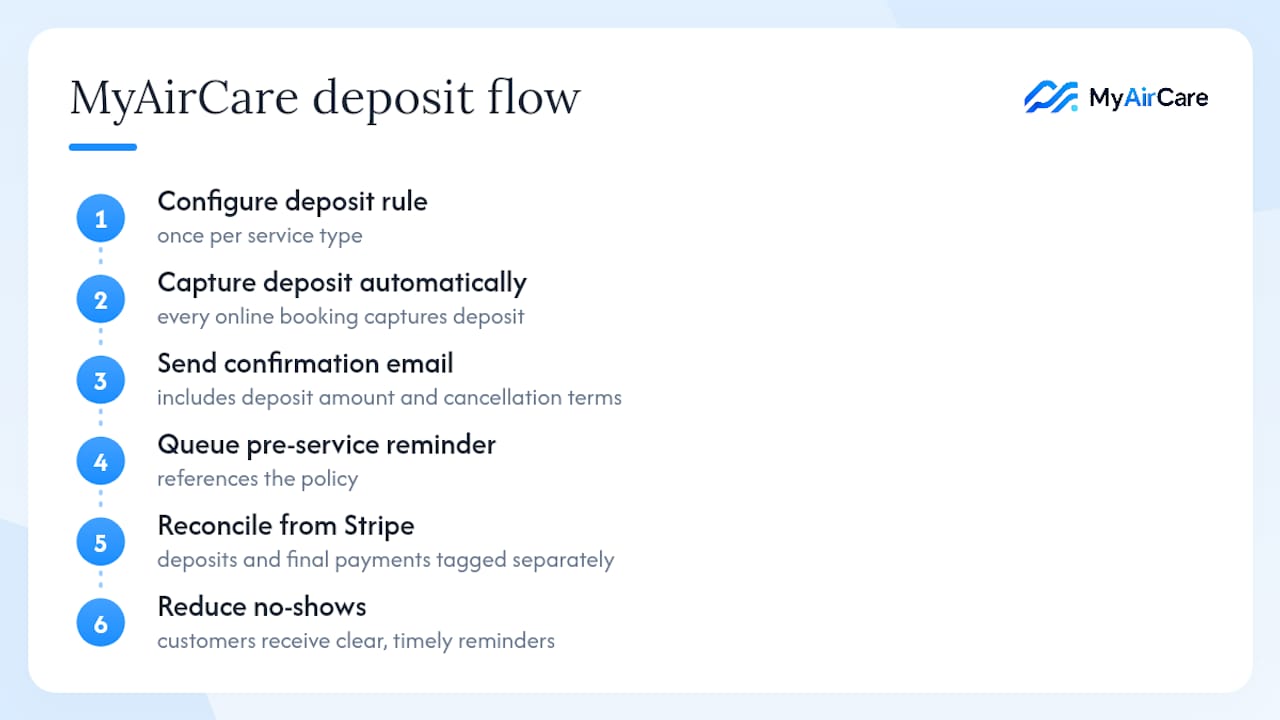
A business using MyAirCare configures a deposit rule once per service type. From that point, every online booking captures the deposit automatically, sends a confirmation email with the deposit amount and cancellation terms, and queues a pre-service reminder that references the policy. Reconciliation pulls directly from Stripe, so deposits and final payments are tagged separately without manual data entry. No-shows drop because customers receive clear, timely reminders about what they stand to lose. To see how the deposit flow works in practice, view a live booking page or visit Myaircare to start a free account.
Sources
The following sources provide authoritative detail on the legal and technical aspects covered in this article:
- Guidance for tourism businesses
- Consumer rights and guarantees
- Non-Refundable Deposits: Legality in Australia | Sprintlaw Australia
- Are Non-refundable Deposits Legal? - Lawpath
- Prepayment in business | Stripe
This article is general information, not a substitute for advice from a qualified lawyer. Consult a qualified legal professional about your own circumstances before acting on anything here.