
Capacity planning for small teams means matching the hours your people actually have against the work you've promised, then deciding what to defer, drop, or delegate before you overcommit. The direct action to take this week is simple: build a shared weekly capacity sheet, plan against a utilisation target significantly below 100% of everyone's working hours, commonly between 70 and 85%, and review it every Monday. The sections below walk through the process, the formula, and templates that hold up past week one.
TL;DR:
- Team capacity should be planned at 70 to 85 percent of available hours to account for unplanned work and avoid overcommitment.
- Using a shared weekly capacity sheet with a designated owner ensures data remains current and trusted, preventing trust-related planning failures.
- Small teams should integrate capacity tracking into existing tools like project boards or calendars to avoid stale data and manual reconciliation.
- Regular, brief meetings and immediate updates when disruptions occur help keep a capacity plan accurate and responsive to real-time changes.
- Tracking actual task hours against estimates helps recalibrate future planning, reducing overestimations and uncovering skill bottlenecks.
Table of Contents
- What is capacity planning for a small team?
- How do you calculate team capacity?
- Which tools actually work for small-team scheduling?
- What's a simple capacity planning template?
- What mistakes wreck a small team's capacity plan?
- What operational wins actually free up capacity?
- What does capacity planning look like when it works?
- How do you keep everyone aligned on the plan?
- How do you adjust the plan when things change?
- How does capacity planning fit with the tools you already use?
- A practitioner's view on what actually works
- Where to go for more on team scheduling
- Sources
- FAQ
What is capacity planning for a small team?
Capacity planning is the process of comparing how much work your team can realistically do against how much work is coming in, then adjusting before the gap becomes a crisis. For a business with two to ten people, this doesn't need enterprise software or a dedicated resourcing manager. It needs a number, not a feeling, according to the practical framing used by Toggl's capacity planning guide.
The standard process, adapted from broader team-management frameworks, runs in six stages:
- Assess current capacity. Work out usable hours per person after leave, meetings, and admin are removed.
- Forecast demand. List every job, task, or client commitment coming up and estimate rough hours for each.
- Identify bottlenecks. Find where a skill, role, or single person is the constraint, not just where total hours run short.
- Develop a strategy. Decide whether to defer work, cut scope, reassign tasks, bring in contract help, or accept a trade-off.
- Implement the plan. Commit the decisions to the shared sheet or board so everyone can see them.
- Monitor and adjust. Check weekly, revise monthly, and treat the plan as a living document rather than a one-off exercise.
This sequence mirrors the process outlined in Slack's guide to capacity planning, and it works at small scale precisely because you can run all six steps in under an hour a week once the habit sets in.
Start with supply. Take each person's contracted or expected working hours, then subtract confirmed leave, standing meetings, and the admin time nobody tracks but everyone loses. A five-day week rarely yields five days of usable output. Then move to demand: list the jobs on the board and put a rough hour estimate next to each, even a guess. Precision matters less than consistency, because you're comparing estimates against estimates.
Bottlenecks show up when you look at skills, not just totals. A team might have 40 spare hours this week, but if the only person who can handle a technical job is fully booked, those 40 hours are irrelevant to that job. This is where small teams differ from large ones: role substitution barely exists, so a single skilled person's calendar often is the real capacity limit.

Once supply and demand are laid side by side, apply a utilisation buffer before comparing them. Planning to 100% of available hours leaves no room for the meeting that runs long or the job that takes an extra hour, an approach the same Toggl guide argues against directly.
With the gap visible, you have five real options: defer the work to next week, reduce its scope, reassign it to whoever has room, bring in a contractor, or accept it with an explicit trade-off (something else slips). Pick one and write it down.
Monitoring doesn't need to be elaborate. A five-minute check every Monday to confirm the week's commitments still match reality, and a slightly longer monthly review to see whether your estimates are drifting from what actually happened, keeps the whole system honest.
How do you calculate team capacity?
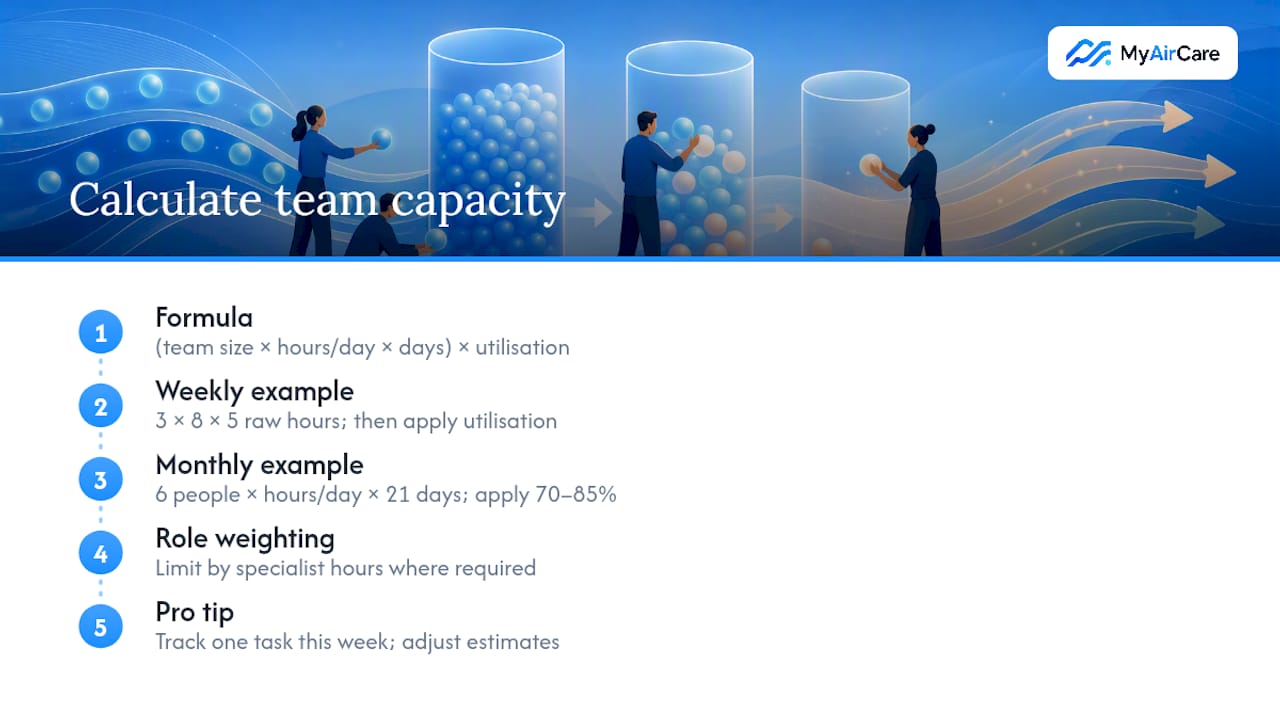
The formula is straightforward: (team size × working hours per day × working days) × utilisation target = available project capacity.
Say you run a three-person team, each working eight hours a day, five days a week. Raw capacity is 3 × 8 × 5, which calculates to a certain number of hours. Apply a typical utilisation target around three-quarters and you get a proportion of that as realistic project capacity for that week, reserving the rest for meetings, admin, breaks, and the inevitable friction of running a business.
For a six-person team over a month with about 21 working days, raw capacity is calculated by multiplying team size, hours per day, and working days. Applying a utilisation target in the range of 70% to 85% provides a realistic range of usable project hours across the month. The gap between those two numbers is exactly the size of the buffer you're choosing to give yourself.
Utilisation target: most small-team guidance settles on 70–85% of theoretical hours as the realistic planning window, a figure repeated consistently in capacity planning frameworks for teams. Anything closer to 100% stops accounting for the unplanned work that always turns up.
Raw hours alone can mislead you. A junior team member's hour and a specialist's hour aren't interchangeable if the job needs a specific skill. Weight your capacity by role where it matters. If only one person can quote a technical job, their hours are the real ceiling for that category of work, regardless of how much spare time the rest of the team has.
Pro Tip: Pick one task this week, track its actual hours against your estimate, and adjust your future estimates by the difference. Most teams overestimate available hours and underestimate task duration in roughly equal measure, so one real data point corrects both errors at once.
Which tools actually work for small-team scheduling?
A spreadsheet is enough for most teams under six people, right up until it isn't. The common failure point isn't the format. It's that nobody keeps it updated once two people are editing it from memory instead of from the actual roster, an issue Inspire Fusion's breakdown of small-team spreadsheets flags directly. Once a spreadsheet stops reflecting reality, people stop trusting it, and once trust goes, they stop using it.
Timeline and swimlane views solve a different problem: spotting conflicts at a glance. A spreadsheet tells you the numbers add up. A swimlane, where each person gets a horizontal row and each job gets a coloured block, shows you visually when two jobs land on the same person in the same week. This is often how teams catch double bookings before they happen rather than after a client calls asking why nobody turned up, a point reinforced by All Do's guide to small-team capacity planning.
When choosing between a spreadsheet, a rostering app, or a lightweight time tracker, run the decision against four questions:
- Can everyone on the team update it without training?
- Does everyone see the same live version, or are you emailing copies around?
- Does it show leave and recurring meetings automatically, or does someone have to remember to subtract them?
- Does it show skill or role, not just a name and a number of hours?
Leave deserves special attention here. Scheduling systems that flag unavailability before a roster gets published avoid the costly scramble of rebooking a job after someone's approved leave collides with a commitment, a benefit highlighted by Roubler's integrated leave and rostering features. If your current setup doesn't do this automatically, build a rule: leave gets entered the same day it's approved, in the same sheet everyone else uses.
For trade businesses specifically, tools built around job scheduling rather than generic project boards tend to fit better, since the unit of work is a booked appointment rather than an abstract task. Reviewing a shortlist of field service apps suited to small teams is worth doing before committing to a system you'll need to migrate away from in six months.
What's a simple capacity planning template?
A minimal template needs seven columns and nothing more: team member, theoretical hours, non-project hours, available hours, committed hours by category, remaining capacity, and a status flag. Fields recommended in Planned's capacity planning template for small teams follow this same shape, splitting committed hours into client work and internal or content work so trade-offs become visible rather than buried in a single total.
Ownership matters more than the template's design. One person needs to own updates. Not "whoever remembers," one named person, updating on the same day each week, before anyone commits to new work. Before saying yes to a new job, that owner checks three things:
- Does anyone have remaining capacity this week, based on the sheet, not a guess?
- Does the job need a skill only one or two people have, and are they already booked?
- What would need to move to fit this in, and is that trade-off acceptable?
Two short examples show how this plays out. The fix is either to push one job to next week or bring in a contractor for the overflow, a decision the sheet made obvious instead of a guess. That's either a sign to hand them more client work or a chance to have them upskill on a bottleneck task, turning slack into future flexibility rather than wasted hours.
Keep a copy of your booking and reminder workflow next to this sheet. Reducing admin time on the booking side, covered in MyAirCare's guide to setting up online booking, frees up hours that otherwise get quietly absorbed into non-project time and never show up as capacity anywhere.
What mistakes wreck a small team's capacity plan?
The most common failure is a plan that goes stale. Someone builds a beautiful sheet in January, updates it twice, then abandons it by March when it stops matching who's actually free. The fix isn't a better sheet. It's a single owner and a simple weekly rule: no owner, no trust, no plan that survives contact with a real week.
Second, teams mix client-facing work and internal or content work in the same column, which hides the real trade-off being made. Separate them. A team that's "80% booked" means something completely different if that's all client work versus half being internal projects that could theoretically slip.
There's no buffer for the meeting that runs over, the job that takes longer than quoted, or the sick day nobody saw coming.
- Plan is out of date → assign one owner, update weekly, same day every time.
- Client and internal work blur together → split into separate columns immediately.
- Plan sits at 100% utilisation → drop the target to 70–85% and re-run the numbers.
- Delivery keeps slipping → check estimate accuracy, check for skill bottlenecks, check whether leave is actually recorded.
Pro Tip: When delivery slips two weeks running, don't just add hours to the sheet. Run the three diagnostic checks above in order. Most slippage traces back to one of them, and fixing the wrong one wastes another week.
What operational wins actually free up capacity?
Capacity planning isn't only about the sheet. It's also about how much of your team's usable time gets eaten by admin before any client work even starts. Booking friction, missed calls, and no-shows all quietly shrink the "available hours" column without anyone updating a spreadsheet to reflect it.
Setting up an online booking page for an air-con cleaning business can take 15 to 30 minutes, a change that directly reduces the time spent on phone tag and manual scheduling. That's admin time returned straight to the capacity pool.
- Online booking setup tested at 15 to 30 minutes, cutting manual scheduling admin.
- On-site maintenance enrolments converting at 20 to 50% when offered at the point of service, showing that small operational tweaks can shift capacity outcomes measurably.
- Automated job reminders and branded booking pages reduce no-shows and rework, which helps keep a technician's booked hour from turning into a wasted one.
These aren't abstract efficiency gains. A no-show doesn't just lose that hour, it usually costs the admin time spent booking it in the first place, plus whatever it takes to fill the gap. Reducing no-shows through better reminder cadence, covered in MyAirCare's evidence-backed guide to cutting no-shows, has a direct multiplier effect on genuine usable capacity, separate from anything in the planning sheet itself.
What does capacity planning look like when it works?
A two-person trade team booked solid through winter is a common scenario, and the pattern that saves it is almost always the same: someone finally writes down actual hours instead of guessing, and the guesswork disappears. One operator running solo with a part-time offsider might discover, once they track a fortnight of real job durations against estimates, that every quote is underestimating travel time by 20 minutes. That single correction, applied across a week of six jobs, reclaims two hours nobody knew were missing.
A five-person service business facing a seasonal spike offers a different lesson. No new hire, no missed jobs, just a redistribution that the sheet made visible in minutes.
The common thread across working examples isn't the specific tool or template. It's that someone looked at real numbers before making a promise to a client. Teams that skip this step tend to discover the mismatch only when a job gets missed or a technician gets double booked, at which point the fix costs far more than the five minutes it would have taken to check the sheet first.
Smaller teams also benefit from treating slack as data, not as spare time to fill immediately. A team member running consistently under target utilisation for two or three weeks running is either a sign of an unbalanced workload or an opportunity to invest that time in training, quoting improvements, or clearing a backlog of admin that never gets attention when things are busy.
How do you keep everyone aligned on the plan?
A capacity plan that lives in one person's head, or in a spreadsheet only the owner opens, doesn't align anyone. It just creates a false sense that planning happened.
The fix is a shared view, not a shared understanding negotiated over email. Whether that's a spreadsheet everyone can open, a swimlane board on a shared screen, or a rostering app with individual logins, the requirement is the same: every team member sees the same numbers the owner sees, without asking.
A short weekly stand up, five to ten minutes, works better than a written summary for one reason: it lets people flag mismatches before they become commitments. If someone knows they're taking Thursday off next week and the sheet doesn't reflect it yet, a quick verbal check catches that instantly. An email nobody reads in full doesn't.
Language matters too.
Saying no becomes easier when the plan is visible to everyone, not just defensible to the person who built it. A shared visual plan reduces double bookings precisely because it removes the guesswork from "can we fit this in," replacing it with a number everyone in the room can see and agree on.
How do you adjust the plan when things change?
Plans built for a normal week fall apart the moment someone calls in sick, a client changes scope mid-project, or an urgent job jumps the queue. The teams that handle this well aren't the ones with buffer. They're the ones with a clear rule for what happens when the buffer runs out.
Deciding this rule during a calm week means you're not improvising it during a chaotic one.
Recurring disruptions, like seasonal spikes or a regular run of urgent call-outs, deserve their own line in the plan rather than being treated as one-off surprises every time. If your team consistently sees a jump in demand at the same time each year, build that expectation into your forecast stage rather than reacting fresh each time it happens.
When an unexpected change does land, the fastest fix is usually a mid-week resync rather than waiting for the next scheduled review. Update the sheet the same day the disruption happens, tell the team what changed and why, and re-run the "defer, reduce, reassign, contract, or accept" decision on whatever got bumped. Teams that wait until the next Monday to update tend to run a full week on a plan that's already wrong, which compounds the disruption rather than containing it.
How does capacity planning fit with the tools you already use?
Most small teams don't run a dedicated capacity planning tool. They run a project board, a calendar, and maybe a messaging app, and capacity planning has to slot into that existing setup rather than replace it.
The simplest integration is a dedicated capacity column or swimlane inside whatever board you already use for jobs. If tasks are already tracked as cards, adding a "capacity" row per person, updated at the same time as the task board, keeps everyone looking at one system instead of two.
Calendar integration solves a narrower but real problem: recurring meetings and confirmed leave eating into available hours without anyone manually subtracting them each week. If your calendar and your capacity sheet don't talk to each other, someone has to reconcile them by hand, and that's exactly the kind of manual step that causes plans to go stale.
For field-based teams specifically, job scheduling apps that combine booking, calendar, and route information in one view avoid the double entry that happens when bookings sit in one system and capacity gets tracked in another. Time-tracking tools that log geofenced hours, like the features offered through Clock-Me's GPS time tracking and rostering, can also feed real hours back into your capacity sheet, which turns your utilisation estimates from guesses into figures based on what people actually worked.
The goal isn't consolidation for its own sake. It's making sure the numbers in your capacity sheet update from the same source as the numbers your team already trusts for scheduling day to day.
A practitioner's view on what actually works
Most capacity problems in small teams aren't forecasting failures. They're trust failures: a stale sheet nobody believes, so nobody uses it to say no. Fix the weekly check and the honest "no" first.
— Lewis
Where to go for more on team scheduling
For deeper reading beyond this guide, Slack's productivity blog covers the six-stage process in more depth, while a ready-to-copy field breaks down the exact columns worth tracking. Pair either with a short trial of MyAirCare's online booking setup if admin time is eating into your usable hours.
Sources
- What Is Capacity Planning? A Practical Guide for Teams (2026)
- Capacity planning for small teams · All Do
- Capacity Planning 101: Balance Workloads and Boost Team Productivity
FAQ
What is an example of capacity planning?
The team reassigns two jobs to balance the load before committing to a new client request.
What is the best tool for capacity planning?
There's no single best tool. A spreadsheet works for teams under six people if someone owns weekly updates; a swimlane or timeline board suits teams that need to spot scheduling conflicts visually, and job-scheduling apps suit field-based trades managing bookings and routes together.
How do I start capacity planning for my team?
Start by assessing current capacity (usable hours after leave and meetings), forecast upcoming demand in rough hours, apply a 70–85% utilisation target, then compare the two numbers weekly and adjust bookings before you commit to new work.
How do I use Excel or Google Sheets for capacity planning?
Build seven columns: team member, theoretical hours, non-project hours, available hours, committed hours by category, remaining capacity, and status. Update it on the same day every week and treat any figure that stops matching reality as a signal to fix the sheet, not ignore it.