
Yes, mobile apps can work offline. Genuine offline capability means the app treats the device itself as the primary source of truth, storing data locally and queueing every change a user makes until the app finds a reliable connection to sync it back. This differs from a basic offline mode that only lets you view cached information. Delivering it usually relies on local databases such as SQLite or IndexedDB, service workers for progressive web apps, and a persisted write queue. Calendar sync and other integrations still depend on reconnection, so expect a lag, sometimes several minutes, before changes appear everywhere else.
TL;DR:
- Offline apps must store all user changes locally and queue them for sync, not just cache data for viewing offline use.
- A true offline-first app automatically continues working without manual toggles, and its interface shows sync status and pending changes.
- Durable mutation queues require unique local IDs, idempotent server endpoints, and exponential backoff retries to handle intermittent connectivity.
- Reconnection does not mean instant sync; calendar and data updates can take 10 to 15 minutes to fully reconcile after reconnecting.
- Trade teams need to evaluate whether they require simple local data capture or multi-user sync, aligning their choice with their operational complexity.
Table of Contents
- What "offline-first" means for how you actually use an app
- The technology behind reliable offline apps
- How offline apps actually sync once you're back online
- A checklist for evaluating any app that claims to work offline
- Real apps and projects worth trying
- Building an offline-capable app: a developer's checklist
- How trades put offline mobile workflows to work
- Choosing between a PWA, a native app, or a specialist platform
- A practical option for trades that need mobile job tools
- Sources
- FAQ
What "offline-first" means for how you actually use an app
Most apps that claim offline support only let you read what was already downloaded. Try to add a job note or upload a photo with no signal, and the app either blocks you or loses the change the moment it crashes. That's a cached-read app, not an offline-first one.
A genuine offline-first app behaves differently in three concrete ways. First, the device becomes the primary source of truth. Every edit, note, or photo gets written to local storage immediately, then queued for sync rather than sent straight to a server. Second, there's no manual "offline mode" toggle. The app just keeps working, and your data survives app restarts, phone reboots, and even a dead battery mid-job. Third, the interface tells you what's happening.
Field teams should expect to see:
- A pending-items counter showing how many changes haven't synced yet
- A sync status indicator, often called a "sync pill," showing connected, syncing, or offline
- Per-item retry or discard controls when a specific record fails to sync
- Confirmation that photos and attachments are still linked to the correct job after sync completes
Forrester research cited by HybridForms frames this as closing the "offline mobile gap": field workers shouldn't notice a difference between working online and working offline, because the moment they have to think about connectivity is the moment they stop trusting the app.
Pro Tip: Test any app you're evaluating by turning on flight mode, completing a full job (notes, photo, signature), then force-closing the app before turning connectivity back on. If your data survives that sequence, you're looking at real offline-first design.
The technology behind reliable offline apps
The specific tools differ between progressive web apps (PWAs) and native mobile apps, but the underlying pattern is the same: persist locally first, sync later, and never lose a write.
For PWAs, that generally means storing data in IndexedDB, often through a wrapper library like Dexie, combined with a service worker that precaches the app shell so it loads even with zero connectivity. Native apps typically lean on SQLite, frequently wrapped in an abstraction layer like Android's Room, which gives developers structured queries against local data without waiting on a network call.
Storage is only half the job. The other half is the mutation queue, the mechanism that captures every write a user makes while offline and holds it until sync succeeds. Developer guidance on offline-first design stresses treating the local device as the primary source of truth rather than building an app that assumes connectivity and only tolerates its absence.
A durable queue needs a few specific properties to hold up under real-world conditions:
- Each queued operation carries a local temporary ID so the UI can update immediately, before the server confirms anything
- Server endpoints are idempotent, meaning submitting the same operation twice (which happens often on flaky connections) doesn't create duplicate records
- Failed syncs retry using exponential backoff rather than hammering the server every few seconds
- A reconciliation step resolves any conflict between what the device queued and what the server already holds
Apps that skip the mutation queue and rely purely on caching will feel fine in a demo and fall apart the first time a technician spends a full day in a basement with no signal.
How offline apps actually sync once you're back online
Reconnection isn't instant, and it isn't always complete. Understanding the gap between "back online" and "fully synced" saves a lot of confused phone calls to support.
Enterprise field-service platforms are open about this. Microsoft's own documentation on Field Service Outlook integration notes that bookings typically sync into Outlook within about 10 to 15 minutes of reconnecting, not the moment signal returns. That window exists because most sync jobs run on a schedule rather than firing instantly on every network change, and Microsoft's Dynamics 365 Field Service blog confirms this is standard behaviour for calendar and exchange integrations, not a bug.
A short delay is the typical sync window enterprise field-service platforms document for calendar bookings to appear in Outlook after reconnection.
Calendar sync also isn't always two-way. Some integrations push bookings from the field app into a calendar but won't pull manual calendar edits back into the job system, so a technician who reschedules directly in their calendar app might find the job record never updates. Always check whether a stated calendar sync for field teams is bidirectional or one-way before you rely on it.
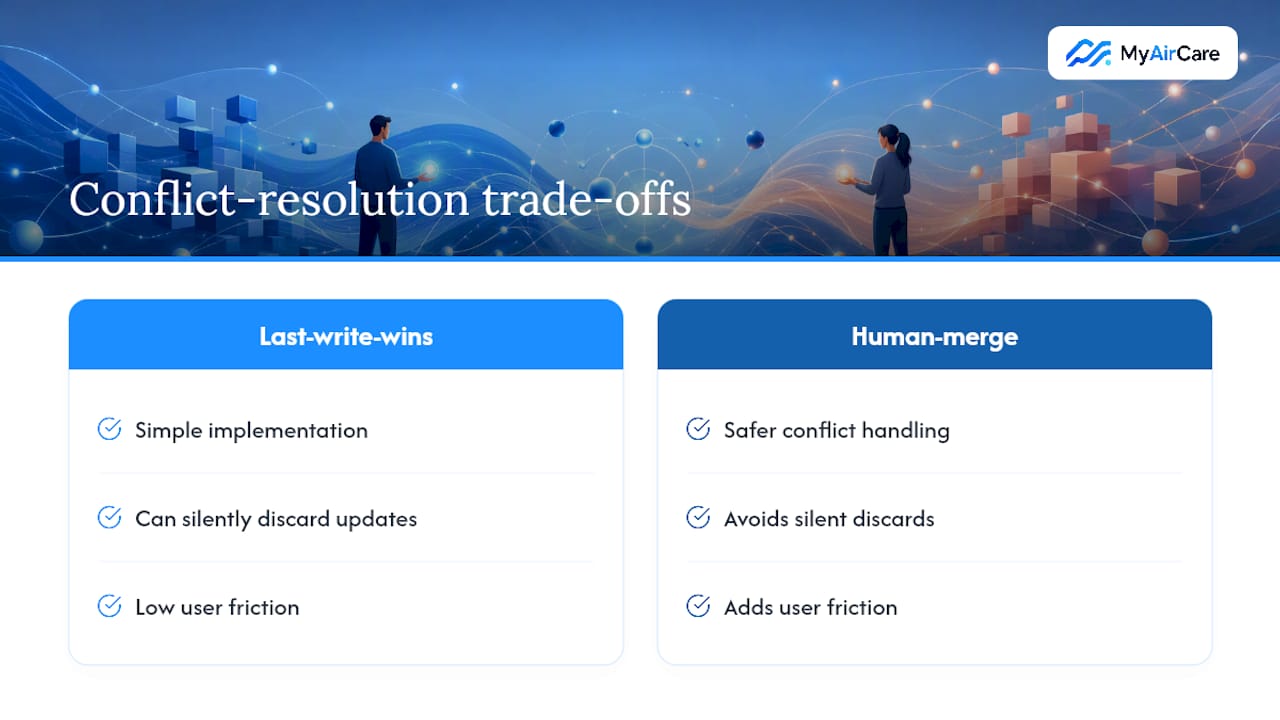
Conflicts crop up when two people edit the same record while one was offline. Most systems handle this with either a last-write-wins rule, where the most recent timestamp overrides the earlier change, or a merge interface that flags the conflict and asks a human to pick a version. Last-write-wins is simpler but can silently discard a technician's update, while merge UIs are safer but add friction.
A checklist for evaluating any app that claims to work offline
Vendor claims about offline support are easy to make and hard to verify from a sales page. Run through this before committing a team to any tool:
- Does it persist queued writes across restarts and reboots? Kill the app mid-sync and restart the phone. If the pending changes vanish, the queue isn't durable.
- Is there a clear sync UI with per-item error handling? You need to see what's pending and retry or discard individual failed items, not just a generic "sync failed" message.
- Can photos, signatures, and attachments queue and reliably reattach after sync? Media files are the most common casualty of weak offline design, especially when a job includes several large photos.
- Does the product document its queue capacity and retention policy? If a vendor can't tell you how many pending items the queue holds or how long unsynced data survives, assume the answer is "not tested at scale."
- Can you export your data as CSV or JSON? Even a well-built sync system should let you get raw data out, both for backup and for peace of mind if the platform ever has an outage.
Capturing clean data offline matters as much as syncing it. A structured job notes template helps technicians record the right details in the field so nothing critical gets lost between the moment of capture and the eventual sync.
Pro Tip: Ask any vendor directly what happens if a technician's queue holds 200 unsynced records with 40 photos attached. A vague answer here is more telling than any feature list.
Real apps and projects worth trying
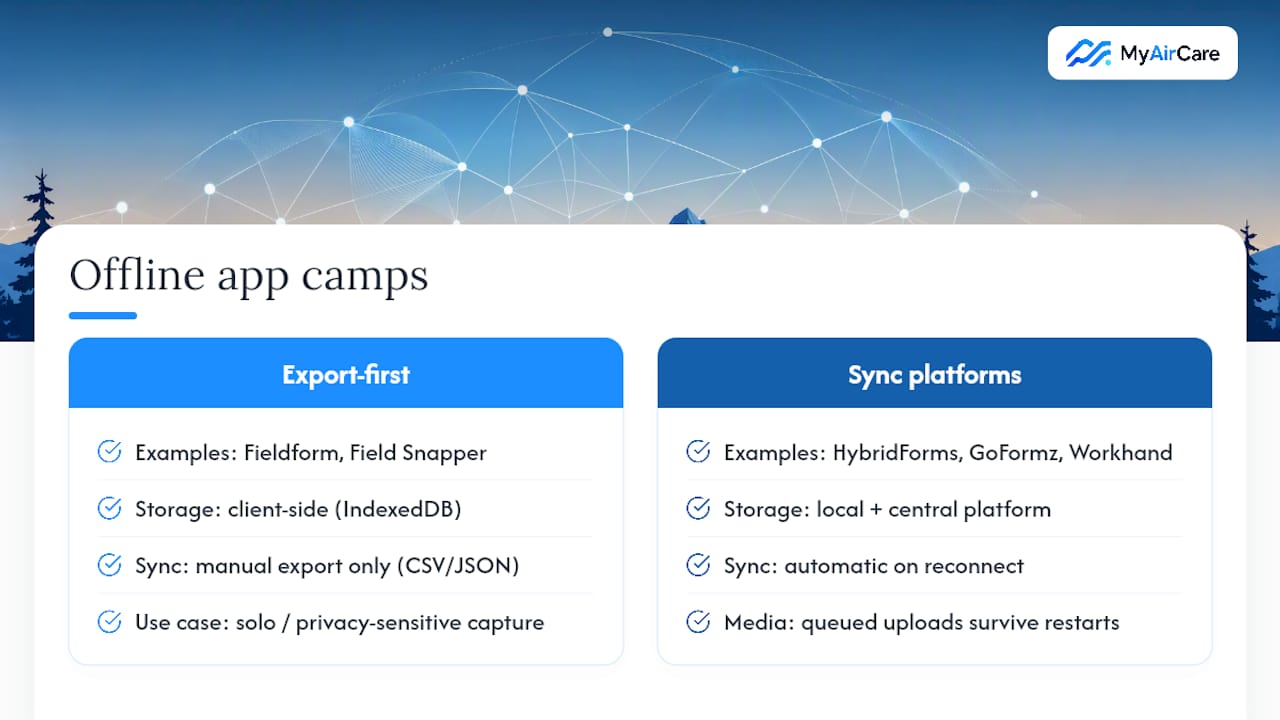
The offline-capable app market splits cleanly into two camps: export-first tools with no server dependency, and sync-capable platforms built for teams.
On the export-first side, fieldform and similar Forms Offline projects are built as fully client-side PWAs. They save every submission to browser storage using IndexedDB and rely on you exporting CSV or JSON files rather than pushing data to a cloud server automatically. That's a genuine strength for privacy-sensitive or one-off data capture, since nothing leaves the device unless you move it yourself, but it also means there's no automatic multi-user sync. Field Snapper follows the same logic in a narrower lane, a simple PWA built around capturing photos in the field and exporting them to CSV, with everything staying local until you pull the data off.
At the other end sit enterprise offline-capable platforms built around automatic reconnection. HybridForms stores all mobile data locally and automatically synchronises with a central platform the moment connectivity returns, with a visible sync status so field staff aren't left guessing. GoFormz takes a similar approach, offering uninterrupted offline form completion with automatic syncing into connected systems like Salesforce or SharePoint once the device is back online.
Workhand represents the native field-app end of that spectrum: it advertises write-capable offline queues that persist across restarts, queue photos and other media locally, and show a sync indicator that drains automatically on reconnect. That queue-and-drain pattern is exactly what separates a trade-ready field app from a consumer app that merely caches your last screen.
Choosing between this depends entirely on whether you need multi-user sync or just reliable solo data capture. A wider comparison of field service apps and their trade-offs is worth reading before locking in a platform for a whole team.
Building an offline-capable app: a developer's checklist
If you're building rather than buying, the sequence below reflects how offline-first apps are actually engineered, not just described in marketing copy.
- Persist core data locally first. Use SQLite (or Room on Android) for native apps, and IndexedDB for PWAs. This is the foundation everything else depends on.
- Design a durable mutation queue. Every user action should update the UI optimistically and immediately, using a local temporary ID, while the actual write sits in a queue until sync succeeds.
- Make server endpoints idempotent. Accept a client-supplied idempotency key on every write so a retried request never creates a duplicate record, a detail developer guidance on offline architecture flags as essential rather than optional.
- Build a sync worker with exponential backoff. Retrying every few seconds on a dead connection drains battery and floods logs; back off progressively instead.
- Give users and support staff real diagnostics. A sync status indicator and per-item retry controls aren't cosmetic, they're what stops a support call turning into a guessing game.
Pro Tip: Script a test session that captures several large photos, forces a device reboot halfway through, then waits ten minutes before reconnecting. If every photo is still attached to the right record afterward, the queue is solid.
How trades put offline mobile workflows to work
Air-con technicians lose signal constantly, inside roof spaces, basement plant rooms, and regional properties well outside reliable coverage. A mobile job app that keeps working through those gaps lets a technician capture before-and-after photos, add service notes, and take payment on-site, all without waiting for a signal bar to reappear.
MyAirCare's mobile job management tools are built around that reality, letting operators track jobs, reschedule on the fly, and document work as it happens rather than typing everything up later from memory. Getting a booking system running fast matters too. Trades setting up an online booking workflow in under 30 minutes tend to see a smoother rollout than teams that try to configure every feature before their first live job.
A sensible onboarding approach: run one full job on a test account first, including a deliberate flight-mode stretch, before trusting the workflow with a real customer.
Choosing between a PWA, a native app, or a specialist platform
Most guides treat offline capability as a single feature you either have or don't. It's not. A fully client-side PWA like fieldform and a write-capable enterprise platform like HybridForms solve genuinely different problems, and picking the wrong one costs more than picking no offline tool at all.
An export-first PWA suits a small team or a solo operator capturing occasional data with no need for real-time multi-user visibility. It's cheap, has no ongoing sync infrastructure to maintain, and the trade-off is that nothing reaches anyone else until someone manually exports and shares it.
A write-capable native or enterprise app suits any team where multiple people need to see the same job data update automatically. That capability costs more to build or licence, and it demands a genuine mutation queue rather than a marketing claim. Enterprise field operations, where dozens of technicians might be offline simultaneously across different sites, should never accept "works offline" without asking to see the sync UI and queue documentation firsthand.
— Lewis
A practical option for trades that need mobile job tools
For an air-con cleaning business choosing between a barebones PWA and an enterprise sync platform, neither extreme fits the day-to-day reality of a two to ten person trade team. MyAirCare sits in that practical middle: a booking and job management system built specifically for Australian air-con cleaners, with a mobile app for tracking jobs, rescheduling on the go, taking on-site payments through Stripe, and documenting before-and-after work as it happens.

The platform also handles automated job reminders that bring customers back for repeat cleans, quote and invoice generation, and a branded booking page customers can use without a phone call. Larger operators running fleets of technicians across multiple sites with heavy simultaneous offline usage may still need the deeper sync guarantees and audit trails that dedicated enterprise offline platforms document. For most local air-con cleaning businesses, though, the setup overhead of those platforms outweighs what a small team actually needs day to day.
Check the MyAirCare pricing page to compare the Free plan against MyAirCare Pro at $199 per month, and see which fits your booking volume and team size before you commit.
Sources
For deeper technical detail on building or evaluating offline-capable apps, these are worth a direct look:
- Offline App for Mobile Data Capture | HybridForms
- Offline Construction App: No Signal, No Problem
- Field Service Outlook integration | Microsoft Learn
FAQ
Can mobile apps work offline?
Yes. A genuinely offline-first app stores data locally on the device and queues any changes you make until it can sync them, rather than simply showing you a cached, read-only version of old data.
What are some apps that work offline?
Export-first PWAs like fieldform and Field Snapper store everything locally and rely on CSV or JSON export, while enterprise platforms like HybridForms and GoFormz sync automatically once reconnected, and trade-focused tools like MyAirCare's mobile app support job tracking and payments in the field.
Which apps can work without internet?
Any app built with local-first storage, using IndexedDB for progressive web apps or SQLite for native apps, combined with a durable write queue, can keep functioning fully with no internet connection at all.
How do you make an app work offline?
Persist core data locally with a database suited to the platform, build a mutation queue with local temporary IDs for pending writes, make server endpoints idempotent, and add a sync worker that retries with exponential backoff once connectivity returns.