
The most effective quote follow-up for an Australian air-con cleaning business involves multiple touches over a couple of weeks, beginning with a phone call soon after sending the quote. The goal is simple: get a clear response, either a booking or a firm no, so the schedule and cashflow can be planned accordingly.
The recommended sequence at a glance:
- Day 0: Send the quote with a dated expiry
- Day 1–2: Phone call — confirm receipt, answer questions
- Day 4–5: SMS — brief check-in with a specific prompt
- Day 9–10: Email — soft close tied to the expiry date
- Day 14: Final SMS or email — breakup message, close the file
Sample call opener for Day 1–2: "Hi [name], it's [your name] from [business]. I sent through a quote for your air-con clean yesterday — just wanted to check you received it and see if you have any questions."
Both outcomes, a yes and a no, are useful. A yes fills the calendar. A no frees up time to pursue the next job.
Table of Contents
- What does an effective quote follow-up cadence look like?
- How to run the follow-up phone call
- SMS and email templates for Australian air-con quotes
- How to automate quote follow-ups in your booking software
- How do you measure quote follow-up success?
- Australian compliance checklist for electronic follow-ups
- Key takeaways
- What actually works in a follow-up sequence
- Myaircare handles the follow-up sequence for you
- Useful sources
What does an effective quote follow-up cadence look like?
Industry guides confirm that most recoverable deals require several touches, with the first few contacts doing the heaviest lifting. A sequence of multiple touches over about two weeks is the standard trade cadence. Spreading touches across phone, SMS, and email increases reply rates compared with repeating a single channel.
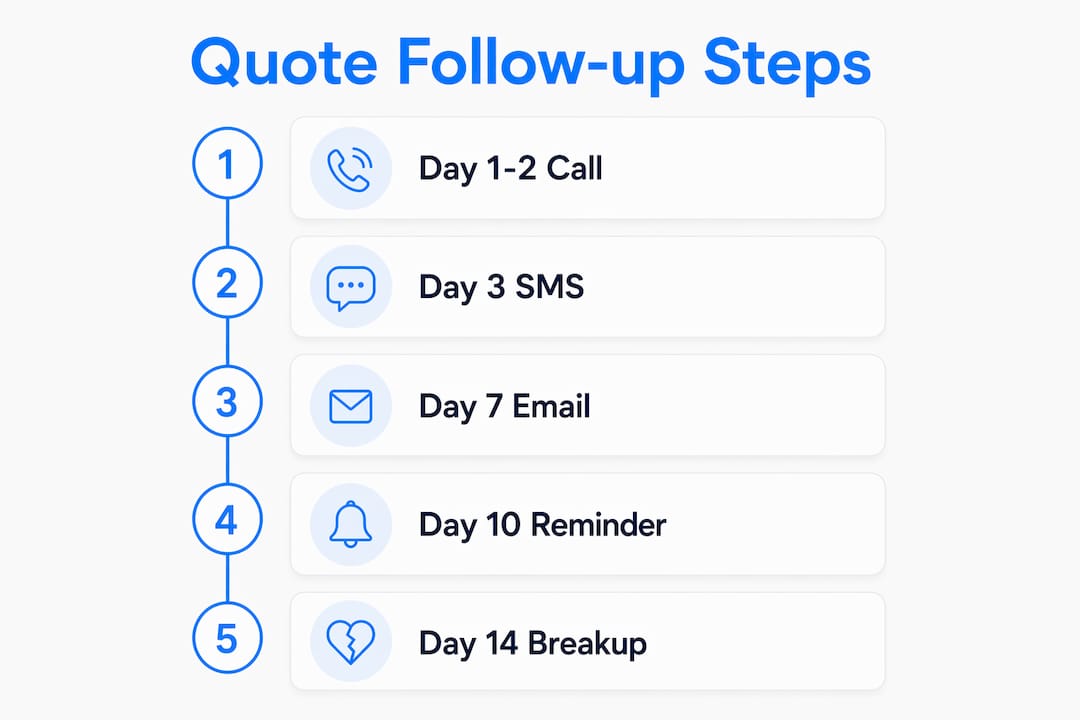
| Day | Channel | Goal | Stop trigger |
|---|---|---|---|
| 0 | Email/quote software | Deliver quote with expiry date | — |
| 1–2 | Phone call | Confirm receipt, surface objections | Reply or booking |
| 4–5 | SMS | Low-friction check-in | Reply or booking |
| 9–10 | Soft close, reference expiry | Reply or booking | |
| 14 | SMS or email | Breakup message, close file | Any response |
After each touch, log:
- Date and channel used
- Customer response (or no response)
- Any objection raised
- Next scheduled action or status change (active, nurture, closed)
After around two weeks of no response, move the lead to a long-term nurture cadence rather than continuing active follow-up. A single low-pressure check-in a couple of months later is sufficient from that point.
How to run the follow-up phone call
A phone call soon after sending a quote is the single most productive first move. It clears price or scope questions quickly and builds rapport in a way automated messages cannot.

Avoid "just checking in." That phrase adds no value and signals there is nothing useful to discuss. Lead with a specific reason for the call instead.
Four-line call script:
- "Hi [name], it's [your name] from [business]."
- "I sent through a quote for your air-con clean on [day] — just wanted to make sure you received it."
- "Do you have any questions about the scope or pricing?"
- "Is there a time that suits you to get it scheduled?"
Common objections and responses:
- "It's a bit expensive." Ask what budget they had in mind, then offer a narrower scope rather than reducing the rate. For example, cleaning the main units only rather than the full system.
- "We're still deciding." Ask: "Is there a date you're hoping to have it done by?" This gives a real timeline to work with.
- "I'll call you back." Confirm a specific follow-up date before ending the call.
Call checklist:
- Update the quote status in the software after every call
- Log the objection type and any scope adjustment discussed
- Set the next follow-up task with a date
- Tag the customer (e.g. "price query", "timing", "no response")
Pro Tip: Offer a scope-down option before any discount. Ask the customer what budget they are working with, then propose a reduced package at the same rate. This protects margins and often resolves the objection without lowering the price.
SMS and email templates for Australian air-con quotes
Mixing channels increases engagement, and SMS is particularly effective for service businesses. Keep SMS messages short and plain. Emails can carry slightly more detail but should still be brief.
SMS templates:
- Midway check-in message: "Hi [name], [your name] here from [business]. Just checking in on the quote for your air-con clean. Happy to answer any questions or adjust the scope. Reply anytime."
- Final follow-up message: "Hi [name], following up one last time on your air-con quote. If the timing isn't right, no problem at all. The quote stays on file if you need it later. [Your name], [business]."
Email templates:
Day 9–10 soft close Subject: Your air-con quote expires [date] "Hi [name], just a quick note that the quote I sent for your air-con clean expires on [date]. Happy to extend it if you need more time, or to adjust the scope if anything has changed. Reply here or call [number] anytime."
Day 14 breakup email Subject: Closing your air-con quote "Hi [name], I'll close off the quote for your air-con clean today. If the timing wasn't right or you went another way, no problem at all. Feel free to get in touch when you're ready. [Your name], [business], [number]."
Opt-out wording for emails (required under Australian law): "To unsubscribe from future messages, reply STOP or email [your address]."
Pro Tip: Always reply from a real, monitored email address. Sending from a no-reply address is a compliance risk under the Spam Act 2003 and reduces the chance of a response.
How to automate quote follow-ups in your booking software
An effective approach is to wire the follow-up sequence to the quote expiry date rather than to a fixed calendar date. When the expiry shifts, the deadline nudge moves accordingly.
Recommended automation triggers:
- Quote sent → start the sequence (Day 0)
- Quote expiry date minus 4 days → send soft-close email (Day 9–10)
- Quote expiry date → send breakup message (Day 14)
- Customer replies or books → stop all automated messages immediately
Automation map:
| Touch | Software action | Log entry |
|---|---|---|
| Day 1–2 | Create call task, assign to operator | Call outcome, objection type |
| Day 4–5 | Send SMS automatically | Delivery status, reply received Y/N |
| Day 9–10 | Send email with expiry date | Open status, reply received Y/N |
| Day 14 | Send breakup SMS or email, close quote | Final status: booked, declined, nurture |
Myaircare supports this workflow through its quote and booking management features, including automated reminders, SMS delivery, and Stripe payment links. Attaching a secure payment link to the quote itself reduces friction at the point of acceptance.
Pro Tip: Set the sequence to stop on any reply, not just a booking. A customer who replies "not yet" is still engaged and should be moved to nurture manually, not continue receiving automated messages.
How do you measure quote follow-up success?
Track key performance indicators regularly to assess what is working: response rate, conversion rate from follow-up to booking, average time from quote to booking, time lag before customer reply, and the rate of no-response after the full sequence.
| KPI | How to calculate | Action if below benchmark |
|---|---|---|
| Response rate | Replies ÷ quotes sent | Test a different channel for Touch 2 |
| Conversion rate | Bookings ÷ followed-up quotes | Review call script and objection handling |
| Time-to-book | Days from quote to booking | Shorten expiry window to create urgency |
| Reply lag | Days from Touch 1 to first reply | Move phone call earlier (Day 1 not Day 2) |
| No-reply churn | No-response quotes ÷ total quotes | Test breakup message subject line |
Two simple A/B tests for small operators:
- Subject line test: Send half the Day 9–10 emails with "Your quote expires [date]" and half with "Quick question about your air-con clean." Compare open and reply rates after 30 quotes per variant.
- Channel order test: Swap Touch 2 from SMS to a second phone call for one month. Compare response rates between the two approaches.
Australian compliance checklist for electronic follow-ups
The Spam Act 2003 and the Do Not Call Register Act 2006 set the rules for commercial electronic messages and unsolicited calls in Australia. Non-compliance carries significant penalties.
Must-have compliance items:
- Consent: Obtain express or inferred consent before sending commercial SMS or email. Inferred consent applies when a customer has requested a quote or has an existing service relationship.
- Sender identification: Every message must clearly identify the business name and include a way to contact the sender.
- Functioning unsubscribe: Every commercial email must include a working unsubscribe mechanism. SMS messages should include a STOP reply option. Unsubscribe requests must be actioned within five business days.
- Consent records: Store a record of how and when consent was obtained for each contact. A note in the CRM or booking software is sufficient.
- Do Not Call Register: Check numbers against the Do Not Call Register before making unsolicited outbound calls. Calls made in response to a quote request are generally exempt, but verify the current exemption rules with the ACMA.
- Australian Privacy Principles: Handle customer data in line with the Privacy Act 1988 and the Australian Privacy Principles. Store only the data needed to deliver the service and follow-up sequence.
- Payment security: Use a PCI-compliant payment processor. Myaircare integrates with Stripe, which meets PCI DSS standards. Never request payment details via SMS or unencrypted email.
Pro Tip: Bookmark the ACMA compliance resources and the OAIC privacy guidance for current rules. Regulations are updated periodically and the penalties for breaches are material.
This article provides general information only and is not legal advice. Confirm current obligations with the ACMA, OAIC, or a qualified legal adviser for your specific situation.
Key takeaways
A multi-touch sequence over a couple of weeks, starting with a prompt phone call, recovers the majority of quotes that would otherwise go unanswered.
| Point | Details |
|---|---|
| Call first, within 1–2 days | A phone call on Day 1–2 clears objections faster than any automated message. |
| Tie timing to quote expiry | Wire the sequence to the expiry date so deadline nudges send automatically when the date shifts. |
| Mix channels across the sequence | Phone, SMS, and email in combination produce higher reply rates than repeating one channel. |
| Stop on any reply | Automated messages must halt the moment a customer responds, whether they book or not. |
| Myaircare automates the sequence | Myaircare maps quote expiry, SMS, call tasks, and Stripe payment links to a single workflow. |
What actually works in a follow-up sequence
The conventional advice is to automate everything and let the software run. That works for the middle of the sequence, but the phone call on Day 1–2 is where most jobs are actually recovered. Customers who receive a quote for an air-con clean are often comparing two or three businesses. A short, direct call that answers a question about scope or timing is frequently the deciding factor, not the price.
The breakup email on Day 14 is also underused. Many operators skip it because it feels like giving up. In practice, it often prompts a reply from customers who were genuinely busy rather than uninterested. It also closes the file cleanly, which matters for scheduling and cashflow planning.
The right split is: automate the SMS and email touches, keep the Day 1–2 call manual, and review the KPIs after every 30 quotes. One change at a time, measured against a clear benchmark, is more useful than overhauling the whole sequence at once.
Myaircare handles the follow-up sequence for you
Fewer unanswered quotes and less time spent on manual follow-up are the practical results of running a structured sequence inside purpose-built software. Myaircare is built specifically for Australian air-con cleaning businesses and maps directly to the workflow described in this article: quote expiry fields trigger automated reminders, SMS messages send and log automatically, call tasks appear in the operator's calendar, and Stripe payment links attach to every quote so customers can pay in one step.

The platform also handles stop-on-reply logic, so automated messages halt the moment a customer responds, and it manages reschedules without creating double bookings. Operators on the paid plan get access to the full automation suite, including branded booking pages and before/after job documentation via the mobile app.
See how Myaircare works or view current plan pricing to find the tier that fits the size of the operation.
Useful sources
The following Australian authorities and industry resources support the recommendations in this article:
- ACMA — Spam Act guidance: Rules for commercial electronic messages, consent requirements, and unsubscribe obligations. Relevant to the compliance checklist and SMS/email templates.
- ACMA — Do Not Call Register: Register check and exemption rules for outbound calls. Relevant to the phone call section.
- OAIC — Privacy Act and Australian Privacy Principles: Guidance on handling customer data collected during the quoting and follow-up process.
- JobEstimator — Follow-up timing by job size: Practical guidance on matching follow-up timing to quote value; supports the cadence recommendations.
- Quotetier — Channel mix and SMS effectiveness: Background on why mixing channels outperforms single-channel follow-up; supports the cadence table.
Operators working in strata buildings, commercial premises, or council-managed facilities should also check local site-access rules, as these can affect scheduling windows and the timing of follow-up calls.