
A staff job assignment workflow is the set of steps a business uses to take incoming work, check who has capacity, and hand each job to the right person with a clear deadline. The single most useful change most managers can make today is combining every request into one intake channel and checking real capacity, not apparent capacity, before assigning anything. Get intake, prioritisation, and capacity visibility right first, and the rest of the process falls into place.
TL;DR:
- Combining all requests into one intake channel and accurately checking true capacity before assigning jobs prevents overload and resource contention.
- Implementing a fixed sequence of intake, prioritization, capacity check, and confirmation each day mitigates common assignment errors and reduces last-minute scrambling.
- Using role-based routing, bulk assignments, and validation checks at the point of assignment improves accuracy and speeds up staff onboarding.
- Visual capacity dashboards and simple intake forms help identify over-allocation and streamline workflow monitoring, avoiding hidden workload buildup.
- A structured 30-day rollout focused on centralizing intake, setting priority criteria, and formal rebalancing ensures consistent operational discipline.
Table of Contents
- Core components every assignment workflow must include
- How do you actually assign jobs to staff?
- Which software features actually reduce assignment friction?
- Templates you can copy today
- The mistakes that quietly overload your team
- What field operations taught us about assignment workflows
- A practical 30-day checklist
- Where MyAirCare fits into a mobile-first assignment workflow
- Sources
- FAQ
Core components every assignment workflow must include
A workflow built on guesswork breaks down the moment two urgent jobs land at once. ISO 30434, the international standard for workforce allocation, frames this as a set of processes and management activities that balance operational, financial, and workforce needs. Five components consistently show up in well-run assignment systems, and each one closes a specific gap.
- Demand intake: one channel, with mandatory fields for deadline, required skills, and expected outcome, so nothing arrives as a vague verbal request.
- Priority scoring: a short rubric that sorts incoming work into commit now, schedule later, clarify, or decline.
- Capacity visibility: the gap between apparent capacity (hours on a roster) and committed capacity (hours left after recurring load).
- Assignment rules: whether work routes to a role or a named person, plus skill and compliance checks before confirmation.
- Rebalancing cadence: a fixed weekly point where an owner reviews load and moves work before anyone burns out.
This structure mirrors the five-part allocation model Workhint describes for operations teams, and it works because each stage catches a different failure mode before it reaches a technician's phone.
How do you actually assign jobs to staff?
Most assignment failures trace back to skipping a step, not choosing the wrong tool. Following a fixed sequence each day removes the guesswork.
- Capture the request through one intake path. Reject or route back any job missing a deadline, required skill, or defined outcome.
- Triage and score priority. Run new requests through your rubric on a quick cadence, ideally twice daily, so nothing sits unscored overnight.
- Check true capacity by role and person. Subtract recurring commitments, like admin blocks or standing client visits, from the roster before offering a slot.
- Assign with an owner, a delivery window, and a confirmation step. An assignment without a named owner and a confirmed acceptance is a request, not a commitment.
- Publish, monitor, and rebalance weekly. Track jobs against their delivery window and shift work before someone is buried.
Pro Tip: Build the capacity check as simple subtraction: rostered hours minus recurring load equals what you can actually assign. Skipping this step is the single biggest cause of overload complaints from field staff.
Portfolio Hub's guidance on resource allocation recommends a similar sequence for fixing conflicts once they appear: reprioritise, smooth the load, level it across the team, reassign, or add capacity, in that order. Following that order stops managers reaching for "add more people" before trying the cheaper fixes first.
Which software features actually reduce assignment friction?
Not every feature on a vendor's sales page changes daily operations. A handful genuinely cut the manual work and error rate that make assignment painful for supervisors managing mobile or frontline staff.
- A mobile "my day" job feed that shows each worker their jobs for the day without a phone call or a group chat message.
- Role-based routing and bulk assignment, so a batch of similar jobs can go to a role or a shift template in one action rather than one at a time.
- Validation checks at the point of assignment, including double-booking prevention, skill matching, and compliance rule enforcement, which stop errors before they reach the field.
- Templates and reusable intake forms that pre-fill recurring job types, cutting data entry for repeat work.
- Capacity boards and simple utilisation dashboards that show overload visually rather than requiring a spreadsheet audit.
Position-based assignment, where a task attaches to a role rather than a named individual, reduces the follow-up work needed when staff change shifts or leave the business. Academic treatments of allocation systems describe this as needing both design-time configuration (the rules you set once) and run-time orchestration (the logic that applies those rules as jobs actually arrive), which is what separates a genuinely automated allocator from a digital version of a paper roster. Mobile field apps listed on marketplaces like Microsoft AppSource show how widespread this mobile-first pattern has become across field service industries. If you're comparing platforms, our breakdown of field service apps for small and mid-sized businesses covers the feature differences in more depth.
Templates you can copy today
Designing a rubric from scratch wastes a week you don't have. These starting points work for most small and mid-sized teams straight away.
- Priority rubric: score each request 1 to 5 on customer impact, revenue at risk, and deadline urgency; total above 12 means commit now, 8 to 11 means schedule this week, below 8 means schedule later.
- Capacity matrix: a simple grid of people down one side, weeks across the top, and a percentage in each cell showing allocation. Anything reading above 85% is a warning sign of over-allocation before the week even starts.
- Assignment rules: route by role first, auto-assign unclaimed jobs after a set time window, and use bulk assign from a saved template for recurring job types.
- Intake fields: requester name, deadline, required skill or certification, site or location, and the expected outcome in one sentence.
Our guide on service report templates for field technicians has ready-made job note formats that plug directly into this intake structure.
The mistakes that quietly overload your team
Most overload problems aren't caused by too much work. They're caused by assignment habits that hide the true load until it's too late.
- Ignoring recurring load: a technician's roster might show six free hours, but two hours of standing admin or on-call time never got subtracted, so the "free" slot was already spoken for.
- Resource contention between competing priorities: two urgent jobs need the same specialist and nobody has decided in advance which one wins, so the specialist ends up deciding under pressure.
- Assigning people instead of positions: work gets tied to a name rather than a role, so every roster change creates a scramble to reassign.
- No single intake path: requests arrive by phone, text, and hallway conversation, and prioritisation becomes noise because nothing is scored consistently.
Pro Tip: Name an escalation owner before you need one. When two high-priority jobs collide over the same specialist, a pre-agreed priority matrix and a named decision-maker avoid the ten-minute argument that follows.
What field operations taught us about assignment workflows
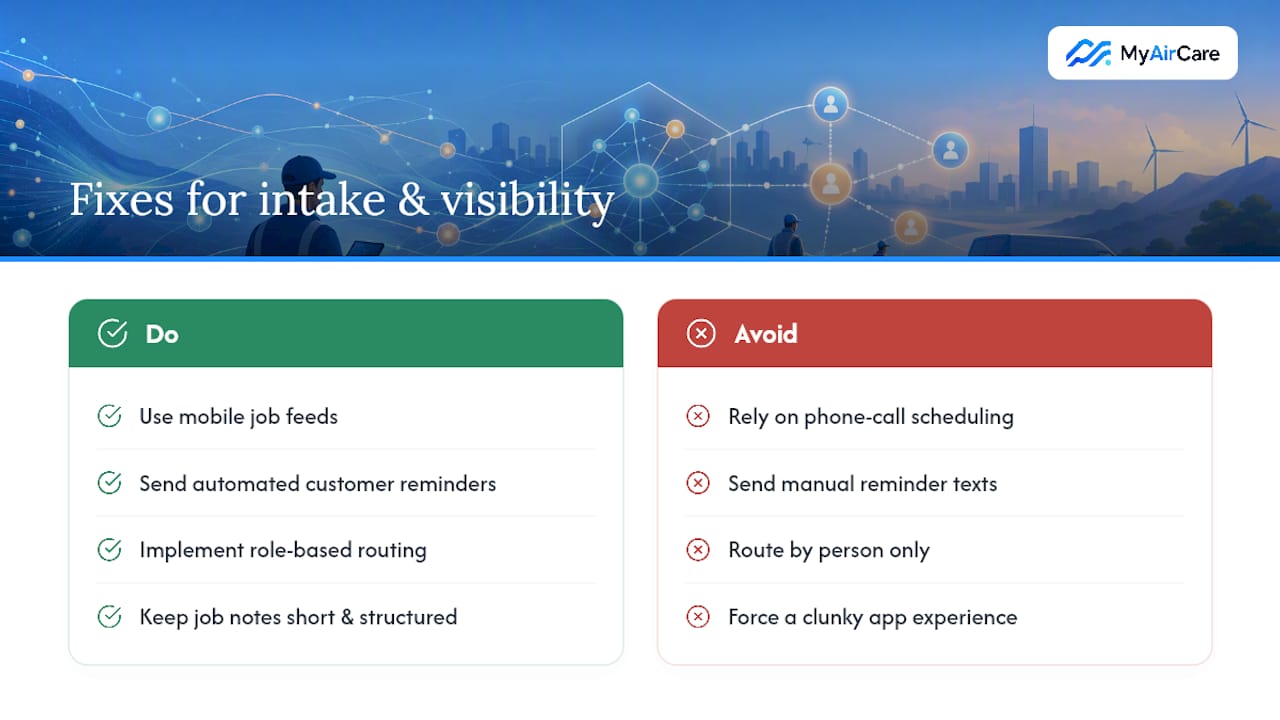
Missed calls and double bookings are rarely a staffing problem. They're an intake and visibility problem, and that pattern shows up consistently across mobile trade operations. Work with air-con cleaning operators shows mobile job feeds and automated reminders directly cut both, because staff see their day without a phone call and customers get a reminder without a manual text.
Role-based routing and short, structured job notes also speed up adoption among field teams who won't tolerate a clunky app for long. Readers wanting a working example of these features can see how they're built into the MyAirCare platform.
A practical 30-day checklist
Most managers overthink the rollout. A month is enough if you sequence it properly.
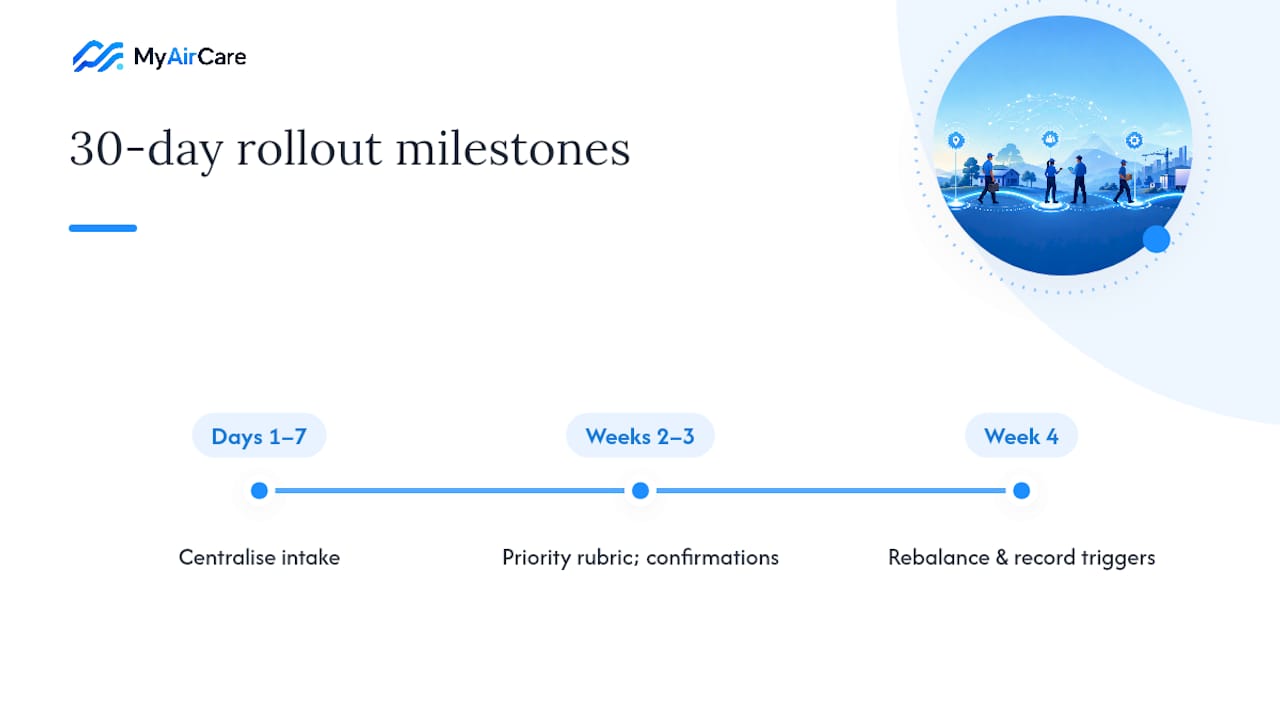
In days one to seven, centralise intake into a single channel and run a capacity baseline, subtracting recurring load from every roster. In weeks two and three, introduce the priority rubric and make assignment confirmation mandatory, no exceptions, even for "quick" jobs. In week four, run your first formal rebalancing session and write down what triggered each escalation, because that record becomes your rubric's next revision.
— Lewis
Where MyAirCare fits into a mobile-first assignment workflow
MyAirCare is the alternative to running your booking book on phone calls and sticky notes: instead of manually juggling scheduling, reminders, and payments, an Australian air-con cleaning operator runs all three from one mobile system built for the trade, not adapted from a generic project tool.

The platform covers the parts of this workflow that cause the most daily friction: online booking and scheduling, a mobile job feed so techs see their day without a call, automated job reminders that cut no-shows and encourage repeat bookings, secure on-site payments through Stripe, and job notes or service reports attached to each completed visit. It suits sole traders and small teams who need the assignment and capacity discipline covered in this guide without building it themselves in a spreadsheet. Developers building bespoke systems around similar prioritisation logic can see comparable design thinking in Devwiz's platform case studies.
MyAirCare offers a free plan, with MyAirCare Pro at $199 per month for operators who want the full feature set unlocked. Check the pricing page to see which tier fits your team's booking volume, or visit the MyAirCare homepage to see how the mobile job feed works before you commit to anything.
Sources
- ISO 30434:2023 - Human resource management — Workforce allocation
- Resource allocation process for operations teams - Workhint blog
- Resource allocation in project management: methods, matrix | Portfolio Hub
- Resource allocation logic and orchestration (academic article)
FAQ
How Do I Assign Tasks to Employees Effectively?
Start with one intake channel, score each request against a priority rubric, then check true capacity by subtracting recurring load before offering a slot. Confirm the assignment with a named owner and a delivery window rather than leaving it as an informal request.
What's a Good Task Tracker for Staff?
The best trackers combine a mobile job feed, role-based assignment, and validation checks like double-booking prevention in one view. For mobile trade teams specifically, a platform like MyAirCare bundles scheduling, job tracking, and reminders into a single system rather than requiring separate tools.
What Does a Staff Assignment Workflow Example Look Like?
A typical workflow runs intake, priority scoring, capacity check, assignment with confirmation, then weekly rebalancing. Each stage produces an artefact, such as an intake form, a scored rubric, or a capacity matrix, that makes the decision auditable later.
What Should I Do if an Employee Refuses an Assigned Job?
Check first whether the refusal points to a genuine capacity or skill mismatch rather than reluctance, since over-allocation is a common root cause. If the job is confirmed as appropriate, escalate to the named owner defined in your rebalancing process rather than letting the disagreement stall the job indefinitely.